Download Android Apps and Games
AppBrain
  • Apps
  • Apps being viewed right now Trending apps today Most popular apps All-time most downloaded apps Top rated apps
  • Intelligence ▾
    Intelligence overview → Track any Android app or your whole market
    Track & analyze
    Keyword Tracker & OptimizerTrack & improve Play rankings App Performance ReportOne-off PDF for any app StatisticsFree Android & Play market stats
    Promote your app
    Featured Apps App Links
  • Intelligence
  • Pricing
  • Dashboard
  • Sign up
  • Log in
Last updated on: 2026-06-09
App Store Apps > Productivity > Pinyin Typist
Pinyin Typist icon

Pinyin Typist

3.10
TroubadourWorks
2.71
7 reviews
$1.99

Pinyin Typist Screenshot 1 of 7
Pinyin Typist Screenshot 2 of 7
Pinyin Typist Screenshot 3 of 7
Pinyin Typist Screenshot 4 of 7
Pinyin Typist Screenshot 5 of 7
Pinyin Typist Screenshot 6 of 7
Pinyin Typist Screenshot 7 of 7
Download from the App Store

About Pinyin Typist

Pinyin Typist is an overall app developed by TroubadourWorks.

How many times has Pinyin Typist been downloaded?

What is the rating of Pinyin Typist?

Pinyin Typist is rated 2.71 out of 5 stars, based on 7 ratings.

Is Pinyin Typist free?

Pinyin Typist costs $1.99 to download. The APK download size is 1.40 MB. The latest version available is 3.10. The last update was on August 6, 2023.

What are the requirements for Pinyin Typist?

The app has a content rating of Everyone. The app has been available on Google Play June 2011.

Description
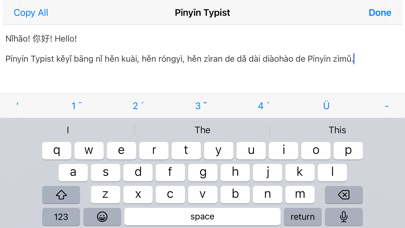
**Pīnyīn Typist lets you quickly and easily type Pīnyīn with tone marks while using Apple’s system keyboards, and it lets you benefit from their features, like predictive text, text replacement, etc., as well as future enhancements. Pīnyīn Typist similarly works with third-party keyboards like Fleksy, etc.**

(THIS APP IS NOT AN ALTERNATIVE WAY TO TYPE CHINESE CHARACTERS—it supports the standard iOS ways of typing characters.)

Pīnyīn makes reading and writing Mandarin Chinese as quick and easy as it ought to be, and Pīnyīn Typist makes typing real, professional-quality Pīnyīn as quick and easy as *it* ought to be.

Pīnyīn Typist was the first iOS Pīnyīn typing app, and it’s still the best, especially for typing more than a word or two of Pīnyīn.

On the iPad, the iPhone, and the iPod touch, Pīnyīn Typist is *noticeably* the quickest, easiest, most natural, most fun, and most beautifully iOS-native way to type exactly the Pīnyīn you want, with proper tone marks.

Its *nice, big* tone mark, Ü, hyphen, and apostrophe buttons work with *just a simple tap*, using the same rhythm and technique as regular typing.

*It even puts the tone marks over the right vowels for you*, and *it also makes it easy to make corrections to tone marks without backspacing and retyping*.

Pīnyīn Typist turns typing Pīnyīn from a pain into a pleasure.


Pīnyīn Typist launches quickly, so with it on your Apple mobile device, you can quickly and easily type real Pīnyīn text to write down anything you hear or want to say in Mandarin, just about anytime the need arises or inspiration strikes. Pīnyīn Typist is thus a must-have app if you are learning or teaching Mandarin, or if sometimes you want or need to write down Mandarin expressions, but you or the one(s) you’re writing to don’t (or don’t want to have to) know all the Chinese characters involved.

Note that like Chinese Braille (which is based on Pīnyīn), Pīnyīn is a *full writing system* for Mandarin, not just a pronunciation aid. And since, as linguists hold, speech is primary and writing is secondary, it’s good that Pīnyīn just works and lets you focus on speech, on *communicating*.


All the text in the Pīnyīn Typing tab view can be copied with a single tap of the Copy All button, and then pasted in other apps, e.g. Pages, Word, Mail, Twitter, Messages, Drafts, etc. (iOS’s standard copying and pasting methods work too.)

Pīnyīn Typist’s sharing functionality lets you share Pīnyīn, etc. text in the various ways enabled by iOS, including email, Messages, AirDrop, Twitter, etc.


Pīnyīn Typist’s 1,2, and 4 tone buttons can also be used to add tone marks for Cantonese Yale romanization.


*TYPING PĪNYĪN IN PĪNYĪN TYPIST*


Type “a” → tap the 3rd tone button = “ǎ”

Type “ai” → tap the 4th tone button = “ài”
(not “aì”!)

After “āi” or “aì”, tap the 4th tone button = “ài”

Pīnyīn Typist can convert both lowercase and uppercase vowels. All the Pīnyīn Typist toolbar buttons enter typographically correct Unicode characters, making Pīnyīn Typist suitable for typing Pīnyīn for professional uses.

Pīnyīn Typist works well with hardware keyboards. Hardware keyboard shortcuts are now available.


*OTHER FEATURES*

• Pīnyīn Typist can be used in both portrait and landscape orientations.

• The size of the text in the Pīnyīn Typing tab view can be quickly and easily adjusted with a slider—all the better for seeing those little Pīnyīn tone marks.

• The text in the Pīnyīn Typing tab view (and its size) can be saved as a snippet for future use, with a title that you can choose. A snippet can be shared in the various ways enabled by iOS.

• An optional Night Theme is available.

• Different fonts can be selected for the text in the Pīnyīn Typing tab view.


*PĪNYĪN TEXT WITH FORMATTING*

Pīnyīn Typist produces Unicode plain text, which can be used to produce Markdown, HTML, CSS, etc. code. When such code is rendered in supporting environments, formatting can be seen that’s like the formatting seen in web pages.
Show more Show less

More data about Pinyin Typist

Price $1.99
Rating 2.71 based on 7 ratings
Ranking Not ranked
Version 3.10
App download size 1.40 MB
Suitable for Everyone

Alternative downloads for the Pinyin Typist app

Chinese words separator icon Chinese words separator
Michael Buen
5.0
$14.99
1 ratings
FlashChat - Learn new language icon FlashChat - Learn new language
1dreamm Ltd.
5.0
Free
1 ratings
Equipd Bible icon Equipd Bible
iMatt Solutions
4.6
$2.99
202 ratings
Geo Survey - Land Survey icon Geo Survey - Land Survey
Nasru Minallah
1.0
Free
1 ratings
Camera Trans icon Camera Trans
Changsha yuanli network technology co. LTD.
4.0
Free
4 ratings
Sign Language AI icon Sign Language AI
Paul Kelly
2.3
Free
6 ratings
NumPad: Your Number Keyboard icon NumPad: Your Number Keyboard
More Voltage
4.2
$1.99
208 ratings
The Magic Highlighter icon The Magic Highlighter
Herd Works Inc
3.9
$1.99
20 ratings

Changelog of Pinyin Typist

No changelog data

Developer information for TroubadourWorks

TroubadourWorks

Address:

Share Pinyin Typist

Comments on Pinyin Typist for iOS

We don't have enough comments to show example comments. Please check back later.

App Store Rankings for Pinyin Typist

This app is not ranked

Technologies used by Pinyin Typist

Popular Overall Apps other people are watching Today's trending apps Top new apps Apps on sale
Chinese words separator icon Chinese words separator
FlashChat - Learn new language icon FlashChat - Learn new language
Equipd Bible icon Equipd Bible
Geo Survey - Land Survey icon Geo Survey - Land Survey
Camera Trans icon Camera Trans
Sign Language AI icon Sign Language AI
NumPad: Your Number Keyboard icon NumPad: Your Number Keyboard
The Magic Highlighter icon The Magic Highlighter

Back to top
AppBrain Intelligence premium content

Subscribe now to get full and unlimited access to AppBrain Intelligence. You'll have access to:

  • App Intelligence dashboard (performance timeline, competitor comparison, country rankings, insight cards)
  • Detailed ranking data per app
  • Full timeline per developer
  • Device market shares data per country
1 Month

$75/mo
(billed every month)

SAVE 0%
Subscribe
3 Months

$65/mo
($195 billed every 3 months)

SAVE 13%
Subscribe
1 Year

$57.50/mo
($690 billed every year)

SAVE 23%
Subscribe
Each subscription will automatically renew 3 days before the expiration date for the same time period. Subscriptions can be cancelled at any time before the renewal.

AppBrain is a directory focused on discovering great apps and games. We give statistics, rankings and search options that Google Play and the App Store don't have. All trademarks are owned by their respective owners. AppBrain doesn't offer APKs or binaries, and always lets users install the official version from Google Play or the App Store.

More apps

  • Top Android apps being viewed
  • View Planery - Stempeluhr
  • Multi-Screen Voice Calculator
  • Bunny Gold Rush

Android Statistics

  • Android statistics
  • Google Play Developer stats
  • Trending Android Apps
  • Top popular Apps
  • Buy the best Android phone

About AppBrain

  • Contact
  • Privacy
  • Documentation
  • DMCA takedowns
  • Articles
  • Blog
  • Free webpage for your Android app
© 2010-2026 - AppBrain