

Pixel art maker - Inktica
Pixel art maker - Inktica is made and published by Robert Filip Odrowaz-Sypniewski. AppBrain is an independent app data site and isn't affiliated with Robert Filip Odrowaz-Sypniewski. The app name, icon, screenshots and description belong to Robert Filip Odrowaz-Sypniewski and are shown as published on the App Store.
AppBrain's verdict
- Rating on App Store
- 4.61
- 23 ratings
- Last updated
- October 15, 2026
It doesn't have enough ratings yet to judge what users think.
Rankings
App Store top chartsApp Store Rankings for Pixel art maker - Inktica
Competitors
Similar apps and more from Robert Filip Odrowaz-SypniewskiAlternatives to Pixel art maker - Inktica








More from Robert Filip Odrowaz-Sypniewski

Also available on Google Play

Releases
Updates seen on the App Store- Version
- 1.58.159
- Launched
- September 2023
No changelog data
User feedback
Ratings and reviews on the App StoreComments on Pixel art maker - Inktica for iOS
We don't have enough comments to show example comments. Please check back later.
Technology
Found in the app by AppBrain- Price
- Free
- App size
- 39.6 MB
- Content rating
- Everyone
Technologies used by Pixel art maker - Inktica
About the app and developer
About Pixel art maker - Inktica
Pixel art maker - Inktica is a graphics & design app developed by Robert Filip Odrowaz-Sypniewski.
User Ratings
Pixel art maker - Inktica is rated 4.61 out of 5 stars. The rating is based on 23 ratings.
App Information
Pixel art maker - Inktica is freely available from the App Store. The app size is 39.64 MB. The latest version available is 1.58.159. The last update was on October 15, 2026.
Technical Requirements
The app has a content rating of Everyone. The app has been available on the App Store since September 2023.
Developer information for Robert Filip Odrowaz-Sypniewski
Robert Filip Odrowaz-Sypniewski
Address:
Store listing
By Robert Filip Odrowaz-Sypniewski, from the App Store



Description by Robert Filip Odrowaz-Sypniewski Written by the developer, not by AppBrain. Click to read.
Aseprite File Support
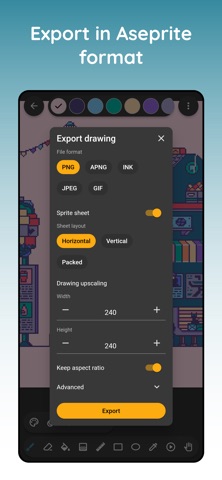
Seamlessly edit your Aseprite (.aseprite, .ase) files on the go! Inktica allows both importing and exporting Aseprite files, so you can work across multiple platforms. (Note: Some Aseprite features may not be available.)
Pixel-Perfect Tools for Pixel Art & Texture Editing
· Inktica offers an extensive toolset tailored for pixel art and texture creation, including:
· Brush (Pixel-Perfect Mode) – Draw clean, single-pixel-wide lines.
· Eraser, Flood-Fill, Gradient, Line, Rectangle, Ellipse, Pipette – All designed for pixel precision.
· Selection Tool – Copy, cut, move, rotate, and flip parts of your pixel art.
Layers & Animation Features
· Organize your pixel art using layers for better editing control.
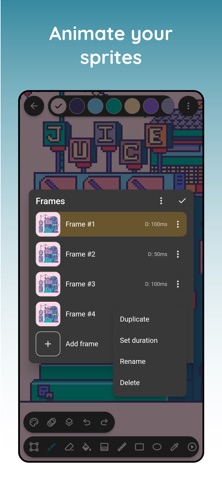
· Create animations with onion skinning, making frame-by-frame pixel animations easier.
Color Palettes & References
· Use color palettes from retro consoles like the Atari 2600, NES, and Game Boy.
· Import Lospec palettes for even more color variety.
· Open a reference image from your gallery to compare while drawing.
Export & Share Your Pixel Art
· Save in PNG, JPEG, GIF, MP4, Aseprite, Sprite sheet and more.
· Upscale images to maintain clarity on modern displays.
· Share your pixel art directly on social media.
With Inktica, your pixel art and texture making process becomes smooth, efficient, and fun!
Art in screenshots by Pikurā
Privacy policy: https://inktica.com/privacy-policy.html
Terms of use: https://inktica.com/terms-of-use.html