

Pixel Coloring by Numbers
Pixel Coloring by Numbers is made and published by Durmus Caner Bal. AppBrain is an independent app data site and isn't affiliated with Durmus Caner Bal. The app name, icon, screenshots and description belong to Durmus Caner Bal and are shown as published on the App Store.
AppBrain's verdict
- Last updated
- August 5, 2026
- Size
- 9.19 MB
User feedback
Ratings and reviews on the App StoreComments on Pixel Coloring by Numbers for iOS
We don't have enough comments to show example comments. Please check back later.
Store listing
By Durmus Caner Bal, from the App Store

Description by Durmus Caner Bal Written by the developer, not by AppBrain. Click to read.
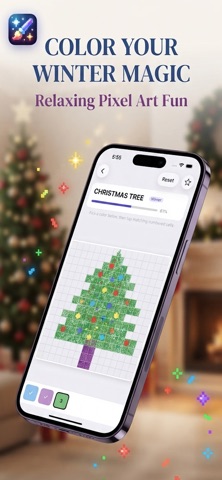
Pixel Coloring is the ultimate color-by-number app for iPhone. Fill numbered cells with the right colors, watch stunning pixel artworks come to life, and enjoy a calm creative break anytime you need it. Perfect for kids, teens, and adults who love paint-by-number puzzles, mindful art, and stress-free fun.
WHY YOU’LL LOVE IT
• Simple tap-to-color gameplay — no drawing skills needed
• 1,000+ handcrafted pixel art designs across 15 themed collections
• 150 artworks free to play — unlock 850+ more with Premium
• Turn your own photos into custom pixel coloring pages
• Auto-saved progress — continue exactly where you left off
• Favorites, random pick, and completion celebrations
• Clean, distraction-free interface designed for relaxing play
• Available in English and 7 more languages
EXPLORE 15 THEMED COLLECTIONS
Animals • Flowers • Nature • Food & Fruit • Sea Life • Insects • Space • Adventure • Emoji • Love • Winter • Fun • Shapes • Patterns • Hard Mode (Premium)
COLOR YOUR WAY
Whether you want a quick 5-minute break or a longer creative session, Pixel Coloring adapts to your mood. Start with easy designs, challenge yourself with intricate Hard puzzles, or import a photo from your library and color your own memories in pixel style.
FOR EVERYONE
• Kids: fun, safe, and easy color-by-number play
• Adults: a relaxing escape from daily stress
• Creators: turn photos into shareable pixel masterpieces
• Puzzle lovers: satisfying progress with every cell you fill
PREMIUM (OPTIONAL)
Upgrade to unlock the full library of 850+ artworks, the exclusive Hard category, unlimited photo imports, and the ability to save finished art to your Photos library. Subscriptions are optional — the free version includes 150 artworks and 3 photo imports to get you started.
Privacy Policy: https://sites.google.com/view/pixelcoloringprivacypolicy
Terms of Use : https://sites.google.com/view/pixelcoloringtermsofuse
Safety and technology
Found in the app by AppBrain- Price
- Free
- App size
- 9.19 MB
- Content rating
- Everyone
Technologies used by Pixel Coloring by Numbers
Releases
Updates seen on the App Store- Version
- 1.0
- Launched
- August 2026
No changelog data
Alternatives
Similar apps and more from Durmus Caner BalAlternatives to Pixel Coloring by Numbers


More from Durmus Caner Bal


Rankings
App Store top chartsApp Store Rankings for Pixel Coloring by Numbers
About the app and developer
About Pixel Coloring by Numbers
Pixel Coloring by Numbers is a games app developed by Durmus Caner Bal.
User Ratings
The app has no ratings yet.
App Information
Pixel Coloring by Numbers is freely available from the App Store. The app size is 9.19 MB. The latest version available is 1.0. The last update was on August 5, 2026.
Technical Requirements
The app has a content rating of Everyone. The app has been available on the App Store since August 2026.
Developer information for Durmus Caner Bal
Address:
Frequently asked questions about Pixel Coloring by Numbers
Is Pixel Coloring by Numbers free?
Yes. Pixel Coloring by Numbers is free on the App Store.
Is Pixel Coloring by Numbers still available?
Yes. Pixel Coloring by Numbers is on the App Store, and the last update we saw was on August 5, 2026.
How large is Pixel Coloring by Numbers?
Pixel Coloring by Numbers is 9.19 MB.
Is Pixel Coloring by Numbers suitable for children?
App Store rates the content of Pixel Coloring by Numbers as suitable for everyone.
Who made Pixel Coloring by Numbers?
Pixel Coloring by Numbers was developed by Durmus Caner Bal. It is listed in the games category on the App Store.
What are the best alternatives to Pixel Coloring by Numbers?
People looking at Pixel Coloring by Numbers also look at these games apps: TinkSnap: Shape Builder, ABC Trace & Learn: Kids Games, Drawing Games : Jewel Painting, PixelColor - Paint by Numbers, Pixel Shoot 3D.