




AppBrain's verdict
EstablishedWell rated- Rating on App Store
- 4.44
- 179 ratings
- Last updated
- September 26, 2026
- Size
- 22.5 MB
Users rate it well: 4.4 stars from 179 ratings.
User feedback
Ratings and reviews on the App StoreComments on Pixel Picker: Color Inspector for iOS
We don't have enough comments to show example comments. Please check back later.
Store listing
By Andrea Bizzotto, from the App StoreDescription by Andrea Bizzotto Written by the developer, not by AppBrain. Click to read.
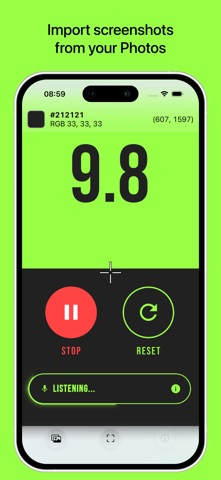
Import an image from Photos, then pan and zoom until the crosshair is over the pixel you need. Instantly view its HEX and RGB values, plus its coordinates in the image.
FEATURES
• Open images from Photos or the share sheet
• Pinch to zoom and pan for precise pixel selection
• View colors in HEX and RGB formats
• See pixel coordinates
• Export the image with its selected color information
• Works with portrait and landscape images on iPhone and iPad
Enjoy!
Safety and technology
Found in the app by AppBrain- Price
- Free
- App size
- 22.5 MB
- Content rating
- Everyone
Technologies used by Pixel Picker: Color Inspector
Releases
Updates seen on the App Store- Version
- 2.0.1
- Launched
- November 2014
No changelog data
Alternatives
Similar apps and more from Andrea BizzottoAlternatives to Pixel Picker: Color Inspector




More from Andrea Bizzotto


Rankings
App Store top chartsApp Store Rankings for Pixel Picker: Color Inspector
About the app and developer
About Pixel Picker: Color Inspector
Pixel Picker: Color Inspector is an utilities app developed by Andrea Bizzotto.
What is the rating of Pixel Picker: Color Inspector?
Pixel Picker: Color Inspector is rated 4.44 out of 5 stars, based on 180 ratings.
Is Pixel Picker: Color Inspector free?
Pixel Picker: Color Inspector is free. The app size is 22.54 MB. The latest version available is 2.0.1. The last update was on September 26, 2026.
What are the requirements for Pixel Picker: Color Inspector?
The app has a content rating of Everyone. The app has been available on the App Store since November 2014.
Pixel Picker: Color Inspector is made and published by Andrea Bizzotto. AppBrain is an independent app data site and isn't affiliated with Andrea Bizzotto. The app name, icon, screenshots and description belong to Andrea Bizzotto and are shown as published on the App Store.
Developer information for Andrea Bizzotto
Address:
Frequently asked questions about Pixel Picker: Color Inspector
Is Pixel Picker: Color Inspector free?
Yes. Pixel Picker: Color Inspector is free on the App Store.
Is Pixel Picker: Color Inspector still available?
Yes. Pixel Picker: Color Inspector is on the App Store, and the last update we saw was on September 26, 2026.
How large is Pixel Picker: Color Inspector?
Pixel Picker: Color Inspector is 22.54 MB.
Is Pixel Picker: Color Inspector suitable for children?
App Store rates the content of Pixel Picker: Color Inspector as suitable for everyone.
How do people rate Pixel Picker: Color Inspector?
Pixel Picker: Color Inspector scores 4.44 out of 5 stars, from 179 ratings on the App Store.
Who made Pixel Picker: Color Inspector?
Pixel Picker: Color Inspector was developed by Andrea Bizzotto. It is listed in the utilities category on the App Store.
What are the best alternatives to Pixel Picker: Color Inspector?
People looking at Pixel Picker: Color Inspector also look at these utilities apps: Color Picker - Pixel Color, Color picker and helper, Hex Color Codes, ColorAssist Lite, Color Name AR.