AppBrain
AppBrain
  • Apps
  • Apps being viewed right now Trending apps today Most popular apps All-time most installed apps Top rated apps iPhone and iPad apps
  • Intelligence ▾
    Intelligence overview → Track any Android app or your whole market
    Track & analyze
    Keyword Tracker & OptimizerTrack & improve Play rankings App Performance ReportOne-off PDF for any app StatisticsFree Android & Play market stats
    Promote your app
    Featured Apps App Links
  • Intelligence
  • Pricing
  • Dashboard
  • Sign up
  • Log in
App Store Apps > Photo & Video > PixelArtCam: Pixel Art Maker
PixelArtCam: Pixel Art Maker icon

PixelArtCam: Pixel Art Maker

by Yuki Okawa · Photo & Video · Free
On the App Store since July 2026 · Data updated 2026-10-23

PixelArtCam: Pixel Art Maker is made and published by Yuki Okawa. AppBrain is an independent app data site and isn't affiliated with Yuki Okawa. The app name, icon, screenshots and description belong to Yuki Okawa and are shown as published on the App Store.

AppBrain's verdict

Last updated
July 19, 2026
Size
23.7 MB
Official page on the App Store

User feedback

Ratings and reviews on the App Store

Comments on PixelArtCam: Pixel Art Maker for iOS

We don't have enough comments to show example comments. Please check back later.

Store listing

By Yuki Okawa, from the App Store
PixelArtCam: Pixel Art Maker Screenshot 1 of 5
PixelArtCam: Pixel Art Maker Screenshot 2 of 5
PixelArtCam: Pixel Art Maker Screenshot 3 of 5
PixelArtCam: Pixel Art Maker Screenshot 4 of 5
PixelArtCam: Pixel Art Maker Screenshot 5 of 5
Screenshots by Yuki Okawa, from the the App Store listing
Description by Yuki Okawa Written by the developer, not by AppBrain. Click to read.
PixelArtCam turns your photos into retro-game pixel art — fully offline, right on your device.

- One-tap convert: pick a photo from your library or take one, and watch it become 8-bit / 16-bit pixel art.
- Adjust the dots: a resolution slider from 16 to 160 px wide lets you dial in chunky retro blocks or fine pixel detail in real time.
- Retro palettes: full color, 32 / 16 / 8 / 4-color reduction, plus Game Boy, grayscale, sepia, 1-bit and a PICO-8-style 16-color palette.
- Dithering & grid: Floyd–Steinberg dithering keeps rich gradients with few colors; toggle a pixel grid to check every dot.
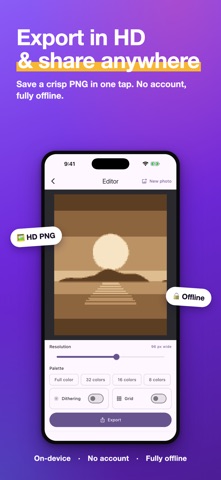
- Export in high resolution: the pixels are kept crisp (never blurred) and saved as a PNG you can share anywhere in one tap.
- Private by design: all conversion happens on-device. Your photos are never uploaded. No account, no login.

Perfect for retro-game fans, pixel-art avatar makers and anyone who loves the 8-bit / 16-bit look.
Official page on the App Store

Safety and technology

Found in the app by AppBrain
Price
Free
App size
23.7 MB
Content rating
Everyone

Technologies used by PixelArtCam: Pixel Art Maker

Releases

Updates seen on the App Store
Version
1.0.2
Launched
July 2026

No changelog data

Alternatives

Similar apps and more from Yuki Okawa

Alternatives to PixelArtCam: Pixel Art Maker

xelka: Pixel Art Camera icon xelka: Pixel Art Camera
Jaemin Kim
0.0
Free
imgPixel : Pixel Art Generator icon imgPixel : Pixel Art Generator
晓航 郑
0.0
$0.99
PixelCute icon PixelCute
TOKEN POCKET INC.
0.0
Free
Mini Camera: Mono Pixel Cam icon Mini Camera: Mono Pixel Cam
CAEN Co., Ltd.
0.0
Free
Lasto - Photo Card Camera icon Lasto - Photo Card Camera
クリサク株式会社
0.0
Free
NeoCam - Pixel art camera icon NeoCam - Pixel art camera
Charles Etzel
4.9
Free
17 ratings
8Bit Photo Lab icon 8Bit Photo Lab
Ilixa Ltd.
3.0
Free
2 ratings
Proseezion - Analog, No AI icon Proseezion - Analog, No AI
John Konstantaras
4.5
Free
8 ratings

More from Yuki Okawa

Intervo: HIIT Tabata Timer icon Intervo: HIIT Tabata Timer
Yuki Okawa
5.0
Free
1 ratings
QuickKakeibo: Expense Log icon QuickKakeibo: Expense Log
Yuki Okawa
0.0
Free
Dueday: Deadline Countdown icon Dueday: Deadline Countdown
Yuki Okawa
0.0
Free
Notedown: Markdown Notes icon Notedown: Markdown Notes
Yuki Okawa
0.0
Free
PackPilot: Packing List icon PackPilot: Packing List
Yuki Okawa
0.0
Free
TaskCount: Task Timer icon TaskCount: Task Timer
Yuki Okawa
0.0
Free
Leafy - Plant Care Reminder icon Leafy - Plant Care Reminder
Yuki Okawa
0.0
Free
RecipeBox: My Recipe Book icon RecipeBox: My Recipe Book
Yuki Okawa
0.0
Free

Rankings

App Store top charts

App Store Rankings for PixelArtCam: Pixel Art Maker

This app is not ranked

About the app and developer

About PixelArtCam: Pixel Art Maker

PixelArtCam: Pixel Art Maker is a photo & video app developed by Yuki Okawa.

User Ratings

The app has no ratings yet.

App Information

PixelArtCam: Pixel Art Maker is freely available from the App Store. The app size is 23.72 MB. The latest version available is 1.0.2. The last update was on July 19, 2026.

Technical Requirements

The app has a content rating of Everyone. The app has been available on the App Store since July 2026.

Developer information for Yuki Okawa

Yuki Okawa

Address:

Frequently asked questions about PixelArtCam: Pixel Art Maker

Is PixelArtCam: Pixel Art Maker free?

Yes. PixelArtCam: Pixel Art Maker is free on the App Store.

Is PixelArtCam: Pixel Art Maker still available?

Yes. PixelArtCam: Pixel Art Maker is on the App Store, and the last update we saw was on July 19, 2026.

How large is PixelArtCam: Pixel Art Maker?

PixelArtCam: Pixel Art Maker is 23.72 MB.

Is PixelArtCam: Pixel Art Maker suitable for children?

App Store rates the content of PixelArtCam: Pixel Art Maker as suitable for everyone.

Who made PixelArtCam: Pixel Art Maker?

PixelArtCam: Pixel Art Maker was developed by Yuki Okawa. It is listed in the photo & video category on the App Store.

What are the best alternatives to PixelArtCam: Pixel Art Maker?

People looking at PixelArtCam: Pixel Art Maker also look at these photo & video apps: xelka: Pixel Art Camera, imgPixel : Pixel Art Generator, PixelCute, Mini Camera: Mono Pixel Cam, Lasto - Photo Card Camera.

Share PixelArtCam: Pixel Art Maker

Price drops on Google Play Today's trending apps Popular Photo & Video Apps Apps other people are watching Top new apps
xelka: Pixel Art Camera icon xelka: Pixel Art Camera
imgPixel : Pixel Art Generator icon imgPixel : Pixel Art Generator
PixelCute icon PixelCute
Mini Camera: Mono Pixel Cam icon Mini Camera: Mono Pixel Cam
Lasto - Photo Card Camera icon Lasto - Photo Card Camera
NeoCam - Pixel art camera icon NeoCam - Pixel art camera
8Bit Photo Lab icon 8Bit Photo Lab
Proseezion - Analog, No AI icon Proseezion - Analog, No AI
Overview Alternatives Reviews Rankings Technology
AppBrain Intelligence premium content

Subscribe now to get full and unlimited access to AppBrain Intelligence. You'll have access to:

  • App Intelligence dashboard (performance timeline, competitor comparison, country rankings, insight cards)
  • Detailed ranking data per app
  • Full timeline per developer
  • Device market shares data per country
  • Unlimited keyword tracking
1 Month

$75/mo
(billed every month)

SAVE 0%
Subscribe
3 Months

$65/mo
($195 billed every 3 months)

SAVE 13%
Subscribe
1 Year

$57.50/mo
($690 billed every year)

SAVE 23%
Subscribe
Each subscription will automatically renew 3 days before the expiration date for the same time period. Subscriptions can be cancelled at any time before the renewal.

AppBrain is an app data site, we track rankings, ratings, installs for all apps and games on Google Play and the App Store. AppBrain doesn't host app files or APKs, all install links go directly to the official store. All trademarks are owned by their respective owners.

More apps

  • Top Android apps being viewed
  • Intuit QuickBooks for Business
  • Mia VPN: Fast & Secure VPN for Android
  • Melon Sandbox x Poppy Playtime

App statistics

  • Android statistics
  • Google Play Developer stats
  • Trending Android Apps
  • Trending iOS apps
  • Top popular Apps
  • Buy the best Android phone
  • Buy & sell app businesses

About AppBrain

  • Contact
  • Privacy
  • Documentation
  • DMCA takedowns
  • Blog
  • Android app Install tracking and attribution options for the AppBrain ad network
© 2010-2026 - AppBrain