

PixelCheck: Dead Pixel Test
PixelCheck: Dead Pixel Test is made and published by Sindre Sørensen. AppBrain is an independent app data site and isn't affiliated with Sindre Sørensen. The app name, icon, screenshots and description belong to Sindre Sørensen and are shown as published on the App Store.
AppBrain's verdict
- Last updated
- August 1, 2026
- Size
- 1.78 MB
User feedback
Ratings and reviews on the App StoreComments on PixelCheck: Dead Pixel Test for iOS
We don't have enough comments to show example comments. Please check back later.
Store listing
By Sindre Sørensen, from the App Store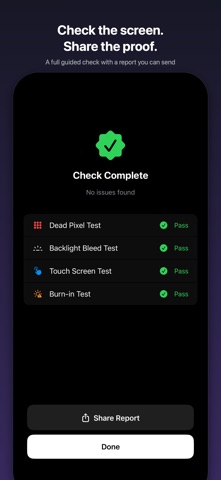


Description by Sindre Sørensen Written by the developer, not by AppBrain. Click to read.
GUIDED SCREEN CHECK
Run every test in sequence with clear instructions, give each a pass or fail, and finish with a summary. Share the result as a report — proof of your screen's condition when buying or selling.
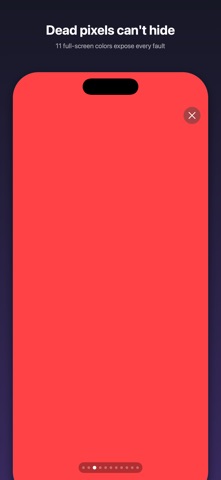
DEAD PIXEL TEST
Cycle through 11 full-screen colors — white, black, red, green, blue, yellow, cyan, magenta, and three gray levels. Dead pixels and stuck pixels stand out immediately against solid colors.
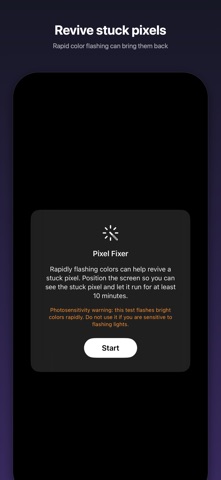
PIXEL FIXER
Found a stuck pixel? Rapid color flashing can help revive it. Position the screen and let it run.
BACKLIGHT BLEED TEST
A pure black screen reveals light leaking around the edges of LCD displays.
TOUCH SCREEN TEST
Draw across a grid overlay to verify every zone of your touch screen responds — with true multi-finger support. Track your coverage in real time.
OLED BURN-IN TEST
A slow-moving gray block and uniform gray screen reveal ghost images, uneven brightness, and burn-in damage on OLED displays. Adjust the gray level to catch subtle issues.
SCREEN INFO
View your device model, screen resolution, pixel density, display type, refresh rate, and current brightness — all in one place.
WHY PIXELCHECK?
- No ads, no tracking, no internet required
- Works completely offline
- Tiny app size, instant launch
- Supports iPhone and iPad
- Screen stays awake and at full brightness during tests
PERFECT FOR
- Buying or selling a used iPhone or iPad
- Checking a screen after repair
- Verifying OLED burn-in on older devices
- Testing touch response across the full screen
Simple, fast, private. Open the app, run the check, share the proof.
Safety and technology
Found in the app by AppBrain- Price
- $0.99
- App size
- 1.78 MB
- Content rating
- Everyone
Technologies used by PixelCheck: Dead Pixel Test
Releases
Updates seen on the App Store- Version
- 1.2
- Launched
- April 2026
No changelog data
Alternatives
Similar apps and more from Sindre SørensenMore from Sindre Sørensen


Rankings
App Store top chartsApp Store Rankings for PixelCheck: Dead Pixel Test
About the app and developer
About PixelCheck: Dead Pixel Test
PixelCheck: Dead Pixel Test is an utilities app developed by Sindre Sørensen.
User Ratings
The app has no ratings yet.
App Information
PixelCheck: Dead Pixel Test costs $0.99. The app size is 1.78 MB. The latest version available is 1.2. The last update was on August 1, 2026.
Technical Requirements
The app has a content rating of Everyone. The app has been available on the App Store since April 2026.
Developer information for Sindre Sørensen
Address:
Frequently asked questions about PixelCheck: Dead Pixel Test
Is PixelCheck: Dead Pixel Test free?
No. PixelCheck: Dead Pixel Test costs $0.99 on the App Store.
Is PixelCheck: Dead Pixel Test still available?
Yes. PixelCheck: Dead Pixel Test is on the App Store, and the last update we saw was on August 1, 2026.
How large is PixelCheck: Dead Pixel Test?
PixelCheck: Dead Pixel Test is 1.78 MB.
Is PixelCheck: Dead Pixel Test suitable for children?
App Store rates the content of PixelCheck: Dead Pixel Test as suitable for everyone.
Who made PixelCheck: Dead Pixel Test?
PixelCheck: Dead Pixel Test was developed by Sindre Sørensen. It is listed in the utilities category on the App Store.