

Pixelize Me is made and published by Nelson Lai. AppBrain is an independent app data site and isn't affiliated with Nelson Lai. The app name, icon, screenshots and description belong to Nelson Lai and are shown as published on the App Store.
AppBrain's verdict
- Last updated
- October 4, 2026
- Size
- 48.5 MB
User feedback
Ratings and reviews on the App StoreComments on Pixelize Me for iOS
We don't have enough comments to show example comments. Please check back later.
Store listing
By Nelson Lai, from the App Store


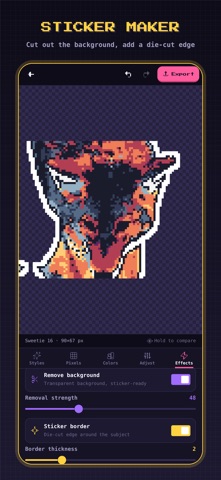
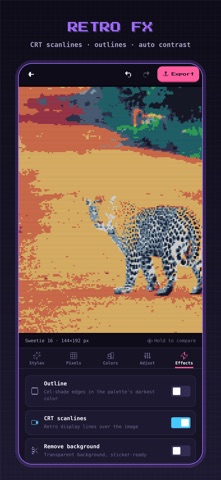


Screenshots by Nelson Lai, from the the App Store listing
Description by Nelson Lai Written by the developer, not by AppBrain. Click to read.
Pixelize turns any photo into real pixel art: authentic retro palettes, true dithering and a live preview that updates as you tweak.
Pick a photo, then pick a look. Game Boy Camera, PICO-8, NES sprite, 1-bit Mac, CRT arcade: every style renders on your own photo before you tap it. Fine-tune pixel size, palette, dithering and tone, then export a crisp PNG or an animated GIF.
REAL PIXELS, NOT A BLUR FILTER
Pixelize snaps your photo to an actual pixel grid and maps every pixel to a real palette. Export at 1× for game sprites and pixel-art references, or up to 4K for prints and wallpapers.
50 RETRO PALETTES
• Consoles: NES, Sega Master System, PICO-8, Sweetie 16
• Handhelds: Game Boy and its variants, Virtual Boy
• Computers: Commodore 64, CGA, Apple II, ZX Spectrum, MSX, Amstrad CPC
• Moods: Vaporwave, Cyberpunk, Synthwave, Thermal, Risograph and more
• Palette Studio: build and save your own
SMART PALETTE
Let Pixelize pick the 4 to 32 colors that best represent your photo, for pixel art that still looks like the original.
6 DITHERING STYLES
Floyd-Steinberg, Atkinson, two Bayer matrices, blue noise and halftone, with adjustable strength: the patterns that gave 8-bit and 16-bit art its texture.
18 ONE-TAP STYLES
Game Boy Camera, PICO-8, NES Sprite, 1-bit Mac, C64 Demo, CRT Arcade, Vaporwave, Newspaper, Sticker, Thermal, Poster and more.
ANIMATED GIFS
Export a "pixel reveal" GIF that resolves from chunky blocks into your finished art. Made for chats and socials.
STICKERS AND EFFECTS
Remove the background for a transparent sticker, add a die-cut border, cel-shaded outlines and CRT scanlines.
PRIVATE BY DESIGN
Everything runs on your device. Photos are never uploaded, there is no account, and the editor works offline.
FREE, WITH OPTIONAL PRO
The editor, 25 classic palettes and 10 styles are free, with ads. Pixelize Pro adds Smart Palette, 25 more palettes, 8 Pro styles, 4K export, GIFs without the watermark and unlimited custom palettes, and removes all ads.
Pixelize Pro is a one-time purchase, not a subscription: pay once and keep it. To get it back on a new device or after reinstalling, tap Restore purchases in Settings.
Terms of Use: https://www.apple.com/legal/internet-services/itunes/dev/stdeula/
Privacy Policy: https://pixel.chinesepowered.com/privacy.html
Pick a photo, then pick a look. Game Boy Camera, PICO-8, NES sprite, 1-bit Mac, CRT arcade: every style renders on your own photo before you tap it. Fine-tune pixel size, palette, dithering and tone, then export a crisp PNG or an animated GIF.
REAL PIXELS, NOT A BLUR FILTER
Pixelize snaps your photo to an actual pixel grid and maps every pixel to a real palette. Export at 1× for game sprites and pixel-art references, or up to 4K for prints and wallpapers.
50 RETRO PALETTES
• Consoles: NES, Sega Master System, PICO-8, Sweetie 16
• Handhelds: Game Boy and its variants, Virtual Boy
• Computers: Commodore 64, CGA, Apple II, ZX Spectrum, MSX, Amstrad CPC
• Moods: Vaporwave, Cyberpunk, Synthwave, Thermal, Risograph and more
• Palette Studio: build and save your own
SMART PALETTE
Let Pixelize pick the 4 to 32 colors that best represent your photo, for pixel art that still looks like the original.
6 DITHERING STYLES
Floyd-Steinberg, Atkinson, two Bayer matrices, blue noise and halftone, with adjustable strength: the patterns that gave 8-bit and 16-bit art its texture.
18 ONE-TAP STYLES
Game Boy Camera, PICO-8, NES Sprite, 1-bit Mac, C64 Demo, CRT Arcade, Vaporwave, Newspaper, Sticker, Thermal, Poster and more.
ANIMATED GIFS
Export a "pixel reveal" GIF that resolves from chunky blocks into your finished art. Made for chats and socials.
STICKERS AND EFFECTS
Remove the background for a transparent sticker, add a die-cut border, cel-shaded outlines and CRT scanlines.
PRIVATE BY DESIGN
Everything runs on your device. Photos are never uploaded, there is no account, and the editor works offline.
FREE, WITH OPTIONAL PRO
The editor, 25 classic palettes and 10 styles are free, with ads. Pixelize Pro adds Smart Palette, 25 more palettes, 8 Pro styles, 4K export, GIFs without the watermark and unlimited custom palettes, and removes all ads.
Pixelize Pro is a one-time purchase, not a subscription: pay once and keep it. To get it back on a new device or after reinstalling, tap Restore purchases in Settings.
Terms of Use: https://www.apple.com/legal/internet-services/itunes/dev/stdeula/
Privacy Policy: https://pixel.chinesepowered.com/privacy.html
Safety and technology
Found in the app by AppBrain- Price
- Free
- App size
- 48.5 MB
- Content rating
- Everyone
Technologies used by Pixelize Me
Releases
Updates seen on the App Store- Version
- 2.0.0
- Launched
- January 2026
No changelog data
Alternatives
Similar apps and more from Nelson Lai








Rankings
App Store top chartsApp Store Rankings for Pixelize Me
This app is not ranked
About the app and developer
About Pixelize Me
Pixelize Me is a photo & video app developed by Nelson Lai.
What is the rating of Pixelize Me?
Pixelize Me has no ratings yet.
Is Pixelize Me free?
Pixelize Me is free. The app size is 48.45 MB. The latest version available is 2.0.0. The last update was on October 4, 2026.
What are the requirements for Pixelize Me?
The app has a content rating of Everyone. The app has been available on the App Store since January 2026.
Developer information for Nelson Lai
Address: