

PlanForm-Measure & Markup PDF
PlanForm-Measure & Markup PDF is made and published by Beijing Honghu Yuntu Technology Co., Ltd. AppBrain is an independent app data site and isn't affiliated with Beijing Honghu Yuntu Technology Co., Ltd. The app name, icon, screenshots and description belong to Beijing Honghu Yuntu Technology Co., Ltd. and are shown as published on the App Store.
AppBrain's verdict
- Last updated
- October 17, 2026
Rankings
App Store top chartsApp Store Rankings for PlanForm-Measure & Markup PDF
Competitors
Similar apps and more from Beijing Honghu Yuntu Technology Co., Ltd.


Releases
Updates seen on the App Store- Version
- 5.2.10
- Launched
- February 2025
No changelog data
User feedback
Ratings and reviews on the App StoreComments on PlanForm-Measure & Markup PDF for iOS
We don't have enough comments to show example comments. Please check back later.
Technology
Found in the app by AppBrain- Price
- Free
- App size
- 173.7 MB
- Content rating
- Everyone
Technologies used by PlanForm-Measure & Markup PDF
About the app and developer
About PlanForm-Measure & Markup PDF
PlanForm-Measure & Markup PDF is a productivity app developed by Beijing Honghu Yuntu Technology Co., Ltd.
User Ratings
The app has no ratings yet.
App Information
PlanForm-Measure & Markup PDF is freely available from the App Store. The app size is 173.72 MB. The latest version available is 5.2.10. The last update was on October 17, 2026.
Technical Requirements
The app has a content rating of Everyone. The app has been available on the App Store since February 2025.
Developer information for Beijing Honghu Yuntu Technology Co., Ltd.
Store listing
By Beijing Honghu Yuntu Technology Co., Ltd., from the App Store


Description by Beijing Honghu Yuntu Technology Co., Ltd. Written by the developer, not by AppBrain. Click to read.
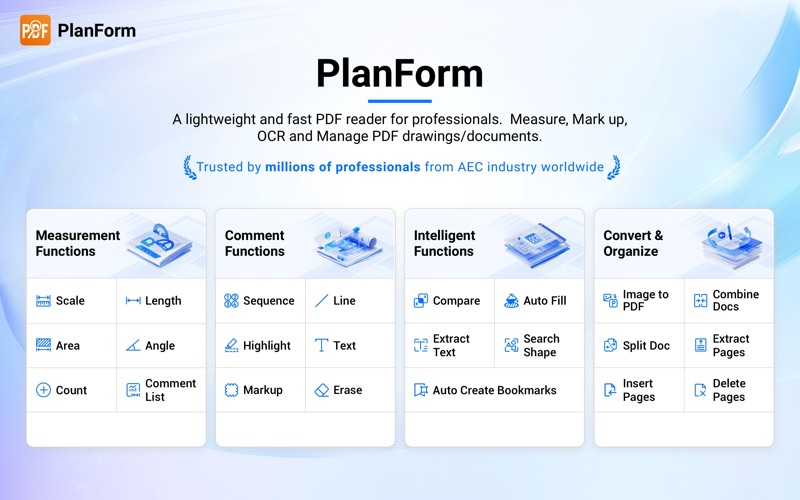
Used widely by global AEC teams, PlanForm centralizes PDF measurement, mark‑ups and data calculation. It reduces manual tasks, limits calculation errors and keeps your construction documents organized and accurate.
KEY FEATURES
Lightweight PDF Blueprint Viewer
Open and browse large construction PDF drawings and blueprints instantly. Support continuous and single-page display, flexible screen rotation, and smooth pan and zoom for detailed plan inspection. View multi-page drawing sets seamlessly and work naturally with architectural, structural, and MEP construction documents.
Precision Intelligent Measurement & Quantity Takeoff
Equipped with professional calibrated measurement tools tailored for construction takeoff. Set custom scale or apply preset scale standards, supporting both metric and imperial units. Measure linear length, aligned segments, continuous length, polygon and irregular areas, radius, angles, and arc length. Built-in auto-fill for irregular zones and intelligent object counting greatly improve estimating efficiency. All measurement results and markups can be automatically tabulated and exported as .xls files for accurate project costing and data sorting.
Professional PDF Markup & Drawing Coordination
Access comprehensive markup tools including lines, rectangles, ellipses, arrows, revision clouds, highlighters, custom text editing, sequential labelling, image insertion, and content erasure. Conduct direct redline and annotation on construction PDFs to clarify design changes and site requirements. Support drawing revision comparison, allowing teams to track updates, identify discrepancies, and mitigate construction risks in advance.
Advanced OCR & Document Intelligence
Powerful OCR technology identifies and extracts text and tables from scanned PDFs, turning non-editable scanned documents into searchable files. Enable full-text search on scanned blueprints and auto-generate structured PDF bookmarks to organize multi-page drawing sets efficiently.
Full-Scale PDF Document Management & Conversion
Support one-stop PDF workflow processing: merge multiple PDFs, split files by pages or bookmarks, insert, delete, extract, and reorder pages freely. Provide high-precision batch conversion between PDF and DWG, as well as batch PDF-to-JPG and JPG-to-PDF conversion. Perfect for sorting, archiving, and reusing construction drawing resources.
BUILT FOR AEC & QS PROFESSIONALS
Whether you are reviewing architectural floor plans, engineering structural drawings, MEP blueprints, or scanned project documents, PlanForm integrates viewing, measuring, takeoff calculation, markup annotation, OCR extraction, and format conversion in one lightweight application. It delivers Bluebeam-level professional functions with simpler operation, smoother performance, and lower device requirements, perfectly matching daily estimating, design review, and site management workflows for AEC teams and QS specialists.
Besides desktop‑based work, PlanForm also supports mobile‑device access so you can carry out onsite drawing‑checking and measurement work while you are on‑site.
Still have questions? Feel free to contact our technical support via email, we provide 1-to-1 services for free!
Email: planformservice@gmail.com
Don't forget to follow our social media pages to learn more tips and tutorials!
YouTube: https://www.youtube.com/@PlanFormPDF
TikTok: www.tiktok.com/@PlanFormPDF
Facebook: https://www.facebook.com/PlanFormPDF
Instagram: https://www.instagram.com/planformpdf/
Website: https://pdf.fastcadreader.com/