

PlanForm
PlanForm is made and published by Beijing Honghu Yuntu Technology Co., Ltd. AppBrain is an independent app data site and isn't affiliated with Beijing Honghu Yuntu Technology Co., Ltd. The app name, icon, screenshots and description belong to Beijing Honghu Yuntu Technology Co., Ltd. and are shown as published on the App Store.
AppBrain's verdict
- Rating on App Store
- 5.00
- 2 ratings
- Last updated
- September 29, 2026
It doesn't have enough ratings yet to judge what users think.
Rankings
App Store top chartsApp Store Rankings for PlanForm
Competitors
Similar apps and more from Beijing Honghu Yuntu Technology Co., Ltd.Alternatives to PlanForm


Releases
Updates seen on the App Store- Version
- 1.0.23
- Launched
- July 2025
No changelog data
User feedback
Ratings and reviews on the App StoreComments on PlanForm for iOS
We don't have enough comments to show example comments. Please check back later.
Technology
Found in the app by AppBrain- Price
- Free
- App size
- 22.0 MB
- Content rating
- Everyone
Technologies used by PlanForm
About the app and developer
About PlanForm
PlanForm is a productivity app developed by Beijing Honghu Yuntu Technology Co., Ltd.
User Ratings
PlanForm is rated 5.00 out of 5 stars. The rating is based on 2 ratings.
App Information
PlanForm is freely available from the App Store. The app size is 21.96 MB. The latest version available is 1.0.23. The last update was on September 29, 2026.
Technical Requirements
The app has a content rating of Everyone. The app has been available on the App Store since July 2025.
Developer information for Beijing Honghu Yuntu Technology Co., Ltd.
Frequently asked questions about PlanForm
Is PlanForm free?
Yes. PlanForm is free on the App Store.
Is PlanForm still available?
Yes. PlanForm is on the App Store, and the last update we saw was on September 29, 2026.
How large is PlanForm?
PlanForm is 21.96 MB.
Is PlanForm suitable for children?
App Store rates the content of PlanForm as suitable for everyone.
How do people rate PlanForm?
PlanForm scores 5.00 out of 5 stars, from 2 ratings on the App Store.
Who made PlanForm?
PlanForm was developed by Beijing Honghu Yuntu Technology Co., Ltd. It is listed in the productivity category on the App Store.
What are the best alternatives to PlanForm?
People looking at PlanForm also look at these productivity apps: Planformer – Smart Takeoffs, CAD快速看图-手机快速看图测量,设计图文档转换PDF, PIMCenter-交付更多满意, CAD快速看图- 手机快速查看图纸, Drawboard Projects.
Store listing
By Beijing Honghu Yuntu Technology Co., Ltd., from the App Store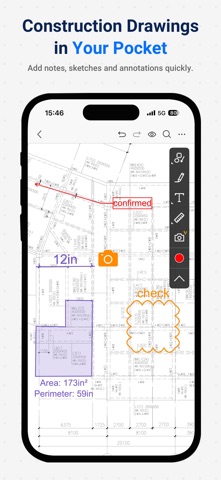



Description by Beijing Honghu Yuntu Technology Co., Ltd. Written by the developer, not by AppBrain. Click to read.
PlanForm Highlights for iOS/iPad:
1.Unzip&Browse PDF Drawings
• Seamless browsing for drawings of any size
2.Measure PDF Drawings
• Set the scale easily
• Measure length and area quickly
3.Annotate PDF Drawings
• Cloud/Pen/Text
• Multiple annotation options to meet diverse needs
4.Search PDF Bookmarks
• Too many pages?Find any instantly with bookmark search
PlanForm Highlights for Windows/Mac:
1. Intelligent Measurement Tools
• Set scale by length or select preset scale, supports metric and imperial systems
• Length measurements, such as Linear and Aligned
• Continuous length measurement
• Measure square and polygon area
• Auto Fill irregular area
• Count Tool
• Measure radius, angles, arc length etc.
• Data tabulation of all measurements and markups
• Automatic snapping points for better accuracy
2. Quick Markup Tools
• Drawing tools such as Line, Rectangle, Ellipse, Arrow, Revision Cloud
• Compare Revision Drawings
• Highlighter tool
• Add and modify texts
• Sequence labelling
• Insert and paste image
• Erase content
3. OCR Functions
• Identify & Extract Texts/Tables (OCR)
• Find texts In Scanned PDF
• Auto generate bookmarks for PDF
4. Document Management & Convert
• Convert image files to PDF
• Combine documents
• Split document
• Extract Pages
• Delete Pages
• Insert Pages
Still have questions? Feel free to contact our technical support via email, we provide 1-to-1 services for free!
Email: planformservice@gmail.com
Don't forget to follow our social media pages to learn more tips and tutorials!
YouTube: https://www.youtube.com/@PlanFormPDF
TikTok: www.tiktok.com/@PlanFormPDF
Facebook: https://www.facebook.com/PlanFormPDF
Instagram: https://www.instagram.com/planformpdf/
LinkedIn: https://www.linkedin.com/company/cadreader/
Website: https://pdf.fastcadreader.com/