

Planmark Room Scanner
Planmark Room Scanner is made and published by NOH HIYEONG. AppBrain is an independent app data site and isn't affiliated with NOH HIYEONG. The app name, icon, screenshots and description belong to NOH HIYEONG and are shown as published on the App Store.
AppBrain's verdict
New- Rating on App Store
- 1.00
- 1 ratings
- Last updated
- August 24, 2026
- Size
- 10.0 MB
Planmark Room Scanner came out 59 days ago. It doesn't have enough ratings yet to judge what users think.
User feedback
Ratings and reviews on the App StoreComments on Planmark Room Scanner for iOS
We don't have enough comments to show example comments. Please check back later.
Store listing
By NOH HIYEONG, from the App Store
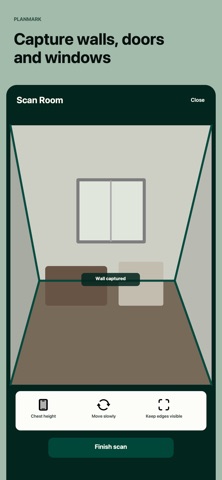


Description by NOH HIYEONG Written by the developer, not by AppBrain. Click to read.
Planmark turns a LiDAR-equipped iPhone Pro or iPad Pro into a guided room-measurement workflow for moving, furniture planning, renovation and field documentation. Capture walls, doors and windows, review the dimensions, and keep both a clean 2D floor plan and the original 3D room scan.
SEE THE RESULT BEFORE YOU BUY
Open the included sample project to inspect the 2D plan, 3D preview, wall measurements and PDF workflow. New room scanning unlocks through a one-time Home or Pro purchase.
SCAN AND UNDERSTAND YOUR SPACE
• Guided LiDAR room capture
• Automatic room outline with walls, doors and windows
• 2D floor plan with measurements for every captured wall
• Original 3D room scan you can rotate and inspect
• Room area, perimeter and door/window count
• Metric and imperial units
• Saved projects for later review
HOME: A CLEAN PLAN FOR YOUR OWN SPACE
Home is designed for moving, checking furniture fit and preparing a renovation.
• Room scanning and saved projects
• Clean personal PDF without a watermark
• Wall lengths, area and perimeter in one shareable document
PRO: CLIENT-READY FIELD HANDOFF
Pro turns a measured room into a structured package for designers, remodelers, contractors and property professionals.
• Client-ready PDF report package
• Client, site, prepared-by and revision details
• Measurement review table and door/window schedule
• Takeoff summary CSV
• SVG vector export and DXF beta export
• Multi-room site package for a single handoff
SIMPLE WORKFLOW
1. Scan the room slowly with walls, corners and floor boundaries visible.
2. Review the 2D plan and original 3D scan.
3. Check important wall measurements.
4. Save a personal PDF or prepare a client package.
DEVICE REQUIREMENT
New room scanning requires a LiDAR-equipped iPhone Pro or iPad Pro that supports Apple RoomPlan. On devices without LiDAR, you can explore the sample result but cannot capture a new room or purchase a scanning unlock.
Measurements depend on the environment and sensor capture. Verify critical dimensions before construction, fabrication or ordering materials.
Terms of Service: https://prizmchain.github.io/planmark-terms-of-service.html
Privacy Policy: https://prizmchain.github.io/planmark-privacy-policy.html
Safety and technology
Found in the app by AppBrain- Price
- Free
- App size
- 10.0 MB
- Content rating
- Everyone
Technologies used by Planmark Room Scanner
Releases
Updates seen on the App Store- Version
- 1.0
- Launched
- August 2026
No changelog data
Alternatives
Similar apps and more from NOH HIYEONGAlternatives to Planmark Room Scanner



More from NOH HIYEONG





Rankings
App Store top chartsApp Store Rankings for Planmark Room Scanner
About the app and developer
About Planmark Room Scanner
Planmark Room Scanner is a productivity app developed by NOH HIYEONG.
User Ratings
Planmark Room Scanner is rated 1.00 out of 5 stars. The rating is based on one rating ratings.
App Information
Planmark Room Scanner is freely available from the App Store. The app size is 10.02 MB. The latest version available is 1.0. The last update was on August 24, 2026.
Technical Requirements
The app has a content rating of Everyone. The app has been available on the App Store since August 2026.
Developer information for NOH HIYEONG
Address: