

Planwall: Lock Screen Calendar
Planwall: Lock Screen Calendar is made and published by Betul Sahin. AppBrain is an independent app data site and isn't affiliated with Betul Sahin. The app name, icon, screenshots and description belong to Betul Sahin and are shown as published on the App Store.
AppBrain's verdict
New- Rating on App Store
- 1.00
- 2 ratings
- Last updated
- October 14, 2026
Planwall: Lock Screen Calendar came out 55 days ago. It doesn't have enough ratings yet to judge what users think.
Rankings
App Store top chartsApp Store Rankings for Planwall: Lock Screen Calendar
Competitors
Similar apps and more from Betul SahinAlternatives to Planwall: Lock Screen Calendar


More from Betul Sahin


Releases
Updates seen on the App Store- Version
- 1.1.2
- Launched
- September 2026
No changelog data
User feedback
Ratings and reviews on the App StoreComments on Planwall: Lock Screen Calendar for iOS
We don't have enough comments to show example comments. Please check back later.
Technology
Found in the app by AppBrain- Price
- Free
- App size
- 9.04 MB
- Content rating
- Everyone
Technologies used by Planwall: Lock Screen Calendar
About the app and developer
About Planwall: Lock Screen Calendar
Planwall: Lock Screen Calendar is a productivity app developed by Betul Sahin.
What is the rating of Planwall: Lock Screen Calendar?
Planwall: Lock Screen Calendar is rated 1.00 out of 5 stars, based on 2 ratings.
Is Planwall: Lock Screen Calendar free?
Planwall: Lock Screen Calendar is free. The app size is 9.04 MB. The latest version available is 1.1.2. The last update was on October 14, 2026.
What are the requirements for Planwall: Lock Screen Calendar?
The app has a content rating of Everyone. The app has been available on the App Store since September 2026.
Developer information for Betul Sahin
Address:
Frequently asked questions about Planwall: Lock Screen Calendar
Is Planwall: Lock Screen Calendar free?
Yes. Planwall: Lock Screen Calendar is free on the App Store.
Is Planwall: Lock Screen Calendar still available?
Yes. Planwall: Lock Screen Calendar is on the App Store, and the last update we saw was on October 14, 2026.
How large is Planwall: Lock Screen Calendar?
Planwall: Lock Screen Calendar is 9.04 MB.
Is Planwall: Lock Screen Calendar suitable for children?
App Store rates the content of Planwall: Lock Screen Calendar as suitable for everyone.
How do people rate Planwall: Lock Screen Calendar?
Planwall: Lock Screen Calendar scores 1.00 out of 5 stars, from 2 ratings on the App Store.
Who made Planwall: Lock Screen Calendar?
Planwall: Lock Screen Calendar was developed by Betul Sahin. It is listed in the productivity category on the App Store.
What are the best alternatives to Planwall: Lock Screen Calendar?
People looking at Planwall: Lock Screen Calendar also look at these productivity apps: LockCal, DayWall: Calendar Wallpaper, GlanceKit: Lock Screen Widget, LookCalendar, Calendar Widget: Day & Month.
Store listing
By Betul Sahin, from the App Store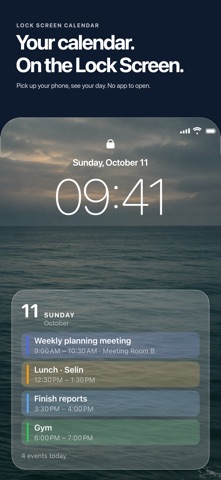


Description by Betul Sahin Written by the developer, not by AppBrain. Click to read.
SET UP ONCE
1. Pick a layout: Today, Agenda, Month, Week Strip, Week Grid, Timeline, Events + Reminders, Note, Countdown, Quote, Life Calendar, Large Text.
2. Choose and order your calendars and reminder lists.
3. Add the ready-made shortcut and link the automation. It refreshes itself every morning.
EVERYTHING ON THE PREVIEW
Drag the card below the clock, swipe to change layout and background, pinch to enlarge text.
WHAT'S FREE STAYS FREE
The Today layout, all backgrounds, your own photo, unlimited rows and automatic refresh are free and will never be locked in future updates. Planwall Pro adds 11 more layouts: monthly or yearly.
WORKS WITH EVERY CALENDAR ON YOUR IPHONE
iCloud, Google, Outlook, Exchange and any other account you've added in iOS Settings. No extra sign-in.
YOUR DATA STAYS ON YOUR IPHONE
No account. Calendar and reminders are read and rendered only on your device; nothing is sent to a server.
Note: Automatic refresh uses Apple Shortcuts; Planwall walks you through the setup. You can also update the wallpaper manually at any time.
Terms of Use (EULA): https://kiyora.app/terms
Privacy Policy: https://kiyora.app/privacy