

PlayFrame for KEF / Sonos
PlayFrame for KEF / Sonos is made and published by Hiroshi Kajihata. AppBrain is an independent app data site and isn't affiliated with Hiroshi Kajihata. The app name, icon, screenshots and description belong to Hiroshi Kajihata and are shown as published on the App Store.
AppBrain's verdict
- Last updated
- June 29, 2026
Rankings
App Store top chartsApp Store Rankings for PlayFrame for KEF / Sonos
Competitors
Similar apps and more from Hiroshi KajihataAlternatives to PlayFrame for KEF / Sonos





More from Hiroshi Kajihata


Releases
Updates seen on the App Store- Version
- 1.0.10
- Launched
- May 2026
No changelog data
User feedback
Ratings and reviews on the App StoreComments on PlayFrame for KEF / Sonos for iOS
We don't have enough comments to show example comments. Please check back later.
Technology
Found in the app by AppBrain- Price
- Free
- App size
- 7.53 MB
- Content rating
- Everyone
Technologies used by PlayFrame for KEF / Sonos
About the app and developer
About PlayFrame for KEF / Sonos
PlayFrame for KEF / Sonos is a music app developed by Hiroshi Kajihata.
What is the rating of PlayFrame for KEF / Sonos?
PlayFrame for KEF / Sonos has no ratings yet.
Is PlayFrame for KEF / Sonos free?
PlayFrame for KEF / Sonos is free. The app size is 7.53 MB. The latest version available is 1.0.10. The last update was on June 29, 2026.
What are the requirements for PlayFrame for KEF / Sonos?
The app has a content rating of Everyone. The app has been available on the App Store since May 2026.
Developer information for Hiroshi Kajihata
Address:
Frequently asked questions about PlayFrame for KEF / Sonos
Is PlayFrame for KEF / Sonos free?
Yes. PlayFrame for KEF / Sonos is free on the App Store.
Is PlayFrame for KEF / Sonos still available?
Yes. PlayFrame for KEF / Sonos is on the App Store, and the last update we saw was on June 29, 2026.
How large is PlayFrame for KEF / Sonos?
PlayFrame for KEF / Sonos is 7.53 MB.
Is PlayFrame for KEF / Sonos suitable for children?
App Store rates the content of PlayFrame for KEF / Sonos as suitable for everyone.
Who made PlayFrame for KEF / Sonos?
PlayFrame for KEF / Sonos was developed by Hiroshi Kajihata. It is listed in the music category on the App Store.
What are the best alternatives to PlayFrame for KEF / Sonos?
People looking at PlayFrame for KEF / Sonos also look at these music apps: Sonow, SonoPad for Sonos, SonoSequencr, Phonos Plus, Sono+: Remote for Sonos.
Store listing
By Hiroshi Kajihata, from the App Store

Description by Hiroshi Kajihata Written by the developer, not by AppBrain. Click to read.
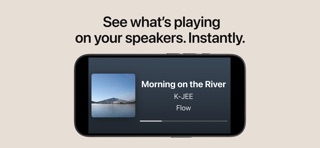
PlayFrame is a simple music display app designed to show what’s playing on your supported speakers. It is not a music player, and it is not a complex speaker controller. PlayFrame is still focused on being a dedicated Now Playing display, but supported speakers can also be controlled with simple actions like play, pause, skip, and seek when available.
Place an iPhone or iPad in your living room, music room, kitchen, bedroom, or workspace, and PlayFrame turns it into a dedicated speaker display for your home audio setup. You can keep PlayFrame running on one device as a display, while controlling playback from another iPhone, iPad, or your usual speaker app.
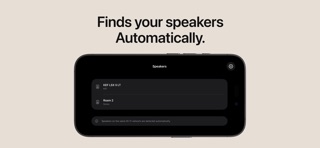
PlayFrame automatically discovers and connects to supported KEF or Sonos speakers on your local network, then shows the currently playing track information in real time. Because the information comes directly from your speaker, you do not need to sign in to Apple Music, Spotify, KEF, Sonos, or other accounts within PlayFrame.
It is an easy way for everyone at home to see what music is playing — even if they did not start playback themselves. With a layout designed to be readable from across the room, family members, guests, and children can quickly check the song title, artist name, and artwork at a glance.
Key Features:
- Show the currently playing song title, artist name, and album artwork
- Display Now Playing information from supported KEF and Sonos speakers
- Works on iPhone and iPad
- Designed for home audio, wireless speakers, and music listening spaces
- Use one iPhone or iPad as a display while controlling playback from another device
- Connects to supported speakers on your local Wi-Fi network
- No sign-in required within PlayFrame for Apple Music, Spotify, KEF, Sonos, or other accounts
- Real-time track information from your speaker
- Easy-to-read design for viewing from across the room
- Clean, simple Now Playing screen for always-on display use
- Reuse an older iPhone or iPad as a dedicated music display
- Customize the Now Playing screen with PlayFrame Pro
A Now Playing Display for Your Room:
Speaker apps are usually made for browsing music, changing settings, and controlling playback. PlayFrame is different. It is made for the moment after the music starts — when you simply want to see what is playing.
With a focused Now Playing view that is easy to read even from a distance, PlayFrame lets album artwork, song titles, and artist names become part of your living space.
PlayFrame Pro:
Upgrade to PlayFrame Pro to customize the Now Playing screen and make it your own.
With PlayFrame Pro, you can adjust the layout and appearance of the display to better match your room, device, and speaker setup.
Great for Older Devices:
PlayFrame supports iOS 16 and later, making it a great way to reuse an older iPhone or iPad as a dedicated Now Playing display for your KEF or Sonos speaker.
Supported Speakers:
PlayFrame currently supports KEF and Sonos speakers. Support for more speakers may be added in the future.
Notes:
PlayFrame is an independent app and is not affiliated with, endorsed by, or sponsored by KEF or Sonos.
Supported features may vary depending on your speaker model, firmware, network environment, and playback source.
PlayFrame is still in active development. If you find an issue or have a feature request, please feel free to contact support. Your feedback helps improve the app.