Download Android Apps and Games
AppBrain
  • Apps
  • Apps being viewed right now Trending apps today Most popular apps All-time most downloaded apps Top rated apps
  • Intelligence ▾
    Intelligence overview → Track any Android app or your whole market
    Track & analyze
    Keyword Tracker & OptimizerTrack & improve Play rankings App Performance ReportOne-off PDF for any app StatisticsFree Android & Play market stats
    Promote your app
    Featured Apps App Links
  • Intelligence
  • Pricing
  • Dashboard
  • Sign up
  • Log in
Last updated on: 2026-06-14
App Store Apps > PLIST Editor Mobile
PLIST Editor Mobile icon

PLIST Editor Mobile

1.4
VDT LABS S.R.L.
5.00
4 reviews
Free

PLIST Editor Mobile Screenshot 1 of 6
PLIST Editor Mobile Screenshot 2 of 6
PLIST Editor Mobile Screenshot 3 of 6
PLIST Editor Mobile Screenshot 4 of 6
PLIST Editor Mobile Screenshot 5 of 6
PLIST Editor Mobile Screenshot 6 of 6
Download from the App Store

About PLIST Editor Mobile

PLIST Editor Mobile is an overall app developed by VDT LABS S.R.L..

How many times has PLIST Editor Mobile been downloaded?

What is the rating of PLIST Editor Mobile?

PLIST Editor Mobile is rated 5.00 out of 5 stars, based on 4 ratings.

Is PLIST Editor Mobile free?

PLIST Editor Mobile is free to download. The APK download size is 9.41 MB. The latest version available is 1.4. The last update was on August 25, 2024.

What are the requirements for PLIST Editor Mobile?

The app has a content rating of Everyone. The app has been available on Google Play October 2023.

Description
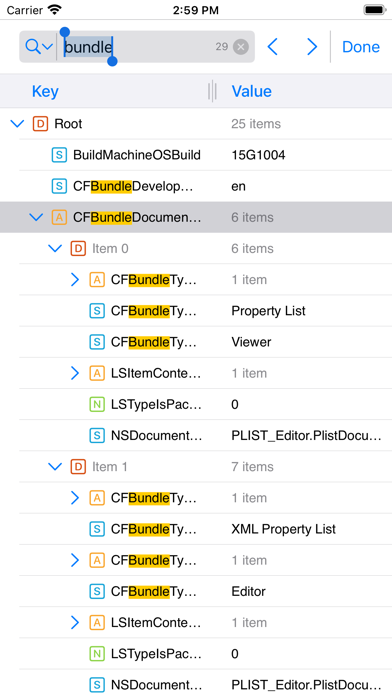
PLIST Editor allows you to create, visualize, modify and save property list (.plist) documents.

PLIST Editor is probably the only "source control friendly" property list editor that you can find on the market (except Xcode, of course). For all plist types (XML, Binary and OpenStep/ASCII), it maintains the order of dictionary elements and the editing capabilities are on parity with Xcode, so you don't see a difference between a file edited in PLIST Editor and one edited in Xcode.

IMPORTANT: PLIST Editor is available as free to download, but there are a few features not available: i.e. Save documents, Find & Replace, Sort.
In order to get the most out of the app, and to enable the aforementioned features, "Premium" is recommended to be purchased ("Premium" is a one-time in-app purchase).

Core features of the app:
• Open and save property list files in XML, Binary and OpenStep/ASCII format.
• Cut, copy, paste, duplicate, delete and reorder elements
• "Source control" friendly - the order of dictionary elements is preserved, showing them in the same order as they are defined in the file. Similarly, when the property list is written to disk, the order of items from a dictionary written to disk is the same as the one seen on screen. This is especially useful when you keep the files in a repository, because only the relevant changes will be shown when diff-ing the edited files.
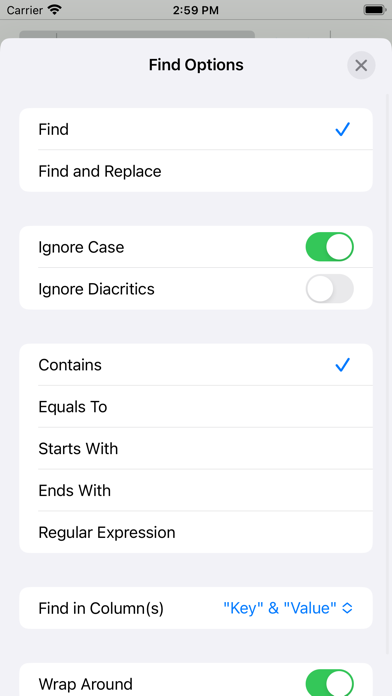
• Find & Replace text in the property list elements. You can choose where the Find (and Replace) will take place: in "Key" column or "Value" column or both.
• Find & Replace also lets you configure where in the text to look for matches: "Contains", "Equals To", "Starts With", "Ends With" and "Regular Expression"
• Sort children or siblings by key, type, value or sub-key
• Edit the elements of a property list by double tapping a key or value.
• Open and edit the files created using NSKeyedArchiver without any loss of information
• Copy elements as Swift objects
• Copy elements as JSON data, both readable and compact JSON
• Copy elements as XML, Binary (Base 64 encoded) and OpenStep/ASCII plists
• Embed selected elements in array or dictionary
• Shift elements to left or right
• Move elements up or down by pressing a row and then moving it to the desired location
• Resize the columns for better readability by dragging the separator
• Open and edit the files created using NSKeyedArchiver without any loss of information
• Export files as JSON (compact or readable) and PLIST (XML, Binary, OpenStep/ASCII)
• Option, in Settings to choose the default font, along with the font size
• Option, in Settings, to enable (or disable) Auto Save
• Undo & Redo
• Dark mode
• Portrait & landscape
• Split view and slide over for iPad
• Keyboard support if you have an external keyboard connected or use “Universal control”

If you're also interested in the Mac version of this app visit https://vdt-labs.com/plist-editor
Show more Show less

More data about PLIST Editor Mobile

Price Free to download
Rating 5.00 based on 4 ratings
Ranking Not ranked
Version 1.4
App download size 9.41 MB
Suitable for Everyone

Alternative downloads for the PLIST Editor Mobile app

Subtree icon Subtree
飞 杨
0.0
Free
Text Editing icon Text Editing
Laxay Gajera
3.2
Free
6 ratings
Copy Text From Image icon Copy Text From Image
Muhammed Sadiq Afridi
1.0
Free
1 ratings
DevPad - Developer Gadgets icon DevPad - Developer Gadgets
Giacomo Pignoni
4.7
Free
12 ratings
SQLed - SQL Database Manager icon SQLed - SQL Database Manager
Andreas Zimnas
4.1
$1.99
49 ratings
Seller Assistant icon Seller Assistant
Carmine Rumma
0.0
Free
Qubic App icon Qubic App
IGLUGO SOCIEDAD LIMITADA
0.0
Free
Font Finder for Flutter icon Font Finder for Flutter
Tachyon Factory Inc.
0.0
Free

More from VDT LABS S.R.L.

Easy CSV Editor Mobile icon Easy CSV Editor Mobile
VDT LABS S.R.L.
4.1
Free
34 ratings
JSON Editor Mobile icon JSON Editor Mobile
VDT LABS S.R.L.
3.9
Free
11 ratings

Changelog of PLIST Editor Mobile

No changelog data

Developer information for VDT LABS S.R.L.

VDT LABS S.R.L.

Address:

Share PLIST Editor Mobile

Comments on PLIST Editor Mobile for iOS

We don't have enough comments to show example comments. Please check back later.

App Store Rankings for PLIST Editor Mobile

This app is not ranked

Technologies used by PLIST Editor Mobile

Apps on sale Apps other people are watching Popular Overall Top new apps Today's trending apps
Subtree icon Subtree
Text Editing icon Text Editing
Copy Text From Image icon Copy Text From Image
DevPad - Developer Gadgets icon DevPad - Developer Gadgets
SQLed - SQL Database Manager icon SQLed - SQL Database Manager
Seller Assistant icon Seller Assistant
Qubic App icon Qubic App
Font Finder for Flutter icon Font Finder for Flutter

Back to top
AppBrain Intelligence premium content

Subscribe now to get full and unlimited access to AppBrain Intelligence. You'll have access to:

  • App Intelligence dashboard (performance timeline, competitor comparison, country rankings, insight cards)
  • Detailed ranking data per app
  • Full timeline per developer
  • Device market shares data per country
1 Month

$75/mo
(billed every month)

SAVE 0%
Subscribe
3 Months

$65/mo
($195 billed every 3 months)

SAVE 13%
Subscribe
1 Year

$57.50/mo
($690 billed every year)

SAVE 23%
Subscribe
Each subscription will automatically renew 3 days before the expiration date for the same time period. Subscriptions can be cancelled at any time before the renewal.

AppBrain is a directory focused on discovering great apps and games. We give statistics, rankings and search options that Google Play and the App Store don't have. All trademarks are owned by their respective owners. AppBrain doesn't offer APKs or binaries, and always lets users install the official version from Google Play or the App Store.

More apps

  • Top Android apps being viewed
  • Pancake Sort
  • KorailTalk
  • Meme Soundboard- Simple sounds

Android Statistics

  • Android statistics
  • Google Play Developer stats
  • Trending Android Apps
  • Top popular Apps
  • Buy the best Android phone

About AppBrain

  • Contact
  • Privacy
  • Documentation
  • DMCA takedowns
  • Articles
  • Blog
  • Monetization tips: Understanding your eCPM
© 2010-2026 - AppBrain