

PocketHear is made and published by 君文 古. AppBrain is an independent app data site and isn't affiliated with 君文 古. The app name, icon, screenshots and description belong to 君文 古 and are shown as published on the App Store.
AppBrain's verdict
- Last updated
- September 24, 2026
Rankings
App Store top chartsApp Store Rankings for PocketHear
This app is not ranked
Competitors
Similar apps and more from 君文 古Alternatives to PocketHear





Releases
Updates seen on the App Store- Version
- 1.5.0
- Launched
- January 2026
No changelog data
User feedback
Ratings and reviews on the App StoreComments on PocketHear for iOS
We don't have enough comments to show example comments. Please check back later.
Technology
Found in the app by AppBrain- Price
- Free
- App size
- 33.6 MB
- Content rating
- Everyone
Technologies used by PocketHear
About the app and developer
About PocketHear
PocketHear is an utilities app developed by 君文 古.
User Ratings
The app has no ratings yet.
App Information
PocketHear is freely available from the App Store. The app size is 33.62 MB. The latest version available is 1.5.0. The last update was on September 24, 2026.
Technical Requirements
The app has a content rating of Everyone. The app has been available on the App Store since January 2026.
Developer information for 君文 古
Address:
Store listing
By 君文 古, from the App Store
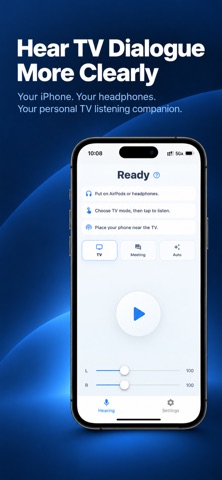

Screenshots by 君文 古, from the the App Store listing
Description by 君文 古 Written by the developer, not by AppBrain. Click to read.
Hear TV dialogue more clearly with PocketHear.
Turn your iPhone and headphones into a personal listening companion for watching TV. Bring dialogue closer and adjust the sound to your preference—without turning up the TV volume for everyone else.
Place your iPhone near the TV, connect your headphones, and start listening. PocketHear picks up sound through the active microphone and plays enhanced audio through your headphones. It’s also useful for everyday conversations and small meetings.
Key Features
- TV Mode: Audio settings designed to bring out speech and make television dialogue easier to follow.
- Personal Volume Control: Adjust the listening level for each ear independently.
- Speech Enhancement: Optional Apple Voice Processing helps reduce background noise and echo. Results depend on your headphones and surroundings.
- Automatic Gain: Helps balance input levels when Apple Voice Processing is enabled.
- Flexible Listening Modes: Choose TV or Meeting mode, or let Auto switch between them based on the sound around you.
- Optional Pink Noise: Add a gentle background sound with its own volume control.
- On-Device Processing: Audio is processed on your iPhone, without uploading it to the cloud or saving recordings.
Using PocketHear with Headphones
Works with compatible wired and Bluetooth headphones, including AirPods.
For TV listening with AirPods, turn off Apple Voice Processing to use your iPhone’s microphone with high-quality Bluetooth playback. Turning it on uses the AirPods microphone and call audio, which may change the sound quality.
Bluetooth audio may introduce a noticeable delay. Your experience will vary depending on your headphones and setup.
PocketHear is a listening assistance app, not a medical device or a replacement for professional hearing care.
Turn your iPhone and headphones into a personal listening companion for watching TV. Bring dialogue closer and adjust the sound to your preference—without turning up the TV volume for everyone else.
Place your iPhone near the TV, connect your headphones, and start listening. PocketHear picks up sound through the active microphone and plays enhanced audio through your headphones. It’s also useful for everyday conversations and small meetings.
Key Features
- TV Mode: Audio settings designed to bring out speech and make television dialogue easier to follow.
- Personal Volume Control: Adjust the listening level for each ear independently.
- Speech Enhancement: Optional Apple Voice Processing helps reduce background noise and echo. Results depend on your headphones and surroundings.
- Automatic Gain: Helps balance input levels when Apple Voice Processing is enabled.
- Flexible Listening Modes: Choose TV or Meeting mode, or let Auto switch between them based on the sound around you.
- Optional Pink Noise: Add a gentle background sound with its own volume control.
- On-Device Processing: Audio is processed on your iPhone, without uploading it to the cloud or saving recordings.
Using PocketHear with Headphones
Works with compatible wired and Bluetooth headphones, including AirPods.
For TV listening with AirPods, turn off Apple Voice Processing to use your iPhone’s microphone with high-quality Bluetooth playback. Turning it on uses the AirPods microphone and call audio, which may change the sound quality.
Bluetooth audio may introduce a noticeable delay. Your experience will vary depending on your headphones and setup.
PocketHear is a listening assistance app, not a medical device or a replacement for professional hearing care.