

PocketPipes is made and published by Claude Le Dû. AppBrain is an independent app data site and isn't affiliated with Claude Le Dû. The app name, icon, screenshots and description belong to Claude Le Dû and are shown as published on the App Store.
AppBrain's verdict
- Last updated
- December 19, 2023
Rankings
App Store top chartsApp Store Rankings for PocketPipes
This app is not ranked
Competitors
Similar apps and more from Claude Le DûAlternatives to PocketPipes








Releases
Updates seen on the App Store- Version
- 13.0
- Launched
- April 2013
No changelog data
User feedback
Ratings and reviews on the App StoreComments on PocketPipes for iOS
We don't have enough comments to show example comments. Please check back later.
Technology
Found in the app by AppBrain- Price
- $5.99
- App size
- 31.3 MB
- Content rating
- Everyone
Technologies used by PocketPipes
About the app and developer
About PocketPipes
PocketPipes is a music app developed by Claude Le Dû.
User Ratings
The app has no ratings yet.
App Information
PocketPipes costs $5.99. The app size is 31.32 MB. The latest version available is 13.0. The last update was on December 19, 2023.
Technical Requirements
The app has a content rating of Everyone. The app has been available on the App Store since April 2013.
Developer information for Claude Le Dû
Address:
Store listing
By Claude Le Dû, from the App Store


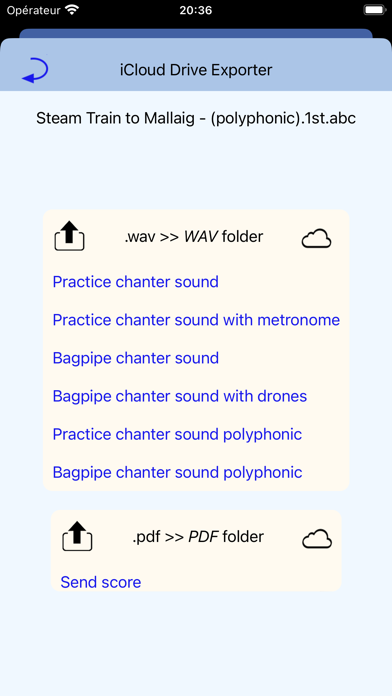


Screenshots by Claude Le Dû, from the the App Store listing
Description by Claude Le Dû Written by the developer, not by AppBrain. Click to read.
PocketPipes is an iPhone/iPad/iPod touch/Mac player for bagpipe tunes (abc and bww files) with lot of options. Polyphony and drones produce a very realistic bagpipe sound. A vertical bar shows the note being played on the sheet music. PocketPipes is your partner for practicing, with your own tunes. Statistics about recent playbacks help you to drive your training sessions.
PLAYBACK OPTIONS
- bagpipe chanter sound or practice chanter sound
- polyphonic capacity (one file for each voice: 1st, 2nd, 3rd, 4th). Select the first one to play in a polyphonic way.
- defining a section of the tune for playback (to focus on few measures when training, with long press on the sheet music). The area outside the section is grayed.
- loop mode
- playing with or without drones
- C natural, or C natural + F natural
- synchronized metronome with the current play
- optional 5-7-9 attack before each play
- tempo tuning for the current tune
TUNES MANAGEMENT
- the app proposes to install demo files automatically when the tunes list is empty (it includes few polyphonic sets)
- importing tunes from a desktop with iTunes or Finder, a Dropbox(TM) account, or email attachements, or with Files App
- file sharing : you can send tunes or sheet music as email attachments
- file uploading to the user's iCloud Drive (wav soundtrack and pdf sheet music)
- sheet music printing
- categorization (tagging) of the tunes allows to work on subsets within the personal tunes (i.e. Marches, Slow airs, To learn, Next performance ....). See guide on website. More flexible than folder hierarchy. When categorized, a tune appears in blue color.
- searching by keys, crossed with categories
- statistics on recent playbacks, crossed with categories
- file edition in textual mode with revert capability to the previous file
- backup/restore of the data to/from iCloud, giving a way to align different devices with the same data
USER INTERFACE
- contextual menu with a long press on the tune title or the sheet music
- two pop-up controllers to handle playback options on the sheet music
- categories editor
- full screen and zooming on sheet music (important for iPhones)
- ability to colorize some parts of the tunes (%%bgcolor for ABC files)
- support of clear/dark mode
- built-in help book to learn how to use the app and including useful links
Nota: beat setting and section marks are made persistent at file level.
Available ressources on the support web site: Packs of tunes, ABC tutorial, FAQ ...
See FAQ for specific questions.
PLAYBACK OPTIONS
- bagpipe chanter sound or practice chanter sound
- polyphonic capacity (one file for each voice: 1st, 2nd, 3rd, 4th). Select the first one to play in a polyphonic way.
- defining a section of the tune for playback (to focus on few measures when training, with long press on the sheet music). The area outside the section is grayed.
- loop mode
- playing with or without drones
- C natural, or C natural + F natural
- synchronized metronome with the current play
- optional 5-7-9 attack before each play
- tempo tuning for the current tune
TUNES MANAGEMENT
- the app proposes to install demo files automatically when the tunes list is empty (it includes few polyphonic sets)
- importing tunes from a desktop with iTunes or Finder, a Dropbox(TM) account, or email attachements, or with Files App
- file sharing : you can send tunes or sheet music as email attachments
- file uploading to the user's iCloud Drive (wav soundtrack and pdf sheet music)
- sheet music printing
- categorization (tagging) of the tunes allows to work on subsets within the personal tunes (i.e. Marches, Slow airs, To learn, Next performance ....). See guide on website. More flexible than folder hierarchy. When categorized, a tune appears in blue color.
- searching by keys, crossed with categories
- statistics on recent playbacks, crossed with categories
- file edition in textual mode with revert capability to the previous file
- backup/restore of the data to/from iCloud, giving a way to align different devices with the same data
USER INTERFACE
- contextual menu with a long press on the tune title or the sheet music
- two pop-up controllers to handle playback options on the sheet music
- categories editor
- full screen and zooming on sheet music (important for iPhones)
- ability to colorize some parts of the tunes (%%bgcolor for ABC files)
- support of clear/dark mode
- built-in help book to learn how to use the app and including useful links
Nota: beat setting and section marks are made persistent at file level.
Available ressources on the support web site: Packs of tunes, ABC tutorial, FAQ ...
See FAQ for specific questions.