

MIDIRegs - Uilleann Regulators
MIDIRegs - Uilleann Regulators is made and published by Michael Eskin. AppBrain is an independent app data site and isn't affiliated with Michael Eskin. The app name, icon, screenshots and description belong to Michael Eskin and are shown as published on the App Store.
AppBrain's verdict
Established- Rating on App Store
- 3.00
- 2 ratings
- Last updated
- July 6, 2025
It doesn't have enough ratings yet to judge what users think.
Rankings
App Store top chartsApp Store Rankings for MIDIRegs - Uilleann Regulators
Competitors
Similar apps and more from Michael EskinAlternatives to MIDIRegs - Uilleann Regulators








More from Michael Eskin








Releases
Updates seen on the App Store- Version
- 3.5
- Launched
- March 2010
No changelog data
User feedback
Ratings and reviews on the App StoreComments on MIDIRegs - Uilleann Regulators for iOS
We don't have enough comments to show example comments. Please check back later.
Technology
Found in the app by AppBrain- Price
- $4.99
- App size
- 8.91 MB
- Content rating
- Everyone
Technologies used by MIDIRegs - Uilleann Regulators
About the app and developer
About MIDIRegs - Uilleann Regulators
MIDIRegs - Uilleann Regulators is a music app developed by Michael Eskin.
User Ratings
MIDIRegs - Uilleann Regulators is rated 3.00 out of 5 stars. The rating is based on 2 ratings.
App Information
MIDIRegs - Uilleann Regulators costs $4.99. The app size is 8.91 MB. The latest version available is 3.5. The last update was on July 6, 2025.
Technical Requirements
The app has a content rating of Everyone. The app has been available on the App Store since March 2010.
Developer information for Michael Eskin
Address:
Frequently asked questions about MIDIRegs - Uilleann Regulators
Is MIDIRegs - Uilleann Regulators free?
No. MIDIRegs - Uilleann Regulators costs $4.99 on the App Store.
Is MIDIRegs - Uilleann Regulators still available?
Yes. MIDIRegs - Uilleann Regulators is on the App Store, and the last update we saw was on July 6, 2025.
How large is MIDIRegs - Uilleann Regulators?
MIDIRegs - Uilleann Regulators is 8.91 MB.
Is MIDIRegs - Uilleann Regulators suitable for children?
App Store rates the content of MIDIRegs - Uilleann Regulators as suitable for everyone.
How do people rate MIDIRegs - Uilleann Regulators?
MIDIRegs - Uilleann Regulators scores 3.00 out of 5 stars, from 2 ratings on the App Store.
Who made MIDIRegs - Uilleann Regulators?
MIDIRegs - Uilleann Regulators was developed by Michael Eskin. It is listed in the music category on the App Store.
What are the best alternatives to MIDIRegs - Uilleann Regulators?
People looking at MIDIRegs - Uilleann Regulators also look at these music apps: WoodValvet, PocketPipes, sinusedo, Holon.ist, K Machine audio visual engine.
Store listing
By Michael Eskin, from the App Store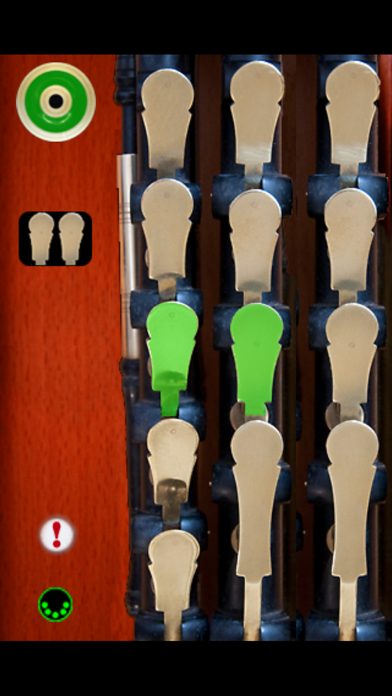
Description by Michael Eskin Written by the developer, not by AppBrain. Click to read.
MIDIRegs doesn't produce any sound on its own, it is for playing hardware or software VST-style MIDI synthesizers via CoreMIDI hardware interfaces connected to the dock connector or virtual MIDI instruments such as IK Multimedia SampleTank or Sonosaurus ThumbJam running on your device.
MIDIRegs is modeled on the drones and three regulators (Tenor, Baritone, and Bass) found on a full set of Uilleann pipes.
MIDIRegs makes it possible to have drones and regulators that sound like any instrument patch available on a CoreMIDI virtual synth running on the device.
You may also use the app to play sounds on a hardware MIDI synthesizer connected via a CoreMIDI interface attached to the dock connector of your device.
Since the drones and regulators messages may be sent on two different MIDI channels, each can play a different synthesizer patch.
Touch the regulator play mode icon just below the drone switch to toggle between regulator auto-chord play and single play modes.
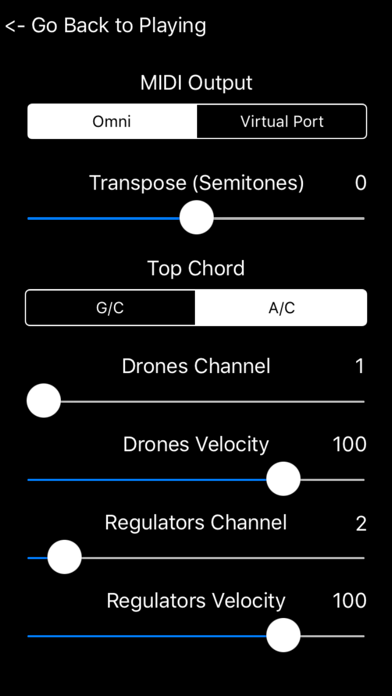
Touch the MIDI icon for the settings page.
Choose between "Omni" sending MIDI data to all CoreMIDI apps or "Virtual Port" sending to a named CoreMIDI virtual output port. When the "Virtual Port option is selected, MIDIRegs will show up as an input option labeled "MIDIRegs" in apps that support virtual ports like Sonosaurus ThumbJam and MIDIBridge. "Omni" mode is selected by default.
Set the overall transposition for the entire instrument using the Transpose (Semitones) slider. Any transposition from between -12 to +12 semitones can be selected. Default is zero, corresponding to a concert D set.
Set the MIDI transmit channel for the drones and regulators using the Drones Channel and Regulators Channel sliders. Any channel from 1-16 may be selected. Default is channel 1 for the drones and channel 2 for the regulators. Multiple devices can simultaneously talk to the MIDI synth, just make sure each device is on its own set of MIDI channels.
Note-on events are sent with a fixed velocity. Set the velocity using the Drones Velocity and Regulators Velocity sliders. Any value from 0-127 may be selected. Default value is 100.
If you ever have "stuck" notes, you may touch the "!" icon on the main screen to send a MIDI "All Notes Off" message and stop the sounds.
All settings are saved when exiting MIDIRegs and restored the next time it is run.
Here's the settings changes required for two popular synth apps:
IK Multimedia SampleTank:
- In Settings (touch the gear icon), enable "Background Audio"
Sonosaurus ThumbJam:
- In "Prefs", under "MIDI Control", in "MIDI General Options" enable "Use CoreMIDI" and "Active in Background"
Other CoreMIDI compatible synth apps will have similar settings.