Polenest: Schedule Calendar
Polenest: Schedule Calendar is made and published by JIHOON LIM. AppBrain is an independent app data site and isn't affiliated with JIHOON LIM. The app name, icon, screenshots and description belong to JIHOON LIM and are shown as published on the App Store.
AppBrain's verdict
- Last updated
- September 14, 2026
Rankings
App Store top chartsApp Store Rankings for Polenest: Schedule Calendar
Competitors
Similar apps and more from JIHOON LIMReleases
Updates seen on the App Store- Version
- 1.1.16
- Launched
- May 2026
No changelog data
User feedback
Ratings and reviews on the App StoreComments on Polenest: Schedule Calendar for iOS
We don't have enough comments to show example comments. Please check back later.
Technology
Found in the app by AppBrain- Price
- Free
- App size
- 99.3 MB
- Content rating
- Everyone
Technologies used by Polenest: Schedule Calendar
About the app and developer
About Polenest: Schedule Calendar
Polenest: Schedule Calendar is a productivity app developed by JIHOON LIM.
What is the rating of Polenest: Schedule Calendar?
Polenest: Schedule Calendar has no ratings yet.
Is Polenest: Schedule Calendar free?
Polenest: Schedule Calendar is free. The app size is 99.34 MB. The latest version available is 1.1.16. The last update was on September 14, 2026.
What are the requirements for Polenest: Schedule Calendar?
The app has a content rating of Everyone. The app has been available on the App Store since May 2026.
Developer information for JIHOON LIM
Address:
Store listing
By JIHOON LIM, from the App StoreDescription by JIHOON LIM Written by the developer, not by AppBrain. Click to read.
Key features
1. Select multiple dates
Choose non-consecutive dates directly from the monthly calendar.
2. Add one event to all selected dates
Enter the title, time, color, and details once. Polenest adds the event to every selected date.
3. Manage irregular schedules
Organize shift work, duty rosters, appointments, lessons, visits, and freelance work without entering the same event again and again.
4. Connect notes to schedules
Keep handover notes, client requests, lesson preparation, booking details, and work notes connected to your schedule.
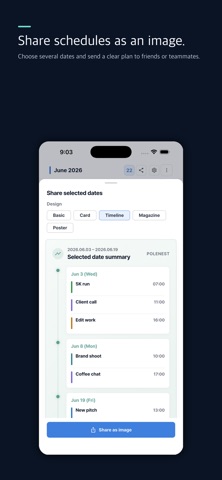
5. Share schedules as images
Save selected schedules as clean images and share them with coworkers, clients, family, or social channels.
6. Stored on your phone
Your schedules and notes are stored on your personal device. Polenest does not send your calendar content to external AI services.
If you often repeat the same schedule across different dates, select the dates first and add the event once with Polenest.
Terms of Use (EULA): https://www.apple.com/legal/internet-services/itunes/dev/stdeula/
Privacy Policy: https://polenest.com/privacy