AppBrain
AppBrain
  • Apps
  • Apps being viewed right now Trending apps today Most popular apps All-time most installed apps Top rated apps iPhone and iPad apps
  • Intelligence ▾
    Intelligence overview → Track any Android app or your whole market
    Track & analyze
    Keyword Tracker & OptimizerTrack & improve Play rankings App Performance ReportOne-off PDF for any app StatisticsFree Android & Play market stats
    Promote your app
    Featured Apps App Links
  • Intelligence
  • Pricing
  • Dashboard
  • Sign up
  • Log in
App Store Apps > Utilities > Porthole: Mac Remote Desktop
Porthole: Mac Remote Desktop icon

Porthole: Mac Remote Desktop

1.5.0
TRD Ventures LLC
5.00
1 reviews
Free

Porthole: Mac Remote Desktop Screenshot 1 of 9
Porthole: Mac Remote Desktop Screenshot 2 of 9
Porthole: Mac Remote Desktop Screenshot 3 of 9
Porthole: Mac Remote Desktop Screenshot 4 of 9
Porthole: Mac Remote Desktop Screenshot 5 of 9
Porthole: Mac Remote Desktop Screenshot 6 of 9
Porthole: Mac Remote Desktop Screenshot 7 of 9
Porthole: Mac Remote Desktop Screenshot 8 of 9
Porthole: Mac Remote Desktop Screenshot 9 of 9
Screenshots by TRD Ventures LLC, from the the App Store listing
View on the App Store

About Porthole: Mac Remote Desktop

Porthole: Mac Remote Desktop is an utilities app developed by TRD Ventures LLC.

User Ratings

Porthole: Mac Remote Desktop is rated 5.00 out of 5 stars. The rating is based on one rating ratings.

App Information

Porthole: Mac Remote Desktop is freely available from the App Store. The app size is 8.21 MB. The latest version available is 1.5.0. The last update was on November 11, 2026.

Technical Requirements

The app has a content rating of Medium Maturity. The app has been available on the App Store since September 2026.

Porthole: Mac Remote Desktop is made and published by TRD Ventures LLC. AppBrain is an independent app data site and isn't affiliated with TRD Ventures LLC. The app name, icon, screenshots and description belong to TRD Ventures LLC and are shown as published on the App Store.

Description by TRD Ventures LLC (from the App Store)
Porthole is a private remote desktop app for your Mac. See and control your Mac from your iPhone or iPad with the Screen Sharing (VNC) that’s already built into macOS. There’s nothing to install on your Mac, no account to create, and no data collected.

Try every feature free for 7 days, then unlock Porthole with one purchase. No subscription.

HOW IT WORKS
1. Turn on Screen Sharing on your Mac. Porthole shows you how, step by step.
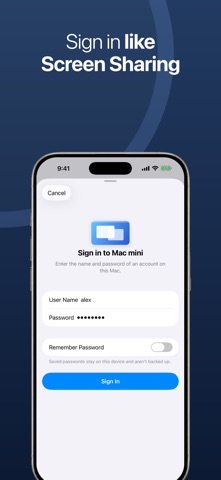
2. Porthole finds your Mac on your Wi‑Fi. Sign in with your Mac account, just as you would from another Mac.
3. Control your Mac with familiar gestures: drag to move the pointer, tap to click, two fingers to right-click and scroll, pinch to zoom. Or switch to Direct Touch and tap exactly where you want to click.

PRIVATE BY DESIGN
• App Store privacy label: Data Not Collected. No analytics, no ads, no accounts, no tracking.
• Porthole connects straight to the Macs you add. No relay server in between.
• Passwords are asked for each time unless you choose to save them. Saved passwords stay in this device’s Keychain and are never backed up or synced.
• Face ID or Touch ID protects the app when you open it, and your Mac’s screen never appears in the app switcher.

USE IT AWAY FROM HOME
• Reach your Mac from anywhere through a free VPN: WireGuard on your own home router, so nothing passes through anyone else’s servers, or Tailscale, the easiest to set up. An SSH tunnel works too. Porthole shows you how.
• Porthole won’t connect directly to a public address, so your screen and typing aren’t sent across the internet unprotected.
• Forgot to turn on your VPN? Porthole tells you right away, and Test Connection says exactly what to fix.
• Automatic quality adapts to your connection, and signal bars show how it’s doing.
• Leave the app and come back, and Porthole reconnects on its own.

WORK ON YOUR MAC FROM YOUR iPHONE
• Send to Mac: paste text you copied on your iPhone or iPad, or type a password straight from your password app.
• One-tap Copy, Paste, Undo, Spotlight, Mission Control and more in the ⌘ menu.
• A keyboard bar with Command, Option, Control, Shift, Escape, Tab and arrow keys, plus F1–F12, Delete, Home, End, Page Up and Page Down.
• Three-finger Mac gestures, and Apple Pencil on iPad.

FILES ON YOUR MAC
• Browse your Mac’s folders, download files to share or save, and send files from your iPhone or iPad to your Mac, over SFTP through the same private connection. Uses Remote Login on your Mac.

MORE THAN ONE DISPLAY
• See all of your Mac’s displays at once, or pick one to fill your screen. Porthole remembers your choice for each Mac.

MADE FOR iPHONE AND iPAD
• iPhone Duo: open it like a laptop, with your Mac on top and a trackpad below.
• Full support for hardware keyboards, mice and trackpads on iPad, including keyboard shortcuts.
• Connect a monitor or TV and your Mac fills the big screen while your iPhone or iPad becomes the trackpad.
• “Connect to Mac mini with Porthole” with Siri, Shortcuts or Spotlight, or from a widget or Control Center.
• Macs with Screen Sharing on your network appear automatically, and your list of Macs syncs through iCloud (passwords never do).
• Dark Mode, Dynamic Type, and 9 languages.

QUESTIONS
• Is there a subscription? No. Try it free for 7 days, then one purchase unlocks Porthole.
• Do I need to install anything on my Mac? No. Porthole uses Screen Sharing, which is part of macOS.
• Is Porthole a VNC client? Yes. It speaks VNC, the protocol behind macOS Screen Sharing, and signs in with your Mac account.
• Which Macs does it work with? Any Mac with Screen Sharing turned on, including Mac mini, MacBook Air, MacBook Pro, iMac and Mac Studio.
• Does it work away from home? Yes, through a VPN such as WireGuard or Tailscale, or an SSH tunnel.

REQUIREMENTS
iPhone or iPad with iOS 18 or iPadOS 18 or later, and a Mac with Screen Sharing turned on. Files requires Remote Login.

Porthole is made by TRD Ventures LLC. Setup guides: getporthole.app
Show more Show less

More data about Porthole: Mac Remote Desktop

Price Free
Rating 5.00 based on a single rating
Ranking Not ranked
Version 1.5.0
App size 8.21 MB
Maturity Medium Maturity

Alternatives to Porthole: Mac Remote Desktop

Everdesk icon Everdesk
Marcel Wlotzka
0.0
$3.99
TimeGlide - Timezone Planner icon TimeGlide - Timezone Planner
瑞华 张
0.0
Free
PosKVM - Remote Desktop VNC icon PosKVM - Remote Desktop VNC
Aribada Inc.
5.0
Free
1 ratings
Padoo Trackpad icon Padoo Trackpad
tal alfi
0.0
Free
Momento Studio: Countdown icon Momento Studio: Countdown
Janaarthan Indirasenan
0.0
Free
Phosphor Monitor icon Phosphor Monitor
Robert Cook
5.0
Free
2 ratings
轻松阅读 - RSS订阅与AI整理 icon 轻松阅读 - RSS订阅与AI整理
山东金悟信息科技有限公司
0.0
Free
FreeMouse: Trackpad & Keyboard icon FreeMouse: Trackpad & Keyboard
BartMolk
0.0
Free

More from TRD Ventures LLC

CoverTrace: Redact ID & SSN icon CoverTrace: Redact ID & SSN
TRD Ventures LLC
5.0
Free
3 ratings
Briefly: AI News & Markets icon Briefly: AI News & Markets
TRD Ventures LLC
5.0
Free
3 ratings
MindVault - Journal & Planner icon MindVault - Journal & Planner
TRD Ventures LLC
5.0
Free
2 ratings
Momentum: ADHD Routines icon Momentum: ADHD Routines
TRD Ventures LLC
0.0
Free

Changelog of Porthole: Mac Remote Desktop

No changelog data

Developer information for TRD Ventures LLC

TRD Ventures LLC

Address:

Share Porthole: Mac Remote Desktop

Comments on Porthole: Mac Remote Desktop for iOS

We don't have enough comments to show example comments. Please check back later.

App Store Rankings for Porthole: Mac Remote Desktop

This app is not ranked

Technologies used by Porthole: Mac Remote Desktop

Popular Utilities Apps Apps other people are watching Price drops on Google Play Top new apps Today's trending apps
Everdesk icon Everdesk
TimeGlide - Timezone Planner icon TimeGlide - Timezone Planner
PosKVM - Remote Desktop VNC icon PosKVM - Remote Desktop VNC
Padoo Trackpad icon Padoo Trackpad
Momento Studio: Countdown icon Momento Studio: Countdown
Phosphor Monitor icon Phosphor Monitor
轻松阅读 - RSS订阅与AI整理 icon 轻松阅读 - RSS订阅与AI整理
FreeMouse: Trackpad & Keyboard icon FreeMouse: Trackpad & Keyboard
AppBrain Intelligence premium content

Subscribe now to get full and unlimited access to AppBrain Intelligence. You'll have access to:

  • App Intelligence dashboard (performance timeline, competitor comparison, country rankings, insight cards)
  • Detailed ranking data per app
  • Full timeline per developer
  • Device market shares data per country
  • Unlimited keyword tracking
1 Month

$75/mo
(billed every month)

SAVE 0%
Subscribe
3 Months

$65/mo
($195 billed every 3 months)

SAVE 13%
Subscribe
1 Year

$57.50/mo
($690 billed every year)

SAVE 23%
Subscribe
Each subscription will automatically renew 3 days before the expiration date for the same time period. Subscriptions can be cancelled at any time before the renewal.

AppBrain is an app data site, we track rankings, ratings, installs for all apps and games on Google Play and the App Store. AppBrain doesn't host app files or APKs, all install links go directly to the official store. All trademarks are owned by their respective owners.

More apps

  • Top Android apps being viewed
  • Animatronics Vampire Horror Android App
  • View Test: Angel or Devil
  • Question To Ask A Girl

App statistics

  • Android statistics
  • Google Play Developer stats
  • Trending Android Apps
  • Trending iOS apps
  • Top popular Apps
  • Buy the best Android phone
  • Buy & sell app businesses

About AppBrain

  • Contact
  • Privacy
  • Documentation
  • DMCA takedowns
  • Blog
  • Free App-Ads.Txt Validation
© 2010-2026 - AppBrain