

Posey: Pose Reference Camera
Posey: Pose Reference Camera is made and published by IWAVE LLC. AppBrain is an independent app data site and isn't affiliated with IWAVE LLC. The app name, icon, screenshots and description belong to IWAVE LLC and are shown as published on the App Store.
AppBrain's verdict
- Last updated
- July 20, 2026
- Size
- 2.76 MB
User feedback
Ratings and reviews on the App StoreComments on Posey: Pose Reference Camera for iOS
We don't have enough comments to show example comments. Please check back later.
Store listing
By IWAVE LLC, from the App Store
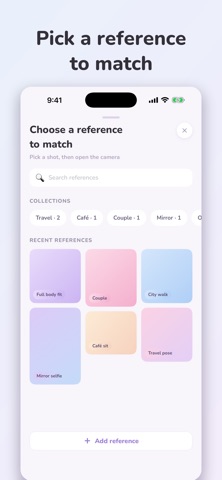


Description by IWAVE LLC Written by the developer, not by AppBrain. Click to read.
You know the photo you want. You found it — a travel pose, an outfit shot, a couple picture. But when you hand your phone to a friend (or your partner), you get… something else.
Posey fixes that. Save the photo you want to recreate, and Posey overlays it — semi-transparent — right on the live camera. Whoever's holding your phone just lines up the ghost image and taps the shutter. Same angle. Same crop. Same vibe.
HOW IT WORKS
• Save your shot ideas — import from your photo library, crop to frame
• Tap Match — your reference floats over the live camera
• The frame auto-matches your reference's aspect ratio (4:5, 1:1, 9:16 and more)
• One control: overlay opacity. No zoom, no fiddling, never technical
• Shoot, then drag to compare your photo against the reference
• Save straight to your photo library — Photo, Live Photo, or Video
BUILT FOR
• Travel photos that look like the ones that inspired the trip
• Outfit shots and mirror pics with consistent framing
• Couples — finally, a fair trade for taking their photos
• Content creators keeping a series visually consistent
PRIVATE BY DESIGN
No account. No tracking. No analytics. Your references and photos stay on your device — and sync privately through your own iCloud if you want them on all your devices.
Safety and technology
Found in the app by AppBrain- Price
- Free
- App size
- 2.76 MB
- Content rating
- Everyone
Technologies used by Posey: Pose Reference Camera
Releases
Updates seen on the App Store- Version
- 1.0
- Launched
- July 2026
No changelog data
Alternatives
Similar apps and more from IWAVE LLCAlternatives to Posey: Pose Reference Camera


More from IWAVE LLC

Rankings
App Store top chartsApp Store Rankings for Posey: Pose Reference Camera
About the app and developer
About Posey: Pose Reference Camera
Posey: Pose Reference Camera is a photo & video app developed by IWAVE LLC.
What is the rating of Posey: Pose Reference Camera?
Posey: Pose Reference Camera has no ratings yet.
Is Posey: Pose Reference Camera free?
Posey: Pose Reference Camera is free. The app size is 2.76 MB. The latest version available is 1.0. The last update was on July 20, 2026.
What are the requirements for Posey: Pose Reference Camera?
The app has a content rating of Everyone. The app has been available on the App Store since July 2026.
Developer information for IWAVE LLC
Address: