

Power Pong Robot is made and published by Attila Malek. AppBrain is an independent app data site and isn't affiliated with Attila Malek. The app name, icon, screenshots and description belong to Attila Malek and are shown as published on the App Store.
AppBrain's verdict
Established- Rating on App Store
- 4.71
- 14 ratings
- Last updated
- August 11, 2026
It doesn't have enough ratings yet to judge what users think.
Rankings
App Store top chartsApp Store Rankings for Power Pong Robot
Competitors
Similar apps and more from Attila MalekAlternatives to Power Pong Robot







Also available on Google Play

Releases
Updates seen on the App Store- Version
- 2.8.0
- Launched
- October 2019
No changelog data
User feedback
Ratings and reviews on the App StoreComments on Power Pong Robot for iOS
We don't have enough comments to show example comments. Please check back later.
Technology
Found in the app by AppBrain- Price
- Free
- App size
- 27.2 MB
- Content rating
- Everyone
Technologies used by Power Pong Robot
About the app and developer
About Power Pong Robot
Power Pong Robot is a sports app developed by Attila Malek.
User Ratings
Power Pong Robot is rated 4.71 out of 5 stars. The rating is based on 14 ratings.
App Information
Power Pong Robot is freely available from the App Store. The app size is 27.16 MB. The latest version available is 2.8.0. The last update was on August 11, 2026.
Technical Requirements
The app has a content rating of Everyone. The app has been available on the App Store since October 2019.
Developer information for Attila Malek
Address:
Store listing
By Attila Malek, from the App Store




Description by Attila Malek Written by the developer, not by AppBrain. Click to read.
We have designed our app with many types of users in mind - from those that are learning the fundamentals to those who compete in high-level tournaments.
Feature Overview:
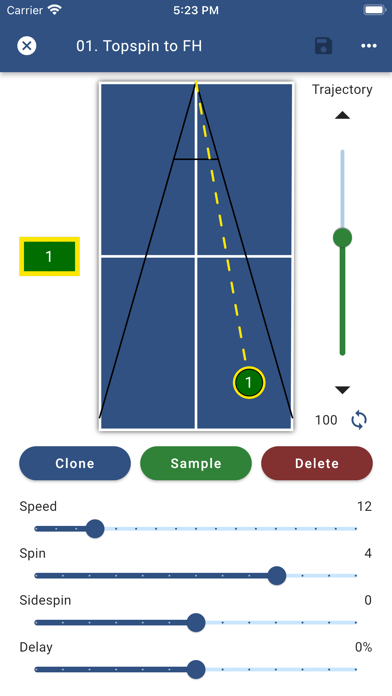
• Create and save drills to run wirelessly on your Power Pong robot
• Drills can hold up to 8 unique balls
• Loaded with a rich variety of preset drills for you to get started
• Speed, spin, and placement of each ball can be individually adjusted
• For ease of use, trajectory is automatically calculated for every ball, but can also be manually adjusted
• Search and sort your drills using customizable tags
• Randomize drills for irregular play or mirror drills for opposite handed players
• Run drills at up to 120 balls per minute for a set duration or indefinitely
• Simulate match situations by grouping drills together and playing them in a specific sequence
• Feeling tired? Add a timed break before the drill automatically restarts
• Share of drills between friends and coaches
If you run into any issues using the application or have any feedback that you want to share, please send an email to support@powerpong.org