

Powerlouvre is made and published by Breezway Pty Ltd. AppBrain is an independent app data site and isn't affiliated with Breezway Pty Ltd. The app name, icon, screenshots and description belong to Breezway Pty Ltd and are shown as published on the App Store.
AppBrain's verdict
Established- Rating on App Store
- 2.00
- 1 ratings
- Last updated
- April 29, 2021
It doesn't have enough ratings yet to judge what users think.
Rankings
App Store top chartsApp Store Rankings for Powerlouvre
Competitors
Similar apps and more from Breezway Pty LtdAlternatives to Powerlouvre





Releases
Updates seen on the App Store- Version
- 1.401
- Launched
- July 2014
No changelog data
User feedback
Ratings and reviews on the App StoreComments on Powerlouvre for iOS
We don't have enough comments to show example comments. Please check back later.
Technology
Found in the app by AppBrain- Price
- Free
- App size
- 12.0 MB
- Content rating
- Everyone
Technologies used by Powerlouvre
About the app and developer
About Powerlouvre
Powerlouvre is an utilities app developed by Breezway Pty Ltd.
User Ratings
Powerlouvre is rated 2.00 out of 5 stars. The rating is based on one rating ratings.
App Information
Powerlouvre is freely available from the App Store. The app size is 12.01 MB. The latest version available is 1.401. The last update was on April 29, 2021.
Technical Requirements
The app has a content rating of Everyone. The app has been available on the App Store since July 2014.
Developer information for Breezway Pty Ltd
Address:
Store listing
By Breezway Pty Ltd, from the App Store

Description by Breezway Pty Ltd Written by the developer, not by AppBrain. Click to read.
Also unlock additional features and settings of your Apptivate Control Units.
Wirelessly connect to your Apptivate Control Unit to:
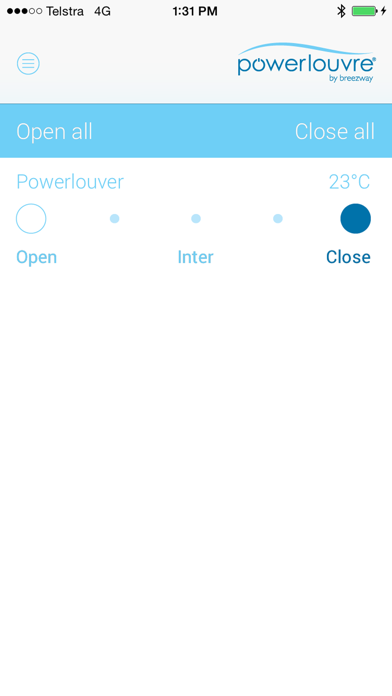
- Remotely open and close Powerlouvre Windows connected to Apptivate Control Units.
- Adjust the settings for automatic opening and closing in response to the Apptivate Control Unit’s in-built temperature sensor.
- Turn automatic response to temperature sensors on and off remotely from your phone.
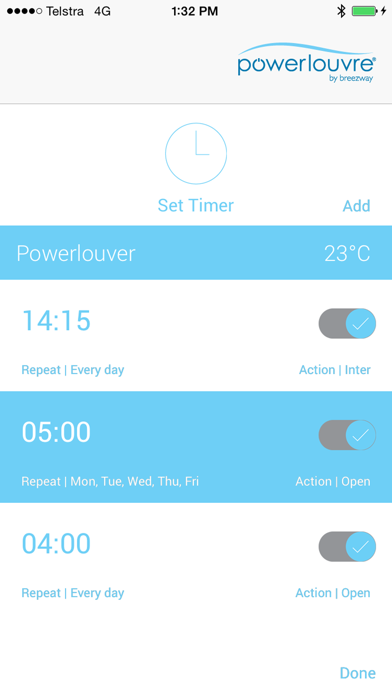
- Set timers in the Apptivate Control Unit to automatically open and close connected Powerlouvre Windows and to enable and disable automatic response to temperatures.
- Turn all timers on and off remotely from your phone.
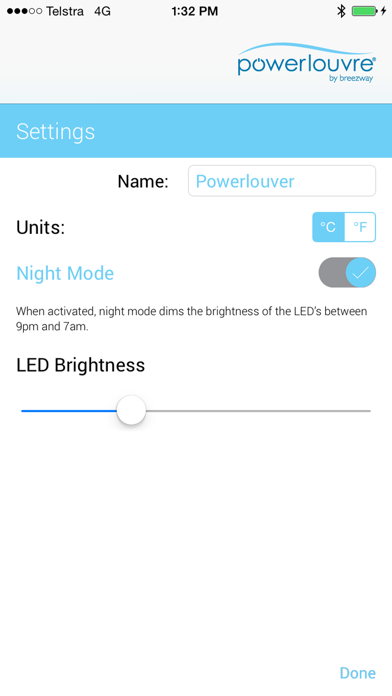
- Set and adjust ‘Night Mode’ which dims the brightness of the lights on the Apptivate Control Unit overnight to minimise ambient light.
Note: The Powerlouvre App enables wireless interfacing with the Apptivate Control Unit which will be hardwired to Powerlouvre Windows. The Powerlouvre App cannot control Powerlouvre Windows without the Apptivate Control Unit.