Printer App: Print,Scanner App is an overall app developed by 宝锋 吴.
How many times has Printer App: Print,Scanner App been downloaded?
What is the rating of Printer App: Print,Scanner App?
Printer App: Print,Scanner App is rated 5.00 out of 5 stars, based on one rating ratings.
Is Printer App: Print,Scanner App free?
Printer App: Print,Scanner App is free to download. The APK download size is 12.69 MB. The latest version available is 1.3.6. The last update was on February 25, 2026.
What are the requirements for Printer App: Print,Scanner App?
The app has a content rating of Everyone. The app has been available on Google Play June 2023.
Description
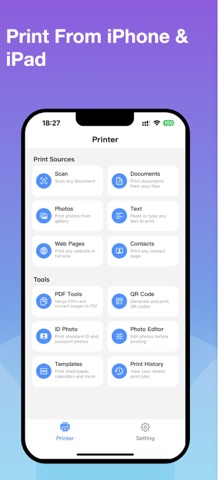
Printer App helps you easily print documents, photos, and more directly from your iPhone or iPad. Scan documents, select your printer, and print in seconds!
PRINT FROM ANYWHERE - Print photos from your photo library or iCloud - Print documents (PDF, PNG, JPEG) from Files - Print full-size web pages directly from any URL - Print contact information on A4 paper - Type or paste text from clipboard and print instantly
POWERFUL SCANNING - Built-in document scanner using your camera - Edit and filter scanned documents before printing - Share or save scans as PDF files - Fast, accurate scanning with auto-edge detection
PDF TOOLS - Merge multiple PDF files into one document - Convert photos and images to PDF format - Print or share your created PDFs instantly
QR CODE GENERATOR - Create QR codes from text, URLs, or WiFi credentials - Print QR codes directly or save to your photo library - Perfect for business cards, events, and sharing
ID PHOTO MAKER - Print standard ID photos on A4 paper - Support for 1-inch, 2-inch, US Passport, EU Passport, and Visa sizes - Automatic grid layout for maximum photos per page - Save money by printing ID photos at home
PHOTO EDITOR - Adjust brightness and contrast before printing - Rotate photos in 90-degree increments - Apply black & white filter for professional results - Edit and print in one seamless workflow
PRINTABLE TEMPLATES - Lined Paper - perfect for writing - Graph Paper - ideal for math and engineering - Dot Grid - great for bullet journaling - Weekly Planner - organize your week - Monthly Calendar - plan your month - Checklist - stay on top of tasks - Cornell Notes - study more effectively - Music Sheet - compose and practice
PRINT HISTORY - Track all your recent print jobs - View print type, date, and details - Quickly reprint previous documents - Manage and clear history as needed
MULTI-LANGUAGE SUPPORT - Available in 30 languages including English, Chinese, Japanese, Korean, French, German, Spanish, Arabic, and more - Switch languages anytime within the app
Note: Make sure your iPhone/iPad is connected to the same Wi-Fi network as your printer to use all features.
SUBSCRIPTION INFORMATION: - Subscribe to Premium for unlimited scanning, premium features, and ad-free experience - Subscriptions auto-renew at the same price and duration unless cancelled at least 24 hours before the end of the current period - Payment is charged to your iTunes account upon confirmation of purchase - Subscriptions can be managed in your Account Settings after purchase - Any unused portion of a free trial period will be forfeited when purchasing a subscription
Terms of Use: https://sites.google.com/view/simpleprinter/simpleprinter/agreement Privacy Policy: https://sites.google.com/view/simpleprinter/simpleprinter/privacy
Each subscription will automatically renew 3 days before the expiration date for
the same time period. Subscriptions can be cancelled at any time before the renewal.