

Video Editor : Video Maker,Cut
Video Editor : Video Maker,Cut is made and published by 宝锋 吴. AppBrain is an independent app data site and isn't affiliated with 宝锋 吴. The app name, icon, screenshots and description belong to 宝锋 吴 and are shown as published on the App Store.
AppBrain's verdict
- Rating on App Store
- 4.14
- 7 ratings
- Last updated
- February 24, 2026
- Size
- 62.4 MB
It doesn't have enough ratings yet to judge what users think.
User feedback
Ratings and reviews on the App StoreComments on Video Editor : Video Maker,Cut for iOS
We don't have enough comments to show example comments. Please check back later.
Store listing
By 宝锋 吴, from the App Store
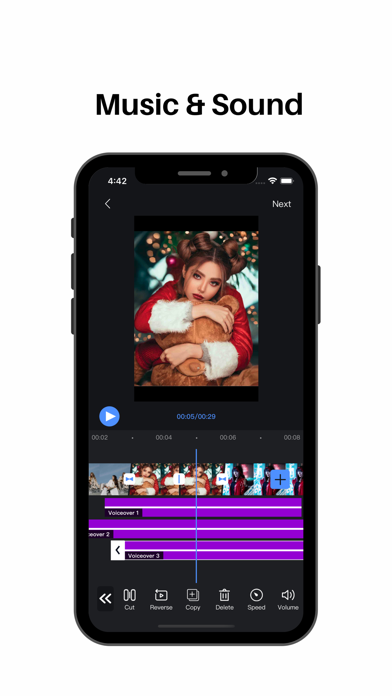


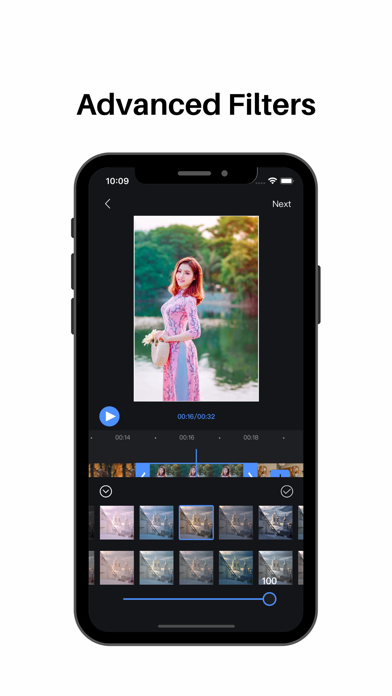


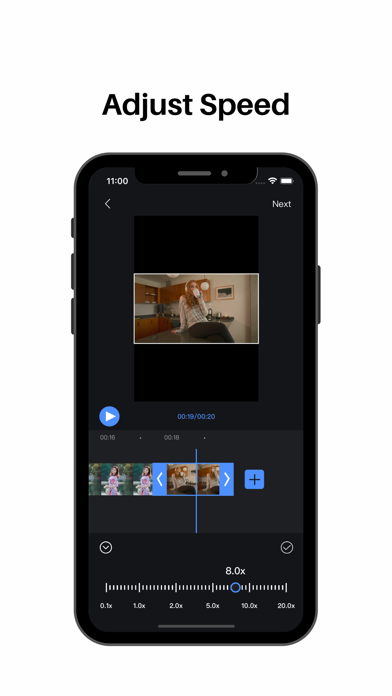
Description by 宝锋 吴 Written by the developer, not by AppBrain. Click to read.
【segmentation】
Split video clips at will
【Splicing】
Video/picture stitching at will
【Speed change】
fast/slow speed switch
【Picture in Picture】
Support for adding video/photo picture-in-picture blending modes
【Transitions】
Cool effects for you to choose
【Special effects】
Easily choose from a variety of video/picture animation modes
【Filter】
A variety of rich filter modes for you to choose, showing different colors
【subtitle】
Multi-layer subtitles can be added, size, position, font style can be changed at will
Easily control subtitle display time
【Extract audio】
Convenient and fast extraction of audio from local video
【Upside down】
Easily switch video/audio reverse mode
【Voice】
Add to extract audio from video
Selection of local audio
Comfortable use of recording mode
【Cutting】
Easy cropping of video/pictures in various ratios
【Video time crop】
Easily crop the desired time segment in the video
【Proportional background】
Easy selection of different ratios of video/picture
Canvas background color can be changed at will
Adding background images
Background blur function settings
【Video Editor VIP Subscription】
1. Subscribing to Video Editor VIP membership includes the following functions: watermark removal, video parameter adjustment, subtitles and video animations, advanced filters, special effects, and transition animations.
2. Video Editor VIP members provide free use (renewed by annual fee) and monthly subscription. We also offer a one-time fee in addition to our existing subscription plans if needed. The price depends on the subscription package you choose.
3. Subscription automatically renews at the selected package price unless cancelled 24 hours in advance of the current subscription period. Subscription fees are charged to your iTunes Account at confirmation of purchase. You can manage subscriptions and turn off auto-renewal by going to your Account Settings after purchase. According to Apple's policy, the current subscription cannot be cancelled during the active subscription period. There will be no refunds for any unused portion after purchase.
4. If you are eligible for a free trial and subscribe before the end of the free trial period, the remaining free trial period will be cancelled after you confirm your purchase. Subscription starts immediately after free usage ends unless cancelled at least 24 hours before the end of the trial.
Privacy Policy: https://sites.google.com/view/appsvideo/video-editor/privacy
User Agreement: https://sites.google.com/view/appsvideo/video-editor/agreement
Feedback Email: feedbackapp@126.com
Safety and technology
Found in the app by AppBrain- Price
- Free
- App size
- 62.4 MB
- Content rating
- Everyone
Technologies used by Video Editor : Video Maker,Cut
Releases
Updates seen on the App Store- Version
- 2.0.0
- Launched
- October 2022
No changelog data
Alternatives
Similar apps and more from 宝锋 吴Alternatives to Video Editor : Video Maker,Cut






More from 宝锋 吴







Rankings
App Store top chartsApp Store Rankings for Video Editor : Video Maker,Cut
About the app and developer
About Video Editor : Video Maker,Cut
Video Editor : Video Maker,Cut is a photo & video app developed by 宝锋 吴.
What is the rating of Video Editor : Video Maker,Cut?
Video Editor : Video Maker,Cut is rated 4.14 out of 5 stars, based on 7 ratings.
Is Video Editor : Video Maker,Cut free?
Video Editor : Video Maker,Cut is free. The app size is 62.39 MB. The latest version available is 2.0.0. The last update was on February 24, 2026.
What are the requirements for Video Editor : Video Maker,Cut?
The app has a content rating of Everyone. The app has been available on the App Store since October 2022.
Developer information for 宝锋 吴
Address:
Frequently asked questions about Video Editor : Video Maker,Cut
Is Video Editor : Video Maker,Cut free?
Yes. Video Editor : Video Maker,Cut is free on the App Store.
Is Video Editor : Video Maker,Cut still available?
Yes. Video Editor : Video Maker,Cut is on the App Store, and the last update we saw was on February 24, 2026.
How large is Video Editor : Video Maker,Cut?
Video Editor : Video Maker,Cut is 62.39 MB.
Is Video Editor : Video Maker,Cut suitable for children?
App Store rates the content of Video Editor : Video Maker,Cut as suitable for everyone.
How do people rate Video Editor : Video Maker,Cut?
Video Editor : Video Maker,Cut scores 4.14 out of 5 stars, from 7 ratings on the App Store.
Who made Video Editor : Video Maker,Cut?
Video Editor : Video Maker,Cut was developed by 宝锋 吴. It is listed in the photo & video category on the App Store.
What are the best alternatives to Video Editor : Video Maker,Cut?
People looking at Video Editor : Video Maker,Cut also look at these photo & video apps: Video Editor : Slow-Mo Video, JoshCam - Video Editor, Make Video with Music~Videotik, All Videos Saver, Video Editor Movie Maker.