

Printer app, Smart AIR printer
Printer app, Smart AIR printer is made and published by 锦菊 曾. AppBrain is an independent app data site and isn't affiliated with 锦菊 曾. The app name, icon, screenshots and description belong to 锦菊 曾 and are shown as published on the App Store.
AppBrain's verdict
- Rating on App Store
- 4.83
- 6 ratings
- Last updated
- November 12, 2025
- Size
- 4.10 MB
It doesn't have enough ratings yet to judge what users think.
User feedback
Ratings and reviews on the App StoreComments on Printer app, Smart AIR printer for iOS
We don't have enough comments to show example comments. Please check back later.
Store listing
By 锦菊 曾, from the App Store




Description by 锦菊 曾 Written by the developer, not by AppBrain. Click to read.
SEAMLESS AIRPRINT INTEGRATION
Connect to any AirPrint-enabled printer on your network. No setup, no drivers, no hassle. Smart Printer automatically discovers available printers and lets you print instantly. Works with HP, Canon, Epson, Brother, and all major printer brands that support AirPrint.
PRINT ANYTHING, BEAUTIFULLY
• Photos - Apply 11 professional filters (B&W, Sepia, Vintage, Chrome, Fade, Instant, Mono, Noir, Process, Tonal, Transfer) or create stunning photo collages with multiple layout templates
• Documents - Print PDF, images, and scanned files with preview
• Contacts - Print professional contact cards with clean formatting
• Web Pages - Capture and print any webpage with automatic formatting
• Notes - Quick text printing for lists, memos, and reminders
ADVANCED SCANNING
Transform your device into a professional scanner with 3 specialized modes: Document mode for contracts and papers, Photo mode for pictures, and ID Card mode for licenses and cards. Automatic edge detection, perspective correction, and color enhancement ensure perfect scans every time.
PROFESSIONAL PRINT SETTINGS
• Paper Sizes: A4, Letter, Legal, A3, A5
• Orientation: Portrait and Landscape
• Color Mode: Full color or black & white
• Multiple Copies: Print up to 99 copies at once
• Duplex Printing: Automatic two-sided printing support
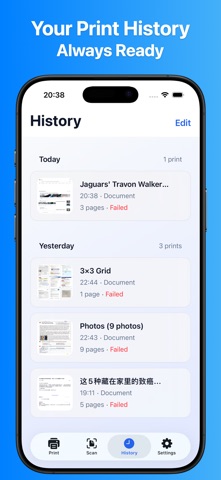
ORGANIZED HISTORY
Never lose track of what you've printed or scanned. Smart Printer maintains a comprehensive history of all your print jobs and scanned documents. View thumbnails, reprint documents, and access your scan archive anytime. Optional iCloud sync keeps your history available across all your devices.
BEAUTIFUL iOS 26 LIQUID GLASS DESIGN
Smart Printer embraces Apple's latest iOS 26 Liquid Glass design language. Every screen features elegant glass-like materials, fluid animations, and a cohesive coral color theme that's both beautiful and functional.
PRIVACY FOCUSED
Your documents and photos are processed locally on your device. No data is sent to external servers. Smart Printer only accesses your photos and contacts when you explicitly choose to print them. Optional iCloud sync is encrypted end-to-end.
SYSTEM REQUIREMENTS
• Requires iOS 18.0 or later
• Compatible with iPhone and iPad
• AirPrint-enabled printer required for printing
• Camera required for document scanning
Whether you're printing family photos, business documents, or scanning receipts on the go, Smart Printer gives you professional results with consumer simplicity.
Terms of Use: https://sites.google.com/view/terms-of-use-smart-printer
Privacy Policy: https://sites.google.com/view/privacy-policy-smart-printer
Contact Us: phototopdf@163.com
Safety and technology
Found in the app by AppBrain- Price
- Free
- App size
- 4.10 MB
- Content rating
- Everyone
Technologies used by Printer app, Smart AIR printer
Releases
Updates seen on the App Store- Version
- 1.1
- Launched
- November 2025
No changelog data
Alternatives
Similar apps and more from 锦菊 曾Alternatives to Printer app, Smart AIR printer


More from 锦菊 曾


Rankings
App Store top chartsApp Store Rankings for Printer app, Smart AIR printer
About the app and developer
About Printer app, Smart AIR printer
Printer app, Smart AIR printer is a business app developed by 锦菊 曾.
User Ratings
Printer app, Smart AIR printer is rated 4.83 out of 5 stars. The rating is based on 6 ratings.
App Information
Printer app, Smart AIR printer is freely available from the App Store. The app size is 4.10 MB. The latest version available is 1.1. The last update was on November 12, 2025.
Technical Requirements
The app has a content rating of Everyone. The app has been available on the App Store since November 2025.
Developer information for 锦菊 曾
Address: