

Private Offline AI
Private Offline AI is made and published by Siva Vimel Rajhen. AppBrain is an independent app data site and isn't affiliated with Siva Vimel Rajhen. The app name, icon, screenshots and description belong to Siva Vimel Rajhen and are shown as published on the App Store.
AppBrain's verdict
- Last updated
- September 22, 2026
Rankings
App Store top chartsApp Store Rankings for Private Offline AI
Competitors
Similar apps and more from Siva Vimel RajhenMore from Siva Vimel Rajhen





Releases
Updates seen on the App Store- Version
- 1.0
- Launched
- September 2026
No changelog data
User feedback
Ratings and reviews on the App StoreComments on Private Offline AI for iOS
We don't have enough comments to show example comments. Please check back later.
Technology
Found in the app by AppBrain- Price
- $9.99
- App size
- 779.1 MB
- Content rating
- High
Technologies used by Private Offline AI
About the app and developer
About Private Offline AI
Private Offline AI is a productivity app developed by Siva Vimel Rajhen.
User Ratings
The app has no ratings yet.
App Information
Private Offline AI costs $9.99. The app size is 779.05 MB. The latest version available is 1.0. The last update was on September 22, 2026.
Technical Requirements
The app has a content rating of High Maturity. The app has been available on the App Store since September 2026.
Developer information for Siva Vimel Rajhen
Address:
Frequently asked questions about Private Offline AI
Is Private Offline AI free?
No. Private Offline AI costs $9.99 on the App Store.
Is Private Offline AI still available?
Yes. Private Offline AI is on the App Store, and the last update we saw was on September 22, 2026.
How large is Private Offline AI?
Private Offline AI is 779.05 MB.
Is Private Offline AI suitable for children?
App Store gives Private Offline AI a high maturity rating. It is meant for adults.
Who made Private Offline AI?
Private Offline AI was developed by Siva Vimel Rajhen. It is listed in the productivity category on the App Store.
Store listing
By Siva Vimel Rajhen, from the App Store




Description by Siva Vimel Rajhen Written by the developer, not by AppBrain. Click to read.
Private Offline AI puts a real language model directly on your device. No account. No subscription. No cloud required. Turn on Airplane Mode and keep chatting, writing, summarising and exploring — completely offline.
AI THAT STAYS WITH YOU
The built-in AI runs locally on your device. What you type into offline chat does not need to travel to a server, and your conversations stay on your device..
CHAT OFFLINE
Ask questions, draft and rewrite text, summarise, explain, translate, brainstorm and plan. Set your own standing instructions, such as “always answer in bullet points” or “reply in Malay,” and the AI follows them throughout your conversation.
ASK ABOUT YOUR FILES
Open PDFs, Word documents and Excel files and ask questions about their contents. You can also use your camera or photo library to ask about images. Supported text recognition runs on your device.
SPEAK INSTEAD OF TYPE
Use voice input for hands-free conversations. Turn spoken words into text, then use the AI to clean them up, summarise them or transform them into something useful.
NOTES, TASKS & EMAIL
• Turn rough thoughts into polished notes and export them when you're ready. Organise tasks with reminders.
• Connect supported email providers such as Gmail, Outlook, Yahoo or iCloud to read, summarise and draft messages. Email access connects directly to your provider rather than routing your mail through our servers.
GAMEHUB
Play built-in games or describe a game idea and let the AI generate one for you.
ONLINE ONLY WHEN YOU CHOOSE
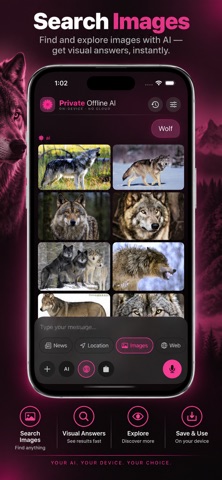
Offline is the default for the core AI experience. When you want live information, you can explicitly enable online features such as web search, image search or the in-app browser. Use the browser with AI alongside the page to help explain, summarise or understand what you're reading. Turn online features off whenever you want to return to a fully offline experience.
BRING YOUR OWN AI
• Need a larger model for more demanding tasks? Connect your own API key for supported providers. You can also connect an endpoint, including a local server running through Ollama or LM Studio on your own network.
• Prefer to use your own model? Import compatible `.gguf` models directly from Files. You pay the AI provider directly where applicable. There is no separate AI subscription from this app.
MAKE IT YOURS
Choose from eight accent colours and switch between light and dark mode. Your chosen colour flows throughout the app — from the logo and chat bubbles to buttons, menus and controls.
WHAT TO EXPECT
The bundled model is intentionally compact so it can run locally on your device without depending on the cloud. It is designed for writing, rewriting, summarising and everyday questions. Like any language model, it can sometimes produce incorrect information. Always verify anything important. When you need more capability, connect a larger model using your own provider or local server.
YOUR AI. YOUR DEVICE. YOUR CHOICE.