

Private Scan Vault is made and published by Nam Tran. AppBrain is an independent app data site and isn't affiliated with Nam Tran. The app name, icon, screenshots and description belong to Nam Tran and are shown as published on the App Store.
AppBrain's verdict
- Last updated
- March 30, 2026
- Size
- 3.48 MB
User feedback
Ratings and reviews on the App StoreComments on Private Scan Vault for iOS
We don't have enough comments to show example comments. Please check back later.
Store listing
By Nam Tran, from the App Store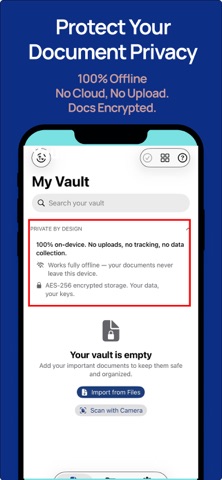


Description by Nam Tran Written by the developer, not by AppBrain. Click to read.
100% offline. No account required. No cloud sync. No tracking. Your documents never leave your iPhone.
SCAN & IMPORT
• Scan multi-page documents with your camera
• Import PDFs, JPG, PNG, and HEIC files from anywhere
• Automatic edge detection and image enhancement
• Up to 50 pages per document
PRIVACY & SECURITY
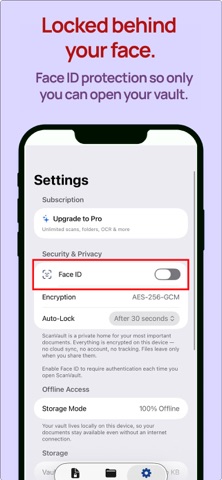
• AES-256 encryption — every file is encrypted at rest
• Face ID / Touch ID lock with configurable auto-lock
• Zero-knowledge design — no server, no account, no sync
• Files excluded from iCloud backup by default
ORGANIZE
• Custom folders: Receipts, Contracts, IDs, Medical, and more
• Hashtag your documents for instant filtering
• Grid and list view
• Drag-and-drop between folders
BACKUP & RESTORE
• Password-protected encrypted backups (.svbackup)
• Restore to any device — no account needed
• Your backup key is yours alone
SCANVAULT PRO — $8.99/MONTH
• Unlimited document scanning
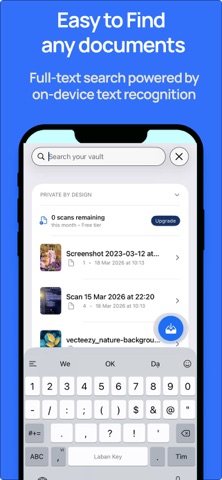
• OCR text extraction — pull text from any scanned page
• Full-text search across all your documents
• Unlimited custom folders
• Cancel anytime
Free tier includes 5 scans per month and the full security model — encryption, biometric lock, and backup are always free.
BUILT DIFFERENT
Most document apps store your files on their servers. ScanVault stores everything locally, encrypted with a key only your device holds. There is no "forgot password" — because there is no server to ask.
Perfect for storing:
• Passports and government IDs
• Insurance and medical records
• Lease agreements and contracts
• Tax documents and receipts
• Warranties and invoices
• Anything you wouldn't want in the cloud
Payment is charged to your Apple ID. Subscription renews automatically unless cancelled at least 24 hours before the end of the current period. Manage or cancel anytime in your Apple ID settings.
Privacy Policy: https://namtran1985vn.github.io/scanvault-site/privacy
Terms of Use (EULA): https://www.apple.com/legal/internet-services/itunes/dev/stdeula/
Safety and technology
Found in the app by AppBrain- Price
- Free
- App size
- 3.48 MB
- Content rating
- Everyone
Technologies used by Private Scan Vault
Releases
Updates seen on the App Store- Version
- 1.0
- Launched
- March 2026
No changelog data
Alternatives
Similar apps and more from Nam TranMore from Nam Tran


Rankings
App Store top chartsApp Store Rankings for Private Scan Vault
About the app and developer
About Private Scan Vault
Private Scan Vault is an utilities app developed by Nam Tran.
What is the rating of Private Scan Vault?
Private Scan Vault has no ratings yet.
Is Private Scan Vault free?
Private Scan Vault is free. The app size is 3.48 MB. The latest version available is 1.0. The last update was on March 30, 2026.
What are the requirements for Private Scan Vault?
The app has a content rating of Everyone. The app has been available on the App Store since March 2026.
Developer information for Nam Tran
Address:
Frequently asked questions about Private Scan Vault
Is Private Scan Vault free?
Yes. Private Scan Vault is free on the App Store.
Is Private Scan Vault still available?
Yes. Private Scan Vault is on the App Store, and the last update we saw was on March 30, 2026.
How large is Private Scan Vault?
Private Scan Vault is 3.48 MB.
Is Private Scan Vault suitable for children?
App Store rates the content of Private Scan Vault as suitable for everyone.
Who made Private Scan Vault?
Private Scan Vault was developed by Nam Tran. It is listed in the utilities category on the App Store.