AppBrain
AppBrain
  • Apps
  • Apps being viewed right now Trending apps today Most popular apps All-time most installed apps Top rated apps iPhone and iPad apps
  • Intelligence ▾
    Intelligence overview → Track any Android app or your whole market
    Track & analyze
    Keyword Tracker & OptimizerTrack & improve Play rankings App Performance ReportOne-off PDF for any app StatisticsFree Android & Play market stats
    Promote your app
    Featured Apps App Links
  • Intelligence
  • Pricing
  • Dashboard
  • Sign up
  • Log in
App Store Apps > Productivity > Progress - Productivity App
App profile & analytics · Productivity · Data updated 2026-10-05
Progress - Productivity App icon

Progress - Productivity App

by Catch Recap LLC · Free · Version 1.4
Availability On the App Store since June 2026 ↗
Rating on App Store
5.00/5
1 ratings
Rating
5.00
1 reviews
Best rank
–
not in the top lists
Last updated
July 16, 2026
1.4
AppBrain's verdict

It doesn't have enough ratings yet to judge what users think.

Progress - Productivity App is made and published by Catch Recap LLC. AppBrain is an independent app data site and isn't affiliated with Catch Recap LLC. The app name, icon, screenshots and description belong to Catch Recap LLC and are shown as published on the App Store.

About Progress - Productivity App

Progress - Productivity App is a productivity app developed by Catch Recap LLC.

User Ratings

Progress - Productivity App is rated 5.00 out of 5 stars. The rating is based on one rating ratings.

App Information

Progress - Productivity App is freely available from the App Store. The app size is 2.80 MB. The latest version available is 1.4. The last update was on July 16, 2026.

Technical Requirements

The app has a content rating of Everyone. The app has been available on the App Store since June 2026.

Description by Catch Recap LLC (from the App Store)
Progress puts everything a project needs into one shared workspace — so you stop juggling ten different apps and losing track of where things live.
Every project you create comes with a full set of built-in tools. Use the ones you need, hide the ones you don't, and reorder them to match how you work. One link holds the entire project.
WHAT'S INSIDE EVERY PROJECT
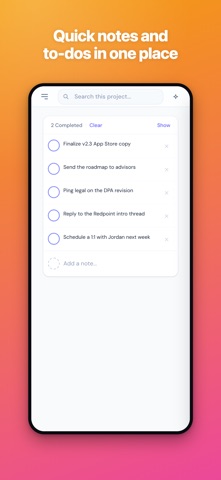
• Board — a fast kanban board for tasks, with checklists, labels, and due dates
• Notes & Documents — rich documents with @mentions and real-time collaboration
• Calendar — events that sync two-way with Google Calendar
• Chat — real-time team chat with channels, DMs, mentions, and file sharing
• Files — upload, preview, and share images, videos, and documents
• Recordings — capture screen and voice recordings in seconds
• Sketch — a whiteboard for diagrams and quick ideas
• Sign — send and sign documents
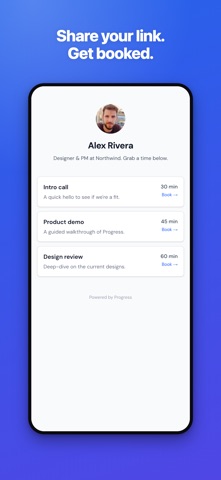
• Bookings — share a link and let people book time on your calendar
• Sheets, CRM, and more
A PROJECT-AWARE AI ASSISTANT
Progress includes an AI assistant that reads from your project's board, notes, files, and chat — so you can ask questions, summarize what's happening, and get help with full context instead of a blank slate.
BUILT FOR HOW YOU ACTUALLY WORK
• Two-way Google Calendar sync
• Built-in voice dictation
• Real-time notifications and sounds
• Native desktop and iPhone apps, plus the web — your work stays in sync everywhere
The whole project. One link. No tab-juggling.
Show more Show less

Screenshots

Progress - Productivity App Screenshot 1 of 10
Progress - Productivity App Screenshot 2 of 10
Progress - Productivity App Screenshot 3 of 10
Progress - Productivity App Screenshot 4 of 10
Progress - Productivity App Screenshot 5 of 10
Progress - Productivity App Screenshot 6 of 10
Progress - Productivity App Screenshot 7 of 10
Progress - Productivity App Screenshot 8 of 10
Progress - Productivity App Screenshot 9 of 10
Progress - Productivity App Screenshot 10 of 10
Screenshots by Catch Recap LLC, from the the App Store listing
Official page on the App Store

Alternatives to Progress - Productivity App

My Folio Assistant icon My Folio Assistant
ALI UYGUR
0.0
Free
Boreal Markdown Editor icon Boreal Markdown Editor
Borealbit Technology Limited
0.0
Free
SaySo - Task Companion icon SaySo - Task Companion
TRENT MATTHEW OLBERDING
5.0
Free
1 ratings
Mini Project - Task Progress icon Mini Project - Task Progress
CHUNLONG LI
5.0
$0.69
1 ratings
AppTime: Screen Time Control icon AppTime: Screen Time Control
帆 邱
3.3
Free
3 ratings
Nebula AI icon Nebula AI
Agent Labs, Inc.
4.8
Free
16 ratings
Text Editor App icon Text Editor App
ChromaticApp Ltd
4.2
Free
14 ratings
Adaptive Computer icon Adaptive Computer
Adaptive Computer, Inc.
5.0
Free
32 ratings

Changelog of Progress - Productivity App

No changelog data

Developer information for Catch Recap LLC

Catch Recap LLC

Address:

Share Progress - Productivity App

Comments on Progress - Productivity App for iOS

We don't have enough comments to show example comments. Please check back later.

App Store Rankings for Progress - Productivity App

This app is not ranked

Technologies used by Progress - Productivity App

Frequently asked questions about Progress - Productivity App

Is Progress - Productivity App free?

Yes. Progress - Productivity App is free on the App Store.

Is Progress - Productivity App still available?

Yes. Progress - Productivity App is on the App Store, and the last update we saw was on July 16, 2026.

How large is Progress - Productivity App?

Progress - Productivity App is 2.80 MB.

Is Progress - Productivity App suitable for children?

App Store rates the content of Progress - Productivity App as suitable for everyone.

How do people rate Progress - Productivity App?

Progress - Productivity App has one rating of 5.00 stars on the App Store.

Who made Progress - Productivity App?

Progress - Productivity App was developed by Catch Recap LLC. It is listed in the productivity category on the App Store.

What are the best alternatives to Progress - Productivity App?

People looking at Progress - Productivity App also look at these productivity apps: My Folio Assistant, Boreal Markdown Editor, SaySo - Task Companion, Mini Project - Task Progress, AppTime: Screen Time Control.

Popular Productivity Apps Today's trending apps Price drops on Google Play Apps other people are watching Top new apps
My Folio Assistant icon My Folio Assistant
Boreal Markdown Editor icon Boreal Markdown Editor
SaySo - Task Companion icon SaySo - Task Companion
Mini Project - Task Progress icon Mini Project - Task Progress
AppTime: Screen Time Control icon AppTime: Screen Time Control
Nebula AI icon Nebula AI
Text Editor App icon Text Editor App
Adaptive Computer icon Adaptive Computer
Overview Alternatives Reviews Rankings Technology
AppBrain Intelligence premium content

Subscribe now to get full and unlimited access to AppBrain Intelligence. You'll have access to:

  • App Intelligence dashboard (performance timeline, competitor comparison, country rankings, insight cards)
  • Detailed ranking data per app
  • Full timeline per developer
  • Device market shares data per country
  • Unlimited keyword tracking
1 Month

$75/mo
(billed every month)

SAVE 0%
Subscribe
3 Months

$65/mo
($195 billed every 3 months)

SAVE 13%
Subscribe
1 Year

$57.50/mo
($690 billed every year)

SAVE 23%
Subscribe
Each subscription will automatically renew 3 days before the expiration date for the same time period. Subscriptions can be cancelled at any time before the renewal.

AppBrain is an app data site, we track rankings, ratings, installs for all apps and games on Google Play and the App Store. AppBrain doesn't host app files or APKs, all install links go directly to the official store. All trademarks are owned by their respective owners.

More apps

  • Top Android apps being viewed
  • Video Collage Maker:Mix Videos
  • AI Security
  • Last Survivor: Zombie Wave

App statistics

  • Android statistics
  • Google Play Developer stats
  • Trending Android Apps
  • Trending iOS apps
  • Top popular Apps
  • Buy the best Android phone
  • Buy & sell app businesses

About AppBrain

  • Contact
  • Privacy
  • Documentation
  • DMCA takedowns
  • Articles
  • Blog
  • The AppBrain advertising system
© 2010-2026 - AppBrain