

SaySo - Task Companion
SaySo - Task Companion is made and published by TRENT MATTHEW OLBERDING. AppBrain is an independent app data site and isn't affiliated with TRENT MATTHEW OLBERDING. The app name, icon, screenshots and description belong to TRENT MATTHEW OLBERDING and are shown as published on the App Store.
AppBrain's verdict
- Rating on App Store
- 5.00
- 1 ratings
- Last updated
- October 23, 2026
It doesn't have enough ratings yet to judge what users think.
Rankings
App Store top chartsApp Store Rankings for SaySo - Task Companion
Competitors
Similar apps and more from TRENT MATTHEW OLBERDINGAlternatives to SaySo - Task Companion


Releases
Updates seen on the App Store- Version
- 1.0.29
- Launched
- May 2026
No changelog data
User feedback
Ratings and reviews on the App StoreComments on SaySo - Task Companion for iOS
We don't have enough comments to show example comments. Please check back later.
Technology
Found in the app by AppBrain- Price
- Free
- App size
- 39.9 MB
- Content rating
- Everyone
Technologies used by SaySo - Task Companion
About the app and developer
About SaySo - Task Companion
SaySo - Task Companion is a food & drink app developed by TRENT MATTHEW OLBERDING.
What is the rating of SaySo - Task Companion?
SaySo - Task Companion is rated 5.00 out of 5 stars, based on one rating ratings.
Is SaySo - Task Companion free?
SaySo - Task Companion is free. The app size is 39.87 MB. The latest version available is 1.0.29. The last update was on October 23, 2026.
What are the requirements for SaySo - Task Companion?
The app has a content rating of Everyone. The app has been available on the App Store since May 2026.
Developer information for TRENT MATTHEW OLBERDING
Address:
Store listing
By TRENT MATTHEW OLBERDING, from the App Store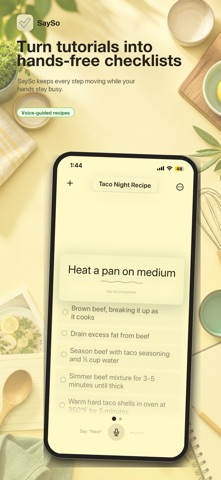



Description by TRENT MATTHEW OLBERDING Written by the developer, not by AppBrain. Click to read.
MAKE A CHECKLIST
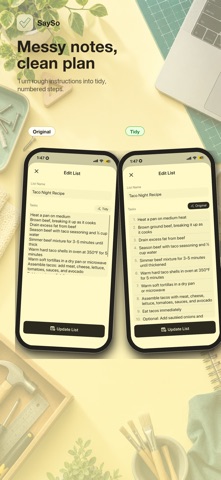
Type or paste your steps, or choose Tidy to organize text with AI. Keep notes about substitutions, equipment, and what worked in your personalized steps.
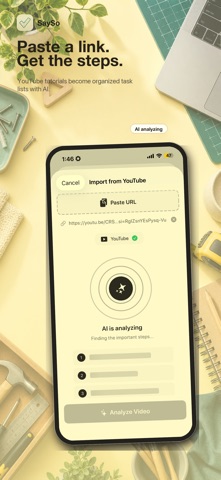
IMPORT INSTRUCTIONS
Import supported YouTube links, webpages, or videos you choose. Where available, generated steps include source timestamps. Source access and extraction quality vary; check the steps against the original before relying on them.
FOLLOW ALONG
Use the screen or optional snap controls to move through your list. One snap advances to the next step; two snaps go back. Snap recognition runs on-device. Voice commands are a separate cloud AI feature.
GET STEP HELP
Choose a photo and ask a question about your current step. With your permission, Google Gemini analyzes the image and relevant checklist context. AI answers can be incorrect, so use your judgment.
YOUR LISTS AND YOUR CHOICES
Start as a guest without registering. Guest lists still use Supabase cloud storage. Sign in to access your account's lists on another device. Internet access is required for loading and saving lists, cloud AI, imports, and purchases.
Cloud AI is optional and requires explicit permission to share selected text, audio, photos, videos, or imported content with Google. You can withdraw AI-sharing permission in Account. SaySo does not save live voice recordings; Google handles submitted content under its own terms. See the privacy policy for cloud storage, analytics, diagnostics, and retention details.
SUBSCRIPTIONS
Free features are available, with limits on some imports. Optional monthly and yearly auto-renewable subscriptions provide the paid features described in the app. Localized prices, renewal periods, and eligible introductory offers appear before purchase. Manage or cancel through your Apple Account. Deleting SaySo or your account does not cancel a subscription.
Terms of Use: https://getsayso.netlify.app/terms/
Privacy Policy: https://getsayso.netlify.app/privacy/