





AppBrain's verdict
- Rating on App Store
- 1.00
- 2 ratings
- Last updated
- November 4, 2026
- Size
- 34.3 MB
It doesn't have enough ratings yet to judge what users think.
User feedback
Ratings and reviews on the App StoreComments on Project Office X: Gantt chart for iOS
We don't have enough comments to show example comments. Please check back later.
Store listing
By DK CONSULTING, TOV, from the App StoreDescription by DK CONSULTING, TOV Written by the developer, not by AppBrain. Click to read.
FREE TRIAL
With the 14-day trial, you can try all of the features of Project Office X for free. After the trial, you can continue using Project Office X in a Preview Mode.
BASIC PROJECT MANAGEMENT OPTIONS
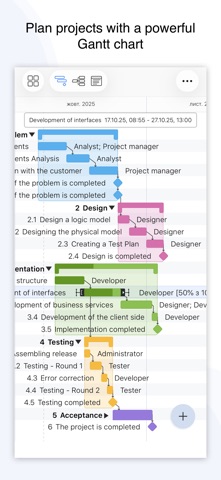
• Gantt chart view: Each task is shown graphically on visual timeline by day, week, month or year. Gantt chart view helps you keep an eye on tasks durations, start and due dates, completion percentage, dependencies and resources assigned.
• Outline view: Use the Table view to see your tasks, groups and milestones in a spreadsheet format. Friendly and intuitive interface helps you get things done fast and stays out of your way while doing so.
• Resource and Base calendars: Each project automatically includes a base calendar with some general working hours and a resource calendar that specifies a unique schedule for a specific resource. Project calendars are used to schedule tasks, and if resources are assigned to tasks, resource calendars are used as well. For each resource you can create an individual resource calendars based on the settings in base calendar.
• Resources management: add resources to your project: people or materials, necessary to make this project done. Identify bottlenecks in your project and distribute workloads fairly.
• Multiple baselines: set baseline to track development by comparing the set baseline with actual plan and progress.
• Critical path: Project Office X displays your project’s critical path, which is the series of tasks that are necessary in order to finish your project on schedule.
• Customized calendar: modifying work hours for entire project you can create a more realistic plan considering off-time and weekends.
• Filtering: you can easily hide those tasks you don't need to think about at the moment. Simply use filter to focus on tasks you need to be done.
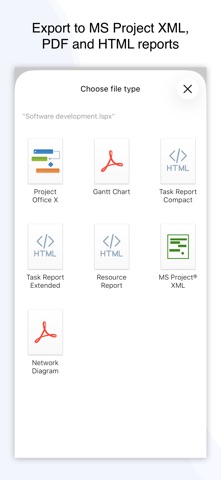
• Projects and reports sharing: send an entire project to your colleagues or Email the Gantt chart to others as PDF. For more convenience you can make task and resources report and send them as HTML.
• iCloud backup: backup your projects to keep all information you have added
Project Office X Pro version:
• IMPORT/EXPORT Microsoft Project® (XML)
Project Office X can export and import files with Microsoft Project® (XML) format. Project Office X does not support export/import MPP files. To use Microsoft Project® (XML) export/import, you need to buy one-time purchase license.
• NETWORK DIAGRAM
This is a graphical flow of tasks, dependencies and the critical path for a project. It represent a chart with a series of boxes and dependencies lines that connect those boxes. Network diagram view will help you easily map out the project schedule and work sequence, track its progress and completion.
For how-to tutorials and other information, please visit our website: https://www.dk-consulting.app/project-office
Privacy policy: https://www.dk-consulting.app/privacy-policy
Terms of Use: https://www.apple.com/legal/internet-services/itunes/dev/stdeula
Safety and technology
Found in the app by AppBrain- Price
- Free
- App size
- 34.3 MB
- Content rating
- Everyone
Technologies used by Project Office X: Gantt chart
Releases
Updates seen on the App Store- Version
- 2.15
- Launched
- September 2022
No changelog data
Alternatives
Similar apps and more from DK CONSULTING, TOVAlternatives to Project Office X: Gantt chart




More from DK CONSULTING, TOV



Rankings
App Store top chartsApp Store Rankings for Project Office X: Gantt chart
About the app and developer
About Project Office X: Gantt chart
Project Office X: Gantt chart is a business app developed by DK CONSULTING, TOV.
What is the rating of Project Office X: Gantt chart?
Project Office X: Gantt chart is rated 1.00 out of 5 stars, based on 2 ratings.
Is Project Office X: Gantt chart free?
Project Office X: Gantt chart is free. The app size is 34.26 MB. The latest version available is 2.15. The last update was on November 4, 2026.
What are the requirements for Project Office X: Gantt chart?
The app has a content rating of Everyone. The app has been available on the App Store since September 2022.
Project Office X: Gantt chart is made and published by DK CONSULTING, TOV. AppBrain is an independent app data site and isn't affiliated with DK CONSULTING, TOV. The app name, icon, screenshots and description belong to DK CONSULTING, TOV and are shown as published on the App Store.
Developer information for DK CONSULTING, TOV
Address:
Frequently asked questions about Project Office X: Gantt chart
Is Project Office X: Gantt chart free?
Yes. Project Office X: Gantt chart is free on the App Store.
Is Project Office X: Gantt chart still available?
Yes. Project Office X: Gantt chart is on the App Store, and the last update we saw was on November 4, 2026.
How large is Project Office X: Gantt chart?
Project Office X: Gantt chart is 34.26 MB.
Is Project Office X: Gantt chart suitable for children?
App Store rates the content of Project Office X: Gantt chart as suitable for everyone.
How do people rate Project Office X: Gantt chart?
Project Office X: Gantt chart scores 1.00 out of 5 stars, from 2 ratings on the App Store.
Who made Project Office X: Gantt chart?
Project Office X: Gantt chart was developed by DK CONSULTING, TOV. It is listed in the business category on the App Store.
What are the best alternatives to Project Office X: Gantt chart?
People looking at Project Office X: Gantt chart also look at these business apps: OmniPlan 4, Merlin Project: Gantt + Kanban, Project Plan 365, Agenda Plan - on Gantt Chart, Tasks Wizard.