

Project Planner: Milestones
Project Planner: Milestones is made and published by Yassine Zeriouh. AppBrain is an independent app data site and isn't affiliated with Yassine Zeriouh. The app name, icon, screenshots and description belong to Yassine Zeriouh and are shown as published on the App Store.
AppBrain's verdict
- Rating on App Store
- 4.94
- 18 ratings
- Last updated
- October 30, 2026
- Size
- 86.9 MB
It doesn't have enough ratings yet to judge what users think.
User feedback
Ratings and reviews on the App StoreComments on Project Planner: Milestones for iOS
We don't have enough comments to show example comments. Please check back later.
Store listing
By Yassine Zeriouh, from the App Store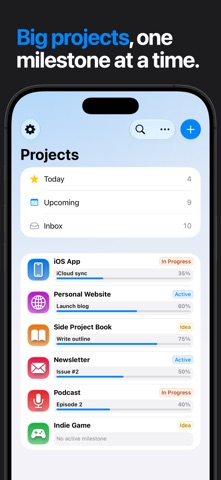


Description by Yassine Zeriouh Written by the developer, not by AppBrain. Click to read.
Milestones is built around a different idea: every project deserves structure, and structure is what makes finishing possible.
A smarter way to plan
Milestones introduces a three-tier hierarchy — Projects, Milestones, and Tasks — that mirrors how real work actually happens. A project isn't one thing; it's a series of phases. Each phase has its own focus, its own deadline, its own definition of done. Milestones makes that structure explicit so you always know where you are and what's next.
Break goals into phases
Every project is divided into named milestones — the chapters of your work. Whether you're building an app, writing a thesis, planning an event, or launching a side project, milestones give you a natural way to chunk the journey into stages you can actually complete one at a time.
Track progress visually
Each milestone has its own live progress bar showing task counts and completion percentage. At a glance, you can see how much you've done, how much is left, and which phases are moving. No more guessing whether you're close or far.
Focus on what matters right now
Mark one milestone as Active. It pins to the top of your project, pulses with a live indicator, and becomes your single point of focus. Everything else stays visible but secondary — giving you clarity without losing context.
Organized from every angle
Milestone statuses — Draft, Planning, In Progress, In Review, Released — give each phase a clear stage in the lifecycle. Tasks are sorted into To Do, In Progress, and Done sections automatically. Tag tasks to group related work across a project. Store unscheduled ideas in the project backlog so nothing falls through the cracks.
Designed to look as good as it works
Give every project its own icon — choose from a curated set of symbols or use your own photo — paired with a custom color. Your project list becomes a visual dashboard that's satisfying to open every day.
Manage projects with AI
Milestones includes a built-in MCP server — connect Claude and other AI agents on your Mac to create projects, add tasks and move milestones forward just by asking. Your project planner, now AI-native.
Built for iPhone, iPad, Mac & Apple Vision Pro
On iPad, Mac and Vision Pro, Milestones expands into a full three-column layout: your project list, milestone list, and task list all visible at once. On iPhone, everything is one tap away. Sync seamlessly across both with iCloud.
Whether you're a developer shipping a product, a student finishing a dissertation, a designer managing client work, or anyone with a goal worth finishing — Milestones gives your projects the structure they've always needed.
Safety and technology
Found in the app by AppBrain- Price
- Free
- App size
- 86.9 MB
- Content rating
- Everyone
Technologies used by Project Planner: Milestones
Releases
Updates seen on the App Store- Version
- 2.0.1
- Launched
- November 2024
No changelog data
Alternatives
Similar apps and more from Yassine ZeriouhAlternatives to Project Planner: Milestones


More from Yassine Zeriouh


Rankings
App Store top chartsApp Store Rankings for Project Planner: Milestones
About the app and developer
About Project Planner: Milestones
Project Planner: Milestones is a productivity app developed by Yassine Zeriouh.
What is the rating of Project Planner: Milestones?
Project Planner: Milestones is rated 4.94 out of 5 stars, based on 18 ratings.
Is Project Planner: Milestones free?
Project Planner: Milestones is free. The app size is 86.86 MB. The latest version available is 2.0.1. The last update was on October 30, 2026.
What are the requirements for Project Planner: Milestones?
The app has a content rating of Everyone. The app has been available on the App Store since November 2024.
Developer information for Yassine Zeriouh
Address:
Frequently asked questions about Project Planner: Milestones
Is Project Planner: Milestones free?
Yes. Project Planner: Milestones is free on the App Store.
Is Project Planner: Milestones still available?
Yes. Project Planner: Milestones is on the App Store, and the last update we saw was on October 30, 2026.
How large is Project Planner: Milestones?
Project Planner: Milestones is 86.86 MB.
Is Project Planner: Milestones suitable for children?
App Store rates the content of Project Planner: Milestones as suitable for everyone.
How do people rate Project Planner: Milestones?
Project Planner: Milestones scores 4.94 out of 5 stars, from 18 ratings on the App Store.
Who made Project Planner: Milestones?
Project Planner: Milestones was developed by Yassine Zeriouh. It is listed in the productivity category on the App Store.
What are the best alternatives to Project Planner: Milestones?
People looking at Project Planner: Milestones also look at these productivity apps: Fox Issue & Project Tracking, KiteSuite - Work Management, TaskFlow: Simple Project Timer, App Idea Vault, LaunchBuddy: App Planner.