

PxPad: Pixel Art Maker Studio
PxPad: Pixel Art Maker Studio is made and published by Andrew Moloney. AppBrain is an independent app data site and isn't affiliated with Andrew Moloney. The app name, icon, screenshots and description belong to Andrew Moloney and are shown as published on the App Store.
AppBrain's verdict
- Rating on App Store
- 5.00
- 1 ratings
- Last updated
- October 12, 2026
It doesn't have enough ratings yet to judge what users think.
Rankings
App Store top chartsApp Store Rankings for PxPad: Pixel Art Maker Studio
Competitors
Similar apps and more from Andrew MoloneyAlternatives to PxPad: Pixel Art Maker Studio







More from Andrew Moloney


Releases
Updates seen on the App Store- Version
- 1.2.1
- Launched
- October 2025
No changelog data
User feedback
Ratings and reviews on the App StoreComments on PxPad: Pixel Art Maker Studio for iOS
We don't have enough comments to show example comments. Please check back later.
Technology
Found in the app by AppBrain- Price
- Free
- App size
- 6.23 MB
- Content rating
- Everyone
Technologies used by PxPad: Pixel Art Maker Studio
About the app and developer
About PxPad: Pixel Art Maker Studio
PxPad: Pixel Art Maker Studio is a graphics & design app developed by Andrew Moloney.
What is the rating of PxPad: Pixel Art Maker Studio?
PxPad: Pixel Art Maker Studio is rated 5.00 out of 5 stars, based on one rating ratings.
Is PxPad: Pixel Art Maker Studio free?
PxPad: Pixel Art Maker Studio is free. The app size is 6.23 MB. The latest version available is 1.2.1. The last update was on October 12, 2026.
What are the requirements for PxPad: Pixel Art Maker Studio?
The app has a content rating of Everyone. The app has been available on the App Store since October 2025.
Developer information for Andrew Moloney
Address:
Frequently asked questions about PxPad: Pixel Art Maker Studio
Is PxPad: Pixel Art Maker Studio free?
Yes. PxPad: Pixel Art Maker Studio is free on the App Store.
Is PxPad: Pixel Art Maker Studio still available?
Yes. PxPad: Pixel Art Maker Studio is on the App Store, and the last update we saw was on October 12, 2026.
How large is PxPad: Pixel Art Maker Studio?
PxPad: Pixel Art Maker Studio is 6.23 MB.
Is PxPad: Pixel Art Maker Studio suitable for children?
App Store rates the content of PxPad: Pixel Art Maker Studio as suitable for everyone.
How do people rate PxPad: Pixel Art Maker Studio?
PxPad: Pixel Art Maker Studio has one rating of 5.00 stars on the App Store.
Who made PxPad: Pixel Art Maker Studio?
PxPad: Pixel Art Maker Studio was developed by Andrew Moloney. It is listed in the graphics & design category on the App Store.
What are the best alternatives to PxPad: Pixel Art Maker Studio?
People looking at PxPad: Pixel Art Maker Studio also look at these graphics & design apps: Pixel Animation - Pixel Art, QuikAnimate, Hot Widgets - Make Your Screen, Pixel Companion: Image Scaler, Pocket Brushes for Procreate.
Store listing
By Andrew Moloney, from the App Store



Description by Andrew Moloney Written by the developer, not by AppBrain. Click to read.
Features
• Brush, eraser, fill, select, move, and eyedropper tools
• Undo / redo feature
• Zoom / pan / rotate gestures
• Layers
• Multiple artboards in one document
• Image imports
• iCloud integration
• Files app icon previews
• Dark mode
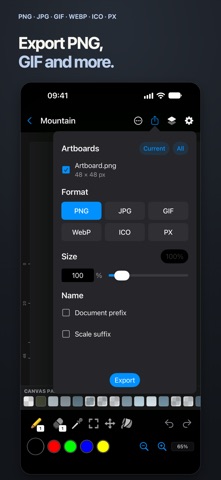
• Export PNG / JPG / GIF / WebP / ICO / PX
• Export multiple artboards at once
• Canvas resizing
• Full color picker
• Haptics
• Apple Pencil support on compatible iPads
• Left-handed mode
• Sample files
• 41 Languages
Create retro art, game graphics and sprite sheets across iPhone, iPad and Mac, with iCloud integration, native sharing and file previews.
Touch shortcuts and gestures
• Double-tap with the brush to fill an area (enable in Settings).
• Press and hold on the canvas while using the brush, eraser or fill tool to pick a color.
• 2 finger tap: Undo
• 3 finger tap: Redo
• 2 finger pan: Pan view
• 2 finger pinch: Zoom view
• 2 finger rotate: Rotate canvas
• Swipe gesture on folder previews, in the grid view, to cycle through previews.
• Drag eyedropper onto canvas to activate with one gesture.
Notes
• When editing, an orange circle by the file name indicates the file is unsaved. Green briefly confirms a successful save. Red indicates a save error.
• Import .px files by moving them into the PxPad folder (see Settings).
If you like PxPad, please let me know in a review!
Thank you,
Andy (The Developer)
License Agreement:
https://www.apple.com/legal/internet-services/itunes/dev/stdeula/