

PyLearn: Python to AI
PyLearn: Python to AI is made and published by KAM HON KUOK. AppBrain is an independent app data site and isn't affiliated with KAM HON KUOK. The app name, icon, screenshots and description belong to KAM HON KUOK and are shown as published on the App Store.
AppBrain's verdict
- Last updated
- September 22, 2026
Rankings
App Store top chartsApp Store Rankings for PyLearn: Python to AI
Competitors
Similar apps and more from KAM HON KUOKAlternatives to PyLearn: Python to AI


More from KAM HON KUOK

Releases
Updates seen on the App Store- Version
- 1.0
- Launched
- September 2026
No changelog data
User feedback
Ratings and reviews on the App StoreComments on PyLearn: Python to AI for iOS
We don't have enough comments to show example comments. Please check back later.
Technology
Found in the app by AppBrain- Price
- Free
- App size
- 23.1 MB
- Content rating
- Everyone
Technologies used by PyLearn: Python to AI
About the app and developer
About PyLearn: Python to AI
PyLearn: Python to AI is an education app developed by KAM HON KUOK.
User Ratings
The app has no ratings yet.
App Information
PyLearn: Python to AI is freely available from the App Store. The app size is 23.05 MB. The latest version available is 1.0. The last update was on September 22, 2026.
Technical Requirements
The app has a content rating of Everyone. The app has been available on the App Store since September 2026.
Developer information for KAM HON KUOK
Address:
Frequently asked questions about PyLearn: Python to AI
Is PyLearn: Python to AI free?
Yes. PyLearn: Python to AI is free on the App Store.
Is PyLearn: Python to AI still available?
Yes. PyLearn: Python to AI is on the App Store, and the last update we saw was on September 22, 2026.
How large is PyLearn: Python to AI?
PyLearn: Python to AI is 23.05 MB.
Is PyLearn: Python to AI suitable for children?
App Store rates the content of PyLearn: Python to AI as suitable for everyone.
Who made PyLearn: Python to AI?
PyLearn: Python to AI was developed by KAM HON KUOK. It is listed in the education category on the App Store.
What are the best alternatives to PyLearn: Python to AI?
People looking at PyLearn: Python to AI also look at these education apps: Time Dilation Explorer Lab, Learn Python: Coding Lessons, Learn Node.js - Backend Coding, Quantum Physics: Visual Lab, Covered Bridge Guide 2.
Store listing
By KAM HON KUOK, from the App Store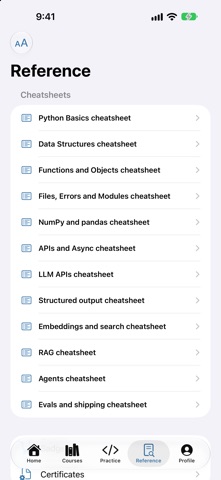


Description by KAM HON KUOK Written by the developer, not by AppBrain. Click to read.
Every lesson gives you a problem, a code editor and a Run button. You write Python, run it, and see the output and the failing tests. The interpreter is real CPython, bundled inside the app, so it works on a plane, on the underground, and anywhere else with no signal.
WHAT IS IN IT
• 12 courses, 108 lessons, from your first variable to shipping an AI system
• 27 quizzes and 6 capstone projects, graded against hidden tests
• 12 cheatsheets for the things nobody remembers
• 12 badges, XP and a streak, for the days when momentum is the hard part
THE PATH
Start with Python Basics: variables, loops, conditionals, functions. Then data structures, functions and objects, files and errors, data analysis, APIs and async.
Then the part most courses stop before: LLM APIs and prompting, structured output and tool calling, embeddings and vector search, RAG systems, agents and tool use, and evals and shipping. Real practice with the things AI engineering is actually made of.
NO ACCOUNT NEEDED
The app opens and works with no sign-up. Make an account only if you want your progress on more than one device — it syncs when there is a connection and waits patiently when there is not.
BUILT FOR A PHONE
• A code editor with line numbers, syntax highlighting and a punctuation row, because semicolons and brackets are miserable on a phone keyboard
• Adjustable text size everywhere, including inside code
• Hints when you are stuck and a worked solution when you have had enough
• Dark and light, and it respects the size you read at
Python runs entirely on your device — no server executes your code. Signed out, nothing you write leaves the phone at all. With an account, your work syncs so you can carry on somewhere else, and the tutor sees the lesson and your code in order to answer questions about them.