

QAudioEditor is made and published by JAKUB KAPRZYK. AppBrain is an independent app data site and isn't affiliated with JAKUB KAPRZYK. The app name, icon, screenshots and description belong to JAKUB KAPRZYK and are shown as published on the App Store.
AppBrain's verdict
- Last updated
- October 30, 2026
- Size
- 3.23 MB
User feedback
Ratings and reviews on the App StoreComments on QAudioEditor for iOS
We don't have enough comments to show example comments. Please check back later.
Store listing
By JAKUB KAPRZYK, from the App Store



Description by JAKUB KAPRZYK Written by the developer, not by AppBrain. Click to read.
SUPPORTED FORMATS
- MP3 (MPEG-1/2 Layer III, constant or variable bitrate)
- AAC - AAC-LC, HE-AAC and HE-AAC v2 - in ADTS (.aac)
- AAC in MP4 (.m4a)
- Apple Lossless / ALAC in M4A (.m4a)
- FLAC (.flac), 16- and 24-bit
- WAV / PCM (.wav), 8- to 32-bit and 32-bit float
- Video (.mp4, .mov, .m4v) - the audio track is extracted losslessly for editing
FEATURES
- Frame-accurate cut, crop, and trim
- Split markers - drop markers anywhere, drag them to fine-tune, and name them; split a long recording into files in one step, each named and tagged after its marker (Pro)
- Markers at Silences - finds the pauses between the tracks of a recording, such as an album saved as one file, and drops a marker in each, ready to split (Pro)
- Chapters (Pro) - save markers as chapters in MP3 and M4A/M4B, for podcasts and audiobooks; chapters in a file you open become named markers
- ReplayGain tags - measure the loudness and tag the file so players level the volume, with no change to the audio (MP3, M4A, FLAC)
- CUE sheets - import a .cue file as markers, or export your markers as .cue
- Loudness - LUFS, peak and loudness range in File Details
- Trim Silence (Pro) - cut the silence at the start and end in one step
- Export Selection - save just the selected part as a new file
- Very large recordings - multi-gigabyte WAV and FLAC files open, edit and save smoothly; the audio is kept on disk instead of in memory
- Lossless fades and one-tap normalize
- Pull the audio out of a video (MP4, MOV, M4V) - open it, or insert it at the playhead; AAC and ALAC tracks are extracted with no re-encoding
- Cut, copy, paste, and insert or append other files of the same format
- Hardware-keyboard shortcuts on iPad
- Playback follows the view - scroll to another part while playing and it plays from there
- Rich waveform with peak + RMS view, zoom that stays centered on the playhead, and an overview navigator
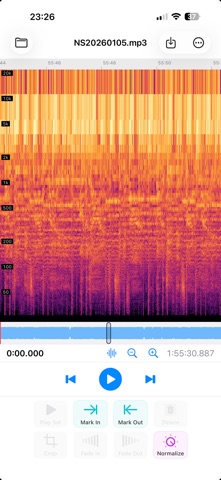
- Spectrogram view - see the frequency content over time on a log scale; toggle it with the waveform
- File details, unlimited undo, and crash-safe session restore
- Edit tags - title, artist, album and cover artwork - saved losslessly (MP3, M4A/AAC, FLAC)
- Export raw AAC as a seekable .m4a
- Record Stream (Pro) - record an internet audio stream (Icecast, SHOUTcast or HLS; MP3, AAC or FLAC) without re-encoding, until you stop it or for a set time, then edit the recording, with a marker named after each song - it keeps recording with the screen locked
- Shortcuts actions - Normalize, Write ReplayGain Tags, Trim Silence, Split at Silences and Record Stream
Free to edit and to save results up to 5 minutes long. QAudioEditor Pro (a one-time purchase) removes the length limit so you can save recordings of any length, and adds Split at Markers, Markers at Silences, Chapters, Trim Silence and Record Stream - and one purchase unlocks Pro on iPhone, iPad and Mac.
Safety and technology
Found in the app by AppBrain- Price
- Free
- App size
- 3.23 MB
- Content rating
- Everyone
Technologies used by QAudioEditor
Releases
Updates seen on the App Store- Version
- 5.1.0
- Launched
- July 2026
No changelog data
Alternatives
Similar apps and more from JAKUB KAPRZYKAlternatives to QAudioEditor


More from JAKUB KAPRZYK

Rankings
App Store top chartsApp Store Rankings for QAudioEditor
About the app and developer
About QAudioEditor
QAudioEditor is a music app developed by JAKUB KAPRZYK.
User Ratings
The app has no ratings yet.
App Information
QAudioEditor is freely available from the App Store. The app size is 3.23 MB. The latest version available is 5.1.0. The last update was on October 30, 2026.
Technical Requirements
The app has a content rating of Everyone. The app has been available on the App Store since July 2026.
Developer information for JAKUB KAPRZYK
Address:
Frequently asked questions about QAudioEditor
Is QAudioEditor free?
Yes. QAudioEditor is free on the App Store.
Is QAudioEditor still available?
Yes. QAudioEditor is on the App Store, and the last update we saw was on October 30, 2026.
How large is QAudioEditor?
QAudioEditor is 3.23 MB.
Is QAudioEditor suitable for children?
App Store rates the content of QAudioEditor as suitable for everyone.
Who made QAudioEditor?
QAudioEditor was developed by JAKUB KAPRZYK. It is listed in the music category on the App Store.
What are the best alternatives to QAudioEditor?
People looking at QAudioEditor also look at these music apps: MP3Gain - Audio Normalization, jd.Edit, SpectraView Studio, Quiet Take: Audio Denoise, PtP Audio Player.