Download Android Apps and Games
AppBrain
  • Apps
  • Apps being viewed right now Trending apps today Most popular apps All-time most downloaded apps Top rated apps
  • Intelligence ▾
    Intelligence overview → Track any Android app or your whole market
    Track & analyze
    Keyword Tracker & OptimizerTrack & improve Play rankings App Performance ReportOne-off PDF for any app StatisticsFree Android & Play market stats
    Promote your app
    Featured Apps App Links
  • Intelligence
  • Pricing
  • Dashboard
  • Sign up
  • Log in
Last updated on: 2026-06-25
App Store Apps > Utilities > qFocus: The Private Browser
qFocus: The Private Browser icon

qFocus: The Private Browser

25.11.16
Sascha Rhein
2.00
2 reviews
Free

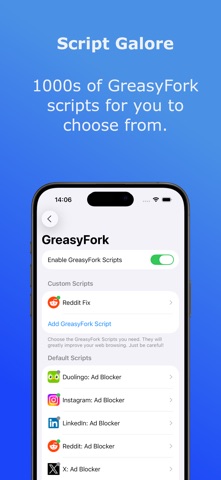
qFocus: The Private Browser Screenshot 1 of 8
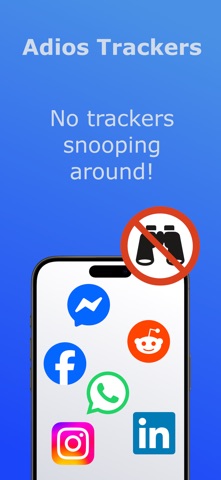
qFocus: The Private Browser Screenshot 2 of 8
qFocus: The Private Browser Screenshot 3 of 8
qFocus: The Private Browser Screenshot 4 of 8
qFocus: The Private Browser Screenshot 5 of 8
qFocus: The Private Browser Screenshot 6 of 8
qFocus: The Private Browser Screenshot 7 of 8
qFocus: The Private Browser Screenshot 8 of 8
Download from the App Store

About qFocus: The Private Browser

qFocus: The Private Browser is an overall app developed by Sascha Rhein.

Download Statistics

User Ratings

qFocus: The Private Browser is rated 2.00 out of 5 stars. The rating is based on 2 ratings.

App Information

qFocus: The Private Browser is FREE to download. The APK download size is 10.98 MB. The latest version available is 25.11.16. The last update was on November 16, 2025.

Technical Requirements

The app has a content rating of High Maturity. The app has been available on Google Play October 2025.

Description
qFocus is not “just another browser”:!
Most browsers try to block ads and trackers but still run everything together. qFocus takes the radical step of splitting social media from the rest of the internet. That’s what makes it unique. It’s not about giving you another copy of Safari or Chrome. It’s about giving you back control.

Social media is powerful, but it doesn’t need to follow you everywhere.
With qFocus Browser, your favorite platforms live in one place, securely locked away from the rest of your digital life.

qFocus isn’t a typical web browser. It’s designed to separate social media from your everyday browsing. Instead of scattering Facebook, LinkedIn, Reddit, Instagram, and other platforms across apps and tabs, and letting them track what you do elsewhere. You add them into qFocus and once added, they stay contained, isolated, and locked inside the app.
Think of it as a cage for social media. You still have full access to all their features, and the ability to scroll or post, but the tracking stops there. When you leave qFocus and open your standard browser, those social networks cannot see or influence what you do.

Why this matters:
• True Privacy: Social networks thrive on cross-site tracking. By walling them off, qFocus breaks the loop.
• All-in-One Hub: No more juggling between apps, you open qFocus, and your chosen social sites are neatly organized in one secure space.
• Peace of Mind: You can browse, research, or shop in your main browser knowing your social accounts are locked away.
• Cleaner Focus: Having them in a dedicated app keeps distraction under control. When you want social, it’s there. When you don’t, it’s gone.

Who is qFocus for?
• Professionals who use LinkedIn, Slack-style communities, or Reddit groups but don’t want their personal browsing profiled.
• Everyday users who love social media, but not the constant surveillance.
• Parents, students, and privacy-minded individuals who want a simple, no-setup way to reduce digital noise.

Why not just use the apps?
You might think: “Why not just install the official app for Facebook, Instagram, or LinkedIn?” The truth is, social media apps don’t just track what you do inside them, they often track what you do across your entire phone. Location data, contacts, notifications, even background activity can be harvested. By keeping these platforms inside qFocus, you avoid the extra layers of surveillance that come bundled with their native apps. You still get the full experience of the site, but without handing over even more of your digital life.

How it works:
1. Download qFocus Browser.
2. Pick up to six social media platforms you want to contain.
3. Use them inside qFocus, which isolates them from your main browsing.
4. Keep your normal browser free, private, and untouched by social media tracking.

Pro-tip: Clear the cookies in your normal browser once. This wipes out old trackers, so from then on social media stays locked where it belongs.

By using qFocus, you finally decide when and where social networks live in your digital life. They don’t get to decide for you.

The bigger picture:
The internet today is full of invisible strings. Social networks pull at them constantly, predicting, nudging, and shaping what you see. qFocus cuts those strings. Your social apps live together, securely contained. Your browsing stays yours.

It’s privacy, structure, and calm, all in one.
Show more Show less

More data about qFocus: The Private Browser

Price Free to download
Rating 2.00 based on 2 ratings
Ranking Not ranked
Version 25.11.16
App download size 11.0 MB
Maturity High Maturity

Alternative downloads for the qFocus: The Private Browser app

KIBrowser icon KIBrowser
Fatih Karadeniz
0.0
Free
AskGo icon AskGo
Etain Power Holdings Inc.
0.0
Free
Bookmarks Validator icon Bookmarks Validator
Gilbert Hansen
0.0
$0.99
Verifiero icon Verifiero
Verifiero AB
0.0
Free
Incognito Browser - Go Private icon Incognito Browser - Go Private
Binapani Jena
4.6
Free
20 ratings
Ring Sizer UK, Measure - Ringi icon Ring Sizer UK, Measure - Ringi
PERIZADE ERBAS
0.0
Free
RabbitHole – VPN client icon RabbitHole – VPN client
RABBIT HOLE STUDIO LTD
4.1
Free
9 ratings
Swift Surf: Secure Web Browser icon Swift Surf: Secure Web Browser
2x2 Media
1.0
Free
1 ratings

Changelog of qFocus: The Private Browser

No changelog data

Developer information for Sascha Rhein

Sascha Rhein

Address:

Share qFocus: The Private Browser

Comments on qFocus: The Private Browser for iOS

We don't have enough comments to show example comments. Please check back later.

App Store Rankings for qFocus: The Private Browser

This app is not ranked

Technologies used by qFocus: The Private Browser

KIBrowser icon KIBrowser
AskGo icon AskGo
Bookmarks Validator icon Bookmarks Validator
Verifiero icon Verifiero
Incognito Browser - Go Private icon Incognito Browser - Go Private
Ring Sizer UK, Measure - Ringi icon Ring Sizer UK, Measure - Ringi
RabbitHole – VPN client icon RabbitHole – VPN client
Swift Surf: Secure Web Browser icon Swift Surf: Secure Web Browser

Back to top
AppBrain Intelligence premium content

Subscribe now to get full and unlimited access to AppBrain Intelligence. You'll have access to:

  • App Intelligence dashboard (performance timeline, competitor comparison, country rankings, insight cards)
  • Detailed ranking data per app
  • Full timeline per developer
  • Device market shares data per country
1 Month

$75/mo
(billed every month)

SAVE 0%
Subscribe
3 Months

$65/mo
($195 billed every 3 months)

SAVE 13%
Subscribe
1 Year

$57.50/mo
($690 billed every year)

SAVE 23%
Subscribe
Each subscription will automatically renew 3 days before the expiration date for the same time period. Subscriptions can be cancelled at any time before the renewal.

AppBrain is a directory focused on discovering great apps and games. We give statistics, rankings and search options that Google Play and the App Store don't have. All trademarks are owned by their respective owners. AppBrain doesn't offer APKs or binaries, and always lets users install the official version from Google Play or the App Store.

More apps

  • Top Android apps being viewed
  • View BMI Tracker & Calculator
  • Easy Quran Courses for Android
  • Happy Cooking: 2025 Chef Fever

Android Statistics

  • Android statistics
  • Google Play Developer stats
  • Trending Android Apps
  • Top popular Apps
  • Buy the best Android phone

About AppBrain

  • Contact
  • Privacy
  • Documentation
  • DMCA takedowns
  • Articles
  • Blog
  • Android App Marketing: Learn how to better market your Android app
© 2010-2026 - AppBrain