

QR Code: Backup & Restore
QR Code: Backup & Restore is made and published by Keval Vasaniya. AppBrain is an independent app data site and isn't affiliated with Keval Vasaniya. The app name, icon, screenshots and description belong to Keval Vasaniya and are shown as published on the App Store.
AppBrain's verdict
- Last updated
- October 7, 2026
- Size
- 68.8 MB
User feedback
Ratings and reviews on the App StoreComments on QR Code: Backup & Restore for iOS
We don't have enough comments to show example comments. Please check back later.
Store listing
By Keval Vasaniya, from the App Store


Description by Keval Vasaniya Written by the developer, not by AppBrain. Click to read.
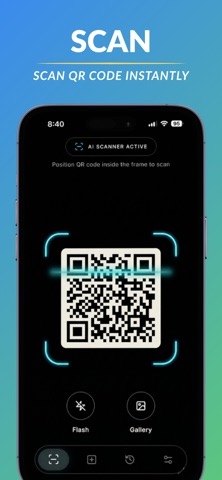
QR Code: Backup & Restore is a fast QR scanner and barcode reader that automatically keeps your scan history. Scan QR codes, save your results, and back up your history so you can restore it when you switch devices or reinstall the app.
SCAN QR CODES & BARCODES
• Scan QR codes quickly with your camera
• Scan barcodes and other supported codes
• Scan QR codes from photos and saved images
• Open links, Wi-Fi information, contacts and more
• Get your scan results instantly
NEVER LOSE YOUR SCAN HISTORY
Every scan can be saved to your history so you can find it again later. No need to rescan a QR code just because you closed the app.
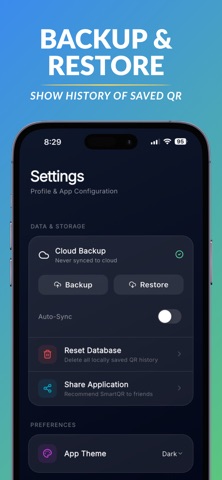
BACKUP & RESTORE
Keep your QR scan history safe with backup and restore.
• Back up your saved QR history
• Restore your scans when needed
• Keep your history when moving to a new device
• Recover your saved scans after reinstalling the app
CREATE QR CODES
Create QR codes for the information you want to share, including links, text, Wi-Fi and more.
YOUR QR HISTORY IN ONE PLACE
Quickly access previous scans and manage the QR codes you've saved. Whether it's a website, Wi-Fi network, product code, ticket or another QR code, you can find your previous scans without scanning again.
WHY QR CODE: BACKUP & RESTORE?
Most QR scanners focus only on scanning. This app also helps you keep your scan history safe.
Scan it. Save it. Back it up. Restore it.
Download QR Code: Backup & Restore and keep your important QR scans available when you need them.
Privacy Policy and Terms of Use are available within the app.
Terms of Use: https://www.apple.com/legal/internet-services/itunes/dev/stdeula/
Safety and technology
Found in the app by AppBrain- Price
- Free
- App size
- 68.8 MB
- Content rating
- Everyone
Technologies used by QR Code: Backup & Restore
Releases
Updates seen on the App Store- Version
- 2.0
- Launched
- March 2026
No changelog data
Alternatives
Similar apps and more from Keval Vasaniya


Rankings
App Store top chartsApp Store Rankings for QR Code: Backup & Restore
About the app and developer
About QR Code: Backup & Restore
QR Code: Backup & Restore is an utilities app developed by Keval Vasaniya.
User Ratings
The app has no ratings yet.
App Information
QR Code: Backup & Restore is freely available from the App Store. The app size is 68.80 MB. The latest version available is 2.0. The last update was on October 7, 2026.
Technical Requirements
The app has a content rating of Everyone. The app has been available on the App Store since March 2026.
Developer information for Keval Vasaniya
Address:
Frequently asked questions about QR Code: Backup & Restore
Is QR Code: Backup & Restore free?
Yes. QR Code: Backup & Restore is free on the App Store.
Is QR Code: Backup & Restore still available?
Yes. QR Code: Backup & Restore is on the App Store, and the last update we saw was on October 7, 2026.
How large is QR Code: Backup & Restore?
QR Code: Backup & Restore is 68.80 MB.
Is QR Code: Backup & Restore suitable for children?
App Store rates the content of QR Code: Backup & Restore as suitable for everyone.
Who made QR Code: Backup & Restore?
QR Code: Backup & Restore was developed by Keval Vasaniya. It is listed in the utilities category on the App Store.
What are the best alternatives to QR Code: Backup & Restore?
People looking at QR Code: Backup & Restore also look at these utilities apps: The QR Scanner & Generator Pro, QR Code & Barcode Reader, Scan, QR Code Scanner・Scan Barcode・, Conta: Sushi Counter, QR Creator - Scan & Design.