

QUAD-G ForceMeter Laptimer
QUAD-G ForceMeter Laptimer is made and published by SYNSETECH LTD. AppBrain is an independent app data site and isn't affiliated with SYNSETECH LTD. The app name, icon, screenshots and description belong to SYNSETECH LTD and are shown as published on the App Store.
AppBrain's verdict
- Last updated
- October 5, 2026
- Size
- 49.2 MB
User feedback
Ratings and reviews on the App StoreComments on QUAD-G ForceMeter Laptimer for iOS
We don't have enough comments to show example comments. Please check back later.
Store listing
By SYNSETECH LTD, from the App Store




Description by SYNSETECH LTD Written by the developer, not by AppBrain. Click to read.
Using nothing but your phone's sensors and GPS, it times laps and sectors while showing four-wheel weight transfer, G-forces and chassis attitude in real time. No extra sensors.
■ GPS lap timer
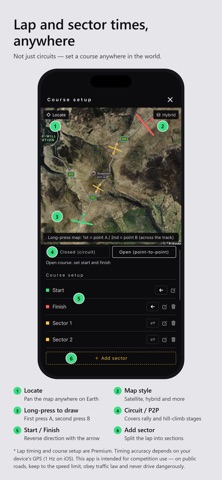
Circuits, of course — but you can set a course anywhere in the world. Long-press the map to place start, finish and sector lines, and every crossing splits a lap and a sector automatically. Best lap, last lap and every sector time stay on the main screen, so you can see where you are finding time while you drive.
Closed circuits and open point-to-point courses are both supported, so rally and hill-climb stages work too. Save as many courses as you like, set which direction counts as a crossing, and add as many sectors as you need. With no course set, the LAP button still times from where you stand.
■ One integrated meter
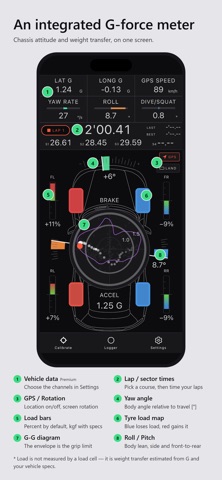
Four-wheel load, the G-G diagram, yaw rate and roll/pitch on a single screen, right alongside the lap display. Everything you need while driving, in one place.
■ Four-wheel load monitoring
Weight transfer is computed from G-forces and your vehicle specs, then shown at each corner as colour and numbers, so you can see whether you are using all of the tyre. Load falling shifts blue, load building shifts red. Delta/absolute and %/kgf are both switchable.
■ G-G diagram
Lateral against longitudinal G, with the trail you actually drove and the envelope of the limit you reached. The envelope is where your car's grip runs out, drawn for you.
■ Understeer and oversteer alerts
Measured yaw rate is compared against the theoretical neutral-steer reference to catch sharp yaw-rate changes in the transient, and the app calls them out by voice and colour. The axle that is losing cornering force is boxed, so you can tell instantly which end is going. Tune it with a scene (circuit / winding road) × sensitivity profile.
■ Data logger and viewer
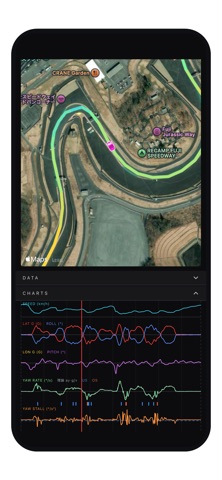
Record a session and review times, racing line and vehicle data afterwards. A track map coloured by speed, time-series charts of G, yaw rate and attitude, and the G-G diagram all follow one playhead. Understeer and oversteer segments are marked on the charts. Export to CSV to analyse the data in external tools.
■ Customisation
Theme (dark / light) and accent colour, which channels appear in the readout column, the range of each meter, load display units, render rate and more.
■ Three steps to start
1. Enter your vehicle info (weight, CG height, wheelbase, track, weight distribution). It works on the defaults, but the more accurate you are, the closer the load readout gets to your real car.
2. Mount the phone rigidly, screen upright.
3. Run calibration once before you drive.
No sensors handy? Settings has a "Play demo" mode that replays real recorded track data through every feature.
■ About the in-app purchase
Lap timing, the data logger and viewer, understeer/oversteer alerts and UI customisation are Premium features, unlocked with a single payment. There is no subscription and nothing auto-renews.
■ Please read
This app is a simulated monitor that estimates and displays vehicle attitude, load, G-forces and understeer/oversteer tendency from phone sensors and GPS. It is not a certified measuring instrument or a safety device. All values shown are approximate and are not guaranteed to be accurate real-world measurements. Load is not a load-cell reading; it is a computed estimate. Timing accuracy depends on your device's.
This app is intended for competition use in closed environments such as race circuits. Watching the screen while driving is distracted driving and is illegal and punishable under applicable traffic laws. Never watch the screen while driving on public roads. If you use it on public roads you must comply with all applicable laws and do so entirely at your own risk.
Safety and technology
Found in the app by AppBrain- Price
- Free
- App size
- 49.2 MB
- Content rating
- Everyone
Technologies used by QUAD-G ForceMeter Laptimer
Releases
Updates seen on the App Store- Version
- 1.2.2
- Launched
- August 2026
No changelog data
Alternatives
Similar apps and more from SYNSETECH LTD


Rankings
App Store top chartsApp Store Rankings for QUAD-G ForceMeter Laptimer
About the app and developer
About QUAD-G ForceMeter Laptimer
QUAD-G ForceMeter Laptimer is a sports app developed by SYNSETECH LTD.
User Ratings
The app has no ratings yet.
App Information
QUAD-G ForceMeter Laptimer is freely available from the App Store. The app size is 49.24 MB. The latest version available is 1.2.2. The last update was on October 5, 2026.
Technical Requirements
The app has a content rating of Everyone. The app has been available on the App Store since August 2026.
Developer information for SYNSETECH LTD
Address:
Frequently asked questions about QUAD-G ForceMeter Laptimer
Is QUAD-G ForceMeter Laptimer free?
Yes. QUAD-G ForceMeter Laptimer is free on the App Store.
Is QUAD-G ForceMeter Laptimer still available?
Yes. QUAD-G ForceMeter Laptimer is on the App Store, and the last update we saw was on October 5, 2026.
How large is QUAD-G ForceMeter Laptimer?
QUAD-G ForceMeter Laptimer is 49.24 MB.
Is QUAD-G ForceMeter Laptimer suitable for children?
App Store rates the content of QUAD-G ForceMeter Laptimer as suitable for everyone.
Who made QUAD-G ForceMeter Laptimer?
QUAD-G ForceMeter Laptimer was developed by SYNSETECH LTD. It is listed in the sports category on the App Store.
What are the best alternatives to QUAD-G ForceMeter Laptimer?
People looking at QUAD-G ForceMeter Laptimer also look at these sports apps: Analyzer For Gymkhana, Pace Motorsport, Apex Lines: Track Day Notebook, LapPulse Timer, LapVision Mobile.