

Quantum: AI Photo Enhancer
Quantum: AI Photo Enhancer is made and published by Perdus Labs. AppBrain is an independent app data site and isn't affiliated with Perdus Labs. The app name, icon, screenshots and description belong to Perdus Labs and are shown as published on the App Store.
AppBrain's verdict
- Last updated
- August 14, 2026
Rankings
App Store top chartsApp Store Rankings for Quantum: AI Photo Enhancer
Competitors
Similar apps and more from Perdus LabsAlternatives to Quantum: AI Photo Enhancer


More from Perdus Labs


Releases
Updates seen on the App Store- Version
- 2.2
- Launched
- July 2024
No changelog data
User feedback
Ratings and reviews on the App StoreComments on Quantum: AI Photo Enhancer for iOS
We don't have enough comments to show example comments. Please check back later.
Technology
Found in the app by AppBrain- Price
- Free
- App size
- 19.4 MB
- Content rating
- Everyone
Technologies used by Quantum: AI Photo Enhancer
About the app and developer
About Quantum: AI Photo Enhancer
Quantum: AI Photo Enhancer is a graphics & design app developed by Perdus Labs.
What is the rating of Quantum: AI Photo Enhancer?
Quantum: AI Photo Enhancer has no ratings yet.
Is Quantum: AI Photo Enhancer free?
Quantum: AI Photo Enhancer is free. The app size is 19.41 MB. The latest version available is 2.2. The last update was on August 14, 2026.
What are the requirements for Quantum: AI Photo Enhancer?
The app has a content rating of Everyone. The app has been available on the App Store since July 2024.
Developer information for Perdus Labs
Address:
Frequently asked questions about Quantum: AI Photo Enhancer
Is Quantum: AI Photo Enhancer free?
Yes. Quantum: AI Photo Enhancer is free on the App Store.
Is Quantum: AI Photo Enhancer still available?
Yes. Quantum: AI Photo Enhancer is on the App Store, and the last update we saw was on August 14, 2026.
How large is Quantum: AI Photo Enhancer?
Quantum: AI Photo Enhancer is 19.41 MB.
Is Quantum: AI Photo Enhancer suitable for children?
App Store rates the content of Quantum: AI Photo Enhancer as suitable for everyone.
Who made Quantum: AI Photo Enhancer?
Quantum: AI Photo Enhancer was developed by Perdus Labs. It is listed in the graphics & design category on the App Store.
What are the best alternatives to Quantum: AI Photo Enhancer?
People looking at Quantum: AI Photo Enhancer also look at these graphics & design apps: Ai Image Generator - AuraX AI, AI Avatar-Headshot & Art Maker, Upsize an Img - Image Upscaler, Flux AI - Lumenis, AI Doodle Art: Sketch to Photo.
Store listing
By Perdus Labs, from the App Store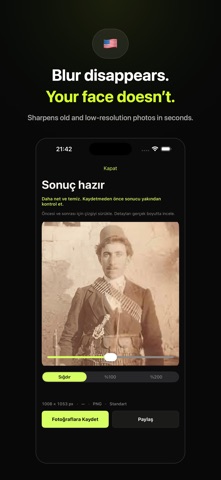


Description by Perdus Labs Written by the developer, not by AppBrain. Click to read.
Turn blurry, pixelated, or low-resolution photos into sharper, cleaner, higher-resolution images while keeping the original look intact.
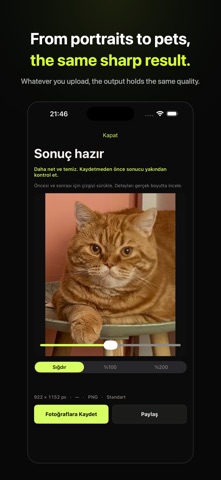
Quantum Upscaler is built for faithful enhancement—not creative redrawing. Choose a mode for portraits, products, pets, illustrations, anime, old photos, documents, architecture, night shots, 3D renders, or food. The app guides the enhancement toward the details that matter for each image.
WHY QUANTUM UPSCALER
• Enhance image clarity and natural detail
• Reduce blur, noise, compression artifacts, and pixelation
• Preserve faces, expressions, objects, text, logos, colors, and composition
• Choose Standard (1K), High Quality (2K), or Studio Output (4K)
• Create one or two output variations
• Keep the original aspect ratio or choose 1:1, 4:5, 9:16, or 16:9
• Add an optional instruction for details you want preserved
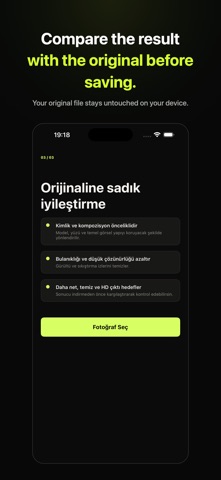
• Compare before and after with an interactive slider
• Save, share, and revisit completed enhancements
SPECIALIZED MODES
Automatic analyzes the image and recommends a suitable approach. Portrait protects identity and natural skin texture. Product preserves shape, packaging, labels, and brand colors. Pet protects fur markings and eye color. Illustration and Anime retain the original drawing style. Additional modes help with old photos, text and documents, architecture, night photography, 3D and game renders, and food.
SIMPLE WORKFLOW
1. Choose a photo
2. Select a mode and quality
3. Enhance
4. Compare the result and save
New users receive 10 complimentary credits. Standard enhancement uses 5 credits per output, High Quality uses 10, and Studio Output uses 20. The credit cost is always shown before processing.
Quantum Upscaler focuses on one job: making your photo clearer while preserving what makes it yours.