

Limitto: Screen Time Blocker
Limitto: Screen Time Blocker is made and published by Perdus Labs. AppBrain is an independent app data site and isn't affiliated with Perdus Labs. The app name, icon, screenshots and description belong to Perdus Labs and are shown as published on the App Store.
AppBrain's verdict
- Last updated
- August 18, 2026
Rankings
App Store top chartsApp Store Rankings for Limitto: Screen Time Blocker
Competitors
Similar apps and more from Perdus LabsAlternatives to Limitto: Screen Time Blocker


More from Perdus Labs


Releases
Updates seen on the App Store- Version
- 1.2
- Launched
- July 2026
No changelog data
User feedback
Ratings and reviews on the App StoreComments on Limitto: Screen Time Blocker for iOS
We don't have enough comments to show example comments. Please check back later.
Technology
Found in the app by AppBrain- Price
- Free
- App size
- 20.8 MB
- Content rating
- Everyone
Technologies used by Limitto: Screen Time Blocker
About the app and developer
About Limitto: Screen Time Blocker
Limitto: Screen Time Blocker is an utilities app developed by Perdus Labs.
User Ratings
The app has no ratings yet.
App Information
Limitto: Screen Time Blocker is freely available from the App Store. The app size is 20.79 MB. The latest version available is 1.2. The last update was on August 18, 2026.
Technical Requirements
The app has a content rating of Everyone. The app has been available on the App Store since July 2026.
Developer information for Perdus Labs
Address:
Frequently asked questions about Limitto: Screen Time Blocker
Is Limitto: Screen Time Blocker free?
Yes. Limitto: Screen Time Blocker is free on the App Store.
Is Limitto: Screen Time Blocker still available?
Yes. Limitto: Screen Time Blocker is on the App Store, and the last update we saw was on August 18, 2026.
How large is Limitto: Screen Time Blocker?
Limitto: Screen Time Blocker is 20.79 MB.
Is Limitto: Screen Time Blocker suitable for children?
App Store rates the content of Limitto: Screen Time Blocker as suitable for everyone.
Who made Limitto: Screen Time Blocker?
Limitto: Screen Time Blocker was developed by Perdus Labs. It is listed in the utilities category on the App Store.
What are the best alternatives to Limitto: Screen Time Blocker?
People looking at Limitto: Screen Time Blocker also look at these utilities apps: TrueFocus: Screen Time Control, Kids Mode: Safe Child Lock App, Bluetooth Device Finder Pro, Time Out: Walk to Unlock Apps, Макснет. ИнтеллиДом.
Store listing
By Perdus Labs, from the App Store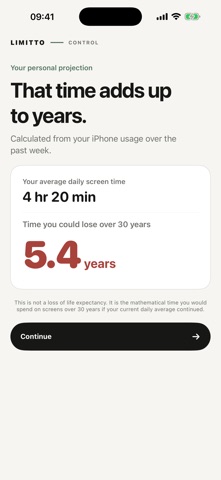




Description by Perdus Labs Written by the developer, not by AppBrain. Click to read.
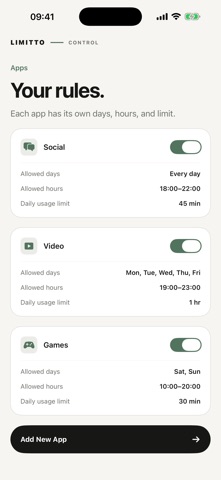
See your recent screen time pattern, understand how those hours add up over the years, and set a realistic personal target. Choose allowed days, allowed hours, and a daily limit for every app separately.
Need a quick break from one app? Start Focus Now for 15 minutes to 8 hours. The block lifts automatically when the session ends.
Highlights:
• A separate daily limit for each app
• Rules for selected days of the week
• All-day or custom allowed hours
• One-time Focus Now sessions
• Reminders before an app locks
• Today and weekly usage summaries
• Optional six-digit PIN to protect settings
• Light and Dark Mode, no account required
Privacy by design:
Your app selections stay on device as privacy-protected Apple tokens. Screen Time usage is shown inside Apple's protected reporting environment and is never sent to Limitto servers.
Limitto Pro offers auto-renewing weekly and annual plans. Eligible new subscribers may receive a 3-day free trial. Trial eligibility, localized price, billing period, and renewal terms are shown on the App Store purchase sheet before you confirm. Subscriptions can be managed or canceled in your Apple Account.
Important limitation:
Limitto uses individual Screen Time authorization. The device owner can delete the app or revoke Screen Time access in system settings. This version does not provide remote child-device management or Family Sharing child-account management.
Terms of Use (Apple Standard EULA):
https://www.apple.com/legal/internet-services/itunes/dev/stdeula/