

TrueFocus: Screen Time Control
TrueFocus: Screen Time Control is made and published by Quillstone Limited. AppBrain is an independent app data site and isn't affiliated with Quillstone Limited. The app name, icon, screenshots and description belong to Quillstone Limited and are shown as published on the App Store.
AppBrain's verdict
- Last updated
- October 1, 2026
- Size
- 50.3 MB
User feedback
Ratings and reviews on the App StoreComments on TrueFocus: Screen Time Control for iOS
We don't have enough comments to show example comments. Please check back later.
Store listing
By Quillstone Limited, from the App Store




Description by Quillstone Limited Written by the developer, not by AppBrain. Click to read.
TrueFocus is here to help you take your life back. By protecting your mornings, focus sessions, and sleep, TrueFocus replaces frustrating hard blocks with intentional daily guards and mindful pauses. Build true self-discipline, reclaim up to 2 hours every single day, and put your time where it actually matters.
Why Other Screen Time Control Apps Fail
We know you’ve tried to fix this before. But rigid locks only lead to frustration (and instant bypasses), while endless usage charts don't stop autopilot taps. TrueFocus is different. Instead of trapped restrictions, it gives your day structure, interrupts habit loops, and trains your brain to step away naturally.
The Benefits You’ll Have
• Reclaim 1–2 Hours Daily: Turn wasted scroll time into hobbies, family, and rest.
• Break Autopilot Taps: Stop impulsive app-opening habits before they start.
• Sleep Deeper & Rest Better: Gain up to 50 extra minutes of quality sleep every week.
• Supercharge Productivity: Complete tasks faster without constant digital noise.
3 Smart Guards for Your Critical Routines
• Morning Guard: Stop losing your first 30 minutes in bed to doomscrolling. Start your morning with clarity before social feeds pull you in.
• Focus Guard: Eliminate constant app notifications during deep work or study. Protect your flow state and finish tasks in less time.
• Night Guard: End the "just 5 more minutes" bedtime trap. Keep screens out of bed, wind down peacefully, and protect your sleep quality.
A Mindful Pause, Not a Cold Hard Wall
When you reach for a guarded app on autopilot, TrueFocus doesn't just slam the door—it interrupts the urge with interactive friction to help you wake up your prefrontal cortex:
• Intention Check-In: Answer one honest question: "What are you here for?"
• Guided Breathing: Take a 5-second deep breath to let the dopamine rush settle.
• Brain Micro-Tasks: Solve a quick math challenge or tap a mini-task to reset your impulsive brain.
• Science-Backed: Research published in PNAS found that adding a mindful pause before opening distracting apps helped reduce actual app openings by 57% over six weeks. Most times, you'll realize you didn't need the app at all!
Precision Rules: Allowlists, Blocklists & Categories
Tailor your limits to your actual lifestyle with maximum flexibility:
• Blacklists & Whitelists: Block specific distracting apps (Social, Games, Shopping, Video) or lock everything except essential tools like Maps, Work Chat, and Calls.
• Category & App-Level Control: Group and guard entire categories with one tap, or pick individual apps with surgical precision.
Detailed Control Logs: Track Every Attempt & Victory
• Open vs. Resisted Counts: See exact daily metrics—how many times you reached for an app versus how many times you successfully resisted and walked away.
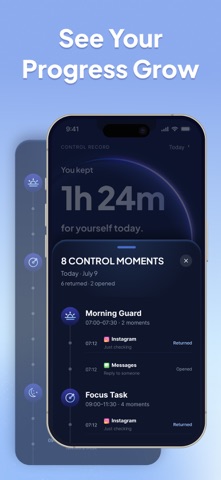
• Precise Timestamps: View a complete Control Moments timeline showing the exact time of every attempt, pause, and breakthrough.
• Daily Victory Summaries: Get positive, encouraging feedback ("You resisted 14 impulsive taps and reclaimed 1h 32m for yourself today!").
Private, Safe & In Your Control
• Powered by Apple’s Screen Time API: Built natively for iOS with zero battery drain.
• 100% Private: Your browsing history, messages, and personal data never leave your device.
• You Hold the Key: Turn any guard on or off whenever you choose.
Unlock TrueFocus Pro
Upgrade to TrueFocus Premium for smarter screen time control, distraction blocking, and tools to build healthier digital habits. TrueFocus Pro is available as an auto-renewable subscription. You can manage or cancel your subscription anytime in your Apple ID settings.
Privacy Policy: https://www.qstonelabs.com/screen-time-control-privacy.html
Terms of Use: https://www.qstonelabs.com/terms.html
Safety and technology
Found in the app by AppBrain- Price
- Free
- App size
- 50.3 MB
- Content rating
- Medium
Technologies used by TrueFocus: Screen Time Control
Releases
Updates seen on the App Store- Version
- 1.1.3
- Launched
- August 2026
No changelog data
Alternatives
Similar apps and more from Quillstone LimitedAlternatives to TrueFocus: Screen Time Control


More from Quillstone Limited

Rankings
App Store top chartsApp Store Rankings for TrueFocus: Screen Time Control
About the app and developer
About TrueFocus: Screen Time Control
TrueFocus: Screen Time Control is an utilities app developed by Quillstone Limited.
User Ratings
The app has no ratings yet.
App Information
TrueFocus: Screen Time Control is freely available from the App Store. The app size is 50.27 MB. The latest version available is 1.1.3. The last update was on October 1, 2026.
Technical Requirements
The app has a content rating of Medium Maturity. The app has been available on the App Store since August 2026.
Developer information for Quillstone Limited
Address:
Frequently asked questions about TrueFocus: Screen Time Control
Is TrueFocus: Screen Time Control free?
Yes. TrueFocus: Screen Time Control is free on the App Store.
Is TrueFocus: Screen Time Control still available?
Yes. TrueFocus: Screen Time Control is on the App Store, and the last update we saw was on October 1, 2026.
How large is TrueFocus: Screen Time Control?
TrueFocus: Screen Time Control is 50.27 MB.
Is TrueFocus: Screen Time Control suitable for children?
App Store gives TrueFocus: Screen Time Control a medium maturity rating, so it is not meant for young children.
Who made TrueFocus: Screen Time Control?
TrueFocus: Screen Time Control was developed by Quillstone Limited. It is listed in the utilities category on the App Store.
What are the best alternatives to TrueFocus: Screen Time Control?
People looking at TrueFocus: Screen Time Control also look at these utilities apps: Momento: Clean Up Storage, Live Transcribe, Voice to Text, Limitto: Screen Time Blocker, Leastric, PhonePause - Parent Lock.