Download Android Apps and Games
AppBrain
  • Apps
  • Apps being viewed right now Trending apps today Most popular apps All-time most downloaded apps Top rated apps
  • Intelligence ▾
    Intelligence overview → Track any Android app or your whole market
    Track & analyze
    Keyword Tracker & OptimizerTrack & improve Play rankings App Performance ReportOne-off PDF for any app StatisticsFree Android & Play market stats
    Promote your app
    Featured Apps App Links
  • Intelligence
  • Pricing
  • Dashboard
  • Sign up
  • Log in
Last updated on: 2026-08-13
App Store Apps > Productivity > Quick Notes Jot Pad & Write
Quick Notes Jot Pad & Write icon

Quick Notes Jot Pad & Write

1.1.0
Phuc Pham
0.00
0 reviews
Free

Quick Notes Jot Pad & Write Screenshot 1 of 3
Quick Notes Jot Pad & Write Screenshot 2 of 3
Quick Notes Jot Pad & Write Screenshot 3 of 3
Download from the App Store

About Quick Notes Jot Pad & Write

Quick Notes Jot Pad & Write is an overall app developed by Phuc Pham.

Download Statistics

User Ratings

The app has no ratings yet.

App Information

Quick Notes Jot Pad & Write is FREE to download. The APK download size is 731.00 kB. The latest version available is 1.1.0. The last update was on June 12, 2026.

Technical Requirements

The app has a content rating of Everyone. The app has been available on Google Play May 2026.

Description
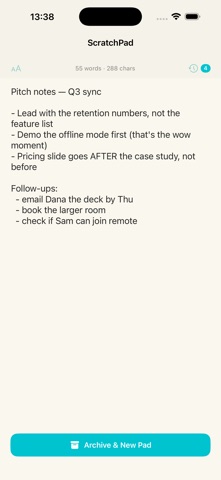
ScratchPad is the fastest way to jot something down on your iPhone or iPad. One persistent scratchpad that's always exactly where you left it — no sync, no accounts, no list clutter. Just open and write.

Most note apps make you create a note, name it, file it, and find it again later. ScratchPad does the opposite: there's a single full-screen pad waiting for you the moment you open the app. Type a phone number, a grocery list, a half-formed idea, a quote, a draft message — anything. It's saved automatically as you type.

When a pad is done, tap "Archive & New Pad" to tuck it into History and start fresh on a clean page. Need an old note back? Open History and restore it with one tap.

Key features:

• Instant-open editor — the app launches straight into a full-screen pad with the keyboard ready.

• Always saved — every keystroke is persisted automatically. Force-quit, switch apps, restart — your text is still there.

• Archive & start fresh — clear the page without losing it. Archived pads move to History.

• History with restore — browse past pads, see when each was saved and how long it is, and restore any of them instantly.

• Word + character count — a live count sits at the top while you write.

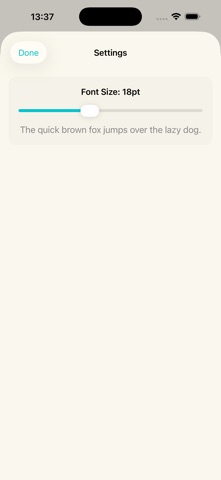
• Adjustable font size — set a comfortable text size from 12 to 28 pt.

• Landscape support — rotate for a wider writing surface on iPad or iPhone.

Privacy by design:
ScratchPad collects nothing. No analytics, no ads, no tracking, no account, no network requests. Everything you type stays on your device. There is no cloud, because there is nothing to sync.

ScratchPad is for you if:
• You want a notepad you can open and write in within one second.
• You're tired of note apps that bury one line of text under folders and tags.
• You like a single, always-available scratch surface for quick thoughts.
• You care about a simple, fast app that respects your time and your data.

PREMIUM
Unlock everything with a 3-day free trial, then an affordable subscription — cancel anytime. No ads, no tracking; everything stays on your device.

— LEGAL —
Terms of Use: https://web-levi.web.app/terms-of-use
Privacy Policy: https://web-levi.web.app/privacy-policy

— SUPPORT —
Questions or feedback? Contact us at: tphuc.work@gmail.com
Show more Show less

More data about Quick Notes Jot Pad & Write

Price Free to download
Rating No ratings
Ranking Not ranked
Version 1.1.0
App download size 731.0 KB
Suitable for Everyone

Alternative downloads for the Quick Notes Jot Pad & Write app

Jotio – Quick Notes icon Jotio – Quick Notes
Heiko Witte
5.0
Free
1 ratings
Optimum: Planner & Focus Timer icon Optimum: Planner & Focus Timer
Mohini Sharma
0.0
Free
Artiful Reader: Read & Listen icon Artiful Reader: Read & Listen
Frank Liu
5.0
Free
10 ratings
Quick Widget Memo icon Quick Widget Memo
Yutaka Kato
0.0
Free
Handwritten Idea Notes icon Handwritten Idea Notes
tadashi atoji
4.6
Free
70 ratings
Flatastic: Chore Checklist icon Flatastic: Chore Checklist
Flatastic GmbH
4.8
Free
268 ratings
Agenda: Notes meets Calendar icon Agenda: Notes meets Calendar
Momenta B.V.
4.6
Free
3.7K ratings
Genspark AI Workspace icon Genspark AI Workspace
GENSPARK INC
4.7
Free
4.0K ratings

More from Phuc Pham

Step Streak Counter & Goal icon Step Streak Counter & Goal
Phuc Pham
1.0
Free
1 ratings
Eye Break Timer: 20-20-20 icon Eye Break Timer: 20-20-20
Phuc Pham
1.0
Free
1 ratings
Hash Calculator MD5 SHA256 icon Hash Calculator MD5 SHA256
Phuc Pham
1.0
Free
1 ratings
Flag Quiz: Learn Countries icon Flag Quiz: Learn Countries
Phuc Pham
1.0
Free
1 ratings
Golf Shot Tracer: Ball Flight icon Golf Shot Tracer: Ball Flight
Phuc Pham
1.0
Free
1 ratings
Book Journal & Reading Tracker icon Book Journal & Reading Tracker
Phuc Pham
1.0
Free
1 ratings
Cool Text Fancy Font Symbols icon Cool Text Fancy Font Symbols
Phuc Pham
1.0
Free
1 ratings
Air Quality: AQI Tracker icon Air Quality: AQI Tracker
Phuc Pham
5.0
Free
1 ratings

Changelog of Quick Notes Jot Pad & Write

No changelog data

Developer information for Phuc Pham

Phuc Pham

Address:

Share Quick Notes Jot Pad & Write

Comments on Quick Notes Jot Pad & Write for iOS

We don't have enough comments to show example comments. Please check back later.

App Store Rankings for Quick Notes Jot Pad & Write

This app is not ranked

Technologies used by Quick Notes Jot Pad & Write

Today's trending apps Top new apps Apps on sale Apps other people are watching Popular Overall
Jotio – Quick Notes icon Jotio – Quick Notes
Optimum: Planner & Focus Timer icon Optimum: Planner & Focus Timer
Artiful Reader: Read & Listen icon Artiful Reader: Read & Listen
Quick Widget Memo icon Quick Widget Memo
Handwritten Idea Notes icon Handwritten Idea Notes
Flatastic: Chore Checklist icon Flatastic: Chore Checklist
Agenda: Notes meets Calendar icon Agenda: Notes meets Calendar
Genspark AI Workspace icon Genspark AI Workspace

Back to top
AppBrain Intelligence premium content

Subscribe now to get full and unlimited access to AppBrain Intelligence. You'll have access to:

  • App Intelligence dashboard (performance timeline, competitor comparison, country rankings, insight cards)
  • Detailed ranking data per app
  • Full timeline per developer
  • Device market shares data per country
  • Unlimited keyword tracking
1 Month

$75/mo
(billed every month)

SAVE 0%
Subscribe
3 Months

$65/mo
($195 billed every 3 months)

SAVE 13%
Subscribe
1 Year

$57.50/mo
($690 billed every year)

SAVE 23%
Subscribe
Each subscription will automatically renew 3 days before the expiration date for the same time period. Subscriptions can be cancelled at any time before the renewal.

AppBrain is a directory focused on discovering great apps and games. We give statistics, rankings and search options that Google Play and the App Store don't have. All trademarks are owned by their respective owners. AppBrain doesn't offer APKs or binaries, and always lets users install the official version from Google Play or the App Store.

More apps

  • Top Android apps being viewed
  • Depth Wallpaper Plus Android App
  • Scary Train Escape
  • Diseases and Disorders stats

Android Statistics

  • Android statistics
  • Google Play Developer stats
  • Trending Android Apps
  • Top popular Apps
  • Buy the best Android phone

About AppBrain

  • Contact
  • Privacy
  • Documentation
  • DMCA takedowns
  • Articles
  • Blog
  • Top Free Games Apps for your iPhone or iPad
© 2010-2026 - AppBrain