

Quick Password Safe
Quick Password Safe is made and published by MIFUMI YOSHIDA. AppBrain is an independent app data site and isn't affiliated with MIFUMI YOSHIDA. The app name, icon, screenshots and description belong to MIFUMI YOSHIDA and are shown as published on the App Store.
AppBrain's verdict
- Last updated
- December 29, 2024
Rankings
App Store top chartsApp Store Rankings for Quick Password Safe
Competitors
Similar apps and more from MIFUMI YOSHIDAAlternatives to Quick Password Safe







More from MIFUMI YOSHIDA





Releases
Updates seen on the App Store- Version
- 1.9
- Launched
- July 2013
No changelog data
User feedback
Ratings and reviews on the App StoreComments on Quick Password Safe for iOS
We don't have enough comments to show example comments. Please check back later.
Technology
Found in the app by AppBrain- Price
- Free
- App size
- 5.57 MB
- Content rating
- Everyone
Technologies used by Quick Password Safe
About the app and developer
About Quick Password Safe
Quick Password Safe is an utilities app developed by MIFUMI YOSHIDA.
User Ratings
The app has no ratings yet.
App Information
Quick Password Safe is freely available from the App Store. The app size is 5.57 MB. The latest version available is 1.9. The last update was on December 29, 2024.
Technical Requirements
The app has a content rating of Everyone. The app has been available on the App Store since July 2013.
Developer information for MIFUMI YOSHIDA
Address:
Frequently asked questions about Quick Password Safe
Is Quick Password Safe free?
Yes. Quick Password Safe is free on the App Store.
Is Quick Password Safe still available?
Yes. Quick Password Safe is on the App Store, and the last update we saw was on December 29, 2024.
How large is Quick Password Safe?
Quick Password Safe is 5.57 MB.
Is Quick Password Safe suitable for children?
App Store rates the content of Quick Password Safe as suitable for everyone.
Who made Quick Password Safe?
Quick Password Safe was developed by MIFUMI YOSHIDA. It is listed in the utilities category on the App Store.
What are the best alternatives to Quick Password Safe?
People looking at Quick Password Safe also look at these utilities apps: myP@ssw0rd1, simple! QuickTodo+, LOCK MEMO - Secure Notes, Offline Password Safe, Notepad with Secure Lock.
Store listing
By MIFUMI YOSHIDA, from the App Store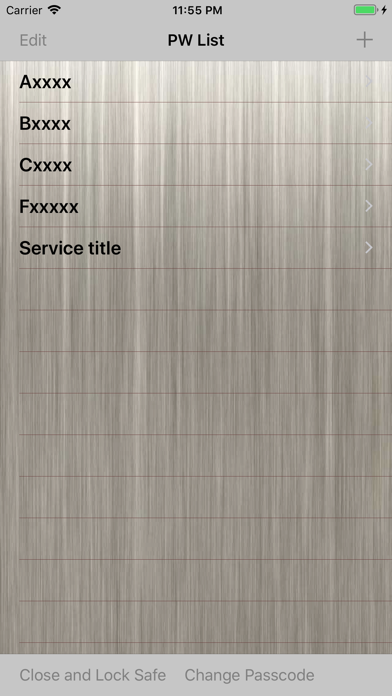

Description by MIFUMI YOSHIDA Written by the developer, not by AppBrain. Click to read.
This app safely keeps the password as a safe(cashbox). Recently, many accidents that are unauthorized access to accounts by the recycling of password have occurred.
With the increase in IT service, in order not to disturb the daily life, we want to avoid that the account is stolen.
However, to perform it, it becomes necessary to set a different password in each.
That means, it is impossible to remember passwords with one's head.
If you use this application, the app will remember your passwords, instead of you.
FEATURES
- It does not clearly display suddenly when viewing the password.
(You can fine-tune the brightness of the character using the slider.)
- It will return to its original position when you release your finger from the slider, it is suitable to browse secretly.
- ID and password can also be used to copy. (Not recommended)
- You can protect the app itself with a passcode.
USAGE
A. SETTING THE PROTECTION PASSCODE
(1)If this is the first time, set the (any 4-digit) passcode to protect the app.
(2)If you press [Change Passcode] button at the bottom of the [PW List] screen, the screen to change the passcode you set opens.
(3)Set the passcode in the same way as the first.
(4)When you stop using it, press the [Close And Lock] button to protect the app.
(5)Enter the passcode in the startup screen when you use again.
B. PASSWORD REGISTRATION
(1)Press the [+] button in the [PW List] screen To open the create screen.
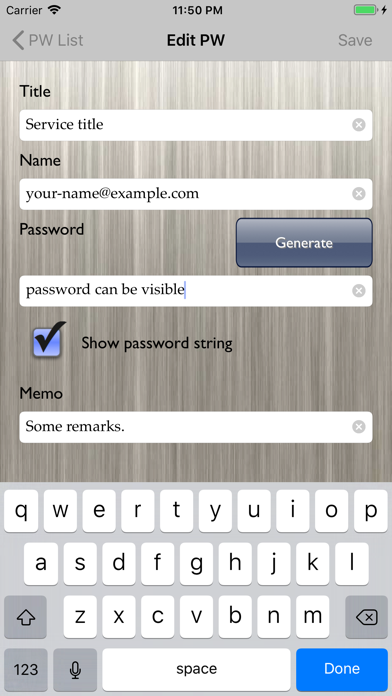
(2)Fill PW information(such as a password, user ID), and press the [Save] button.
(3)If you want to change the PW information, open the [Edit PW] screen by pressing the [Edit] button at the [PW Detail] screen.
C. SEE PASSWORD
(1)Tap the title of information you want to see in the [PW List] screen.
(2)[PW Detail] screen is displayed, but the password is hidden.
(3)Make sure the safety of your surroundings, and slide the slider to the right. Then password will gradually appear.
D. PASSWORD DELETION
(1)Press the [Edit] button on the [PW List] screen.
(2)Tap the [-]icon of the PW that you want to delete, and then press the [Delete] button.
(3)Press the [Done] button at the end.