

Quick Share : FIle Transfer
Quick Share : FIle Transfer is made and published by Karthik Bakshi. AppBrain is an independent app data site and isn't affiliated with Karthik Bakshi. The app name, icon, screenshots and description belong to Karthik Bakshi and are shown as published on the App Store.
AppBrain's verdict
- Rating on App Store
- 3.90
- 39 ratings
- Last updated
- June 30, 2026
- Size
- 38.7 MB
It doesn't have enough ratings yet to judge what users think.
User feedback
Ratings and reviews on the App StoreComments on Quick Share : FIle Transfer for iOS
We don't have enough comments to show example comments. Please check back later.
Store listing
By Karthik Bakshi, from the App Store


Description by Karthik Bakshi Written by the developer, not by AppBrain. Click to read.
Discover Quick Share - Your All-in-One Sharing Solution
Say goodbye to cumbersome sharing methods and hello to effortless, fast, and secure file transfers with File Sharing - Quick Share. Whether you’re sharing photos, videos, music, contacts, or any files, Quick Share makes it incredibly easy.
Key Features:
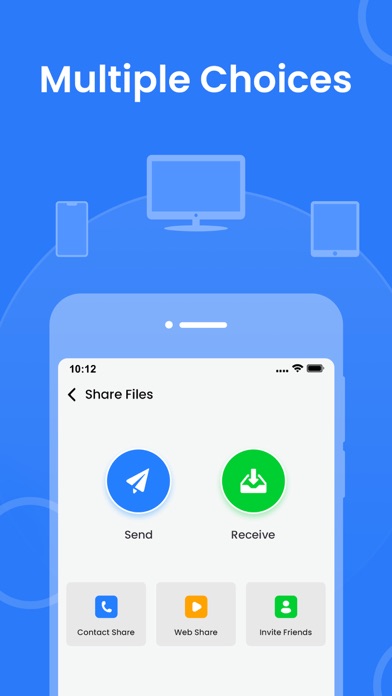
Universal Sharing: Share anything, anywhere. Whether it’s photos, videos, music, contacts, or files, Quick Share handles it all seamlessly.
Blazing-Fast Transfers: Experience ultra-fast transfer speeds, even for large HD videos and high-resolution photos. No more waiting around!
Top-Notch Security: Your privacy is our priority. Quick Share uses advanced security measures to keep your data safe during transfers. Share with confidence knowing your information is protected.
User-Friendly Interface: Quick Share’s intuitive design makes it easy for anyone to share files quickly and efficiently. Perfect for beginners and pros alike.
Organize with Ease: Manage your shared content effortlessly. Quick Share’s built-in organization features ensure your files, photos, videos, music, and contacts are always within reach.
Unlimited Sharing: Share without limits. Quick Share offers unrestricted sharing capabilities with no hidden fees or restrictions.
Why Choose Quick Share?
Quick Share stands out with its unbeatable speed, robust security, and incredible versatility. Whether sharing personal moments, work documents, or important contacts, trust Quick Share to deliver swiftly and securely.
Download File Sharing - Quick Share Today and Experience Seamless Sharing on iOS!
Get unlimited access to all premium features of Quick Share: Fast File Sharing by
Subscribe to Monthly Quick Share: Fast File Sharing Pro at USD $1.99,
Yearly Quick Share: Fast File Sharing Pro at USD $4.99,
and Lifetime Quick Share: Fast File Sharing Pro at USD $6.99
to use ad-free versions of the premium app, which can be canceled anytime.
• Privacy Policy: https://karthikbakshi.s3.ap-southeast-2.amazonaws.com/privacy-policy.html
• Terms of Service: https://www.apple.com/legal/internet-services/itunes/dev/stdeula/
Safety and technology
Found in the app by AppBrain- Price
- Free
- App size
- 38.7 MB
- Content rating
- High
Technologies used by Quick Share : FIle Transfer
Releases
Updates seen on the App Store- Version
- 2.0
- Launched
- September 2024
No changelog data
Alternatives
Similar apps and more from Karthik BakshiAlternatives to Quick Share : FIle Transfer



More from Karthik Bakshi





Rankings
App Store top chartsApp Store Rankings for Quick Share : FIle Transfer
About the app and developer
About Quick Share : FIle Transfer
Quick Share : FIle Transfer is a productivity app developed by Karthik Bakshi.
What is the rating of Quick Share : FIle Transfer?
Quick Share : FIle Transfer is rated 3.90 out of 5 stars, based on 39 ratings.
Is Quick Share : FIle Transfer free?
Quick Share : FIle Transfer is free. The app size is 38.71 MB. The latest version available is 2.0. The last update was on June 30, 2026.
What are the requirements for Quick Share : FIle Transfer?
The app has a content rating of High Maturity. The app has been available on the App Store since September 2024.
Developer information for Karthik Bakshi
Address:
Frequently asked questions about Quick Share : FIle Transfer
Is Quick Share : FIle Transfer free?
Yes. Quick Share : FIle Transfer is free on the App Store.
Is Quick Share : FIle Transfer still available?
Yes. Quick Share : FIle Transfer is on the App Store, and the last update we saw was on June 30, 2026.
How large is Quick Share : FIle Transfer?
Quick Share : FIle Transfer is 38.71 MB.
Is Quick Share : FIle Transfer suitable for children?
App Store gives Quick Share : FIle Transfer a high maturity rating. It is meant for adults.
How do people rate Quick Share : FIle Transfer?
Quick Share : FIle Transfer scores 3.90 out of 5 stars, from 39 ratings on the App Store.
Who made Quick Share : FIle Transfer?
Quick Share : FIle Transfer was developed by Karthik Bakshi. It is listed in the productivity category on the App Store.
What are the best alternatives to Quick Share : FIle Transfer?
People looking at Quick Share : FIle Transfer also look at these productivity apps: ShareMe - All File Sharing, FileShare: ShareIt Anywhere, SmAmp Pro, SmAmp Max, XendNow Tasklog.