

QuickieCam is made and published by Adam Fields. AppBrain is an independent app data site and isn't affiliated with Adam Fields. The app name, icon, screenshots and description belong to Adam Fields and are shown as published on the App Store.
AppBrain's verdict
- Last updated
- June 5, 2026
Rankings
App Store top chartsApp Store Rankings for QuickieCam
This app is not ranked
Competitors
Similar apps and more from Adam FieldsMore from Adam Fields


Releases
Updates seen on the App Store- Version
- 1.02
- Launched
- June 2026
No changelog data
User feedback
Ratings and reviews on the App StoreComments on QuickieCam for iOS
We don't have enough comments to show example comments. Please check back later.
Technology
Found in the app by AppBrain- Price
- $2.99
- App size
- 2.39 MB
- Content rating
- Everyone
Technologies used by QuickieCam
About the app and developer
About QuickieCam
QuickieCam is a photo & video app developed by Adam Fields.
User Ratings
The app has no ratings yet.
App Information
QuickieCam costs $2.99. The app size is 2.39 MB. The latest version available is 1.02. The last update was on June 5, 2026.
Technical Requirements
The app has a content rating of Everyone. The app has been available on the App Store since June 2026.
Developer information for Adam Fields
Address:
Store listing
By Adam Fields, from the App Store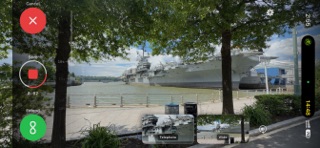
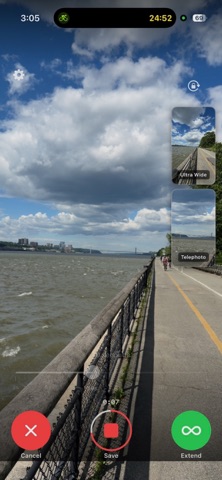
Screenshots by Adam Fields, from the the App Store listing
Description by Adam Fields Written by the developer, not by AppBrain. Click to read.
QuickieCam is built for one thing: not missing the shot.
The moment you open QuickieCam — or return to it from another app — it starts recording. No tapping. No waiting. If something is happening right now,
QuickieCam is already capturing it.
How it works
Set your capture duration with the time slider. QuickieCam records for that long, then stops and saves automatically. Too short? Hit the infinity button to
keep going. Changed your mind? Hit X to discard. Want a fresh clip mid-session? Press capture to stop, save, and immediately start the next one.
Multi-camera capture
Record from up to three cameras at once — ultra wide, wide, and telephoto — each saved as its own file. Tap any preview to swap it to the main display.
Configure resolution and frame rate per camera in settings.
Built for speed
- Starts capturing the instant the app gets focus
- Assign to your Action Button via Shortcuts for even faster access
- Volume buttons trigger capture
- Duration setting persists between sessions
- Videos optionally geotagged with your current location
A fair warning
QuickieCam is opinionated. It will capture video you didn't mean to keep. You'll spend a little time learning the controls. That's the tradeoff for never
missing a moment.
The moment you open QuickieCam — or return to it from another app — it starts recording. No tapping. No waiting. If something is happening right now,
QuickieCam is already capturing it.
How it works
Set your capture duration with the time slider. QuickieCam records for that long, then stops and saves automatically. Too short? Hit the infinity button to
keep going. Changed your mind? Hit X to discard. Want a fresh clip mid-session? Press capture to stop, save, and immediately start the next one.
Multi-camera capture
Record from up to three cameras at once — ultra wide, wide, and telephoto — each saved as its own file. Tap any preview to swap it to the main display.
Configure resolution and frame rate per camera in settings.
Built for speed
- Starts capturing the instant the app gets focus
- Assign to your Action Button via Shortcuts for even faster access
- Volume buttons trigger capture
- Duration setting persists between sessions
- Videos optionally geotagged with your current location
A fair warning
QuickieCam is opinionated. It will capture video you didn't mean to keep. You'll spend a little time learning the controls. That's the tradeoff for never
missing a moment.