

QuickList: Smart Grocery List
QuickList: Smart Grocery List is made and published by Elias Reyes. AppBrain is an independent app data site and isn't affiliated with Elias Reyes. The app name, icon, screenshots and description belong to Elias Reyes and are shown as published on the App Store.
AppBrain's verdict
- Rating on App Store
- 5.00
- 2 ratings
- Last updated
- January 8, 2026
It doesn't have enough ratings yet to judge what users think.
Rankings
App Store top chartsApp Store Rankings for QuickList: Smart Grocery List
Competitors
Similar apps and more from Elias ReyesAlternatives to QuickList: Smart Grocery List


More from Elias Reyes


Releases
Updates seen on the App Store- Version
- 2.0.0
- Launched
- November 2025
No changelog data
User feedback
Ratings and reviews on the App StoreComments on QuickList: Smart Grocery List for iOS
We don't have enough comments to show example comments. Please check back later.
Technology
Found in the app by AppBrain- Price
- Free
- App size
- 62.0 MB
- Content rating
- Everyone
Technologies used by QuickList: Smart Grocery List
About the app and developer
About QuickList: Smart Grocery List
QuickList: Smart Grocery List is a productivity app developed by Elias Reyes.
User Ratings
QuickList: Smart Grocery List is rated 5.00 out of 5 stars. The rating is based on 2 ratings.
App Information
QuickList: Smart Grocery List is freely available from the App Store. The app size is 62.01 MB. The latest version available is 2.0.0. The last update was on January 8, 2026.
Technical Requirements
The app has a content rating of Everyone. The app has been available on the App Store since November 2025.
Developer information for Elias Reyes
Address:
Store listing
By Elias Reyes, from the App Store




Description by Elias Reyes Written by the developer, not by AppBrain. Click to read.
QuickList turns your meal ideas into complete, organized shopping lists in seconds. Type what you’re cooking, tap from your saved meals, and let QuickList do the rest.
On supported devices, QuickList uses Apple’s on-device AI to understand your meals and build ingredient lists automatically.
CREATE GROCERY LISTS IN SECONDS
Start from a blank slate or reuse meals you’ve already saved.
• TYPE OR SELECT MEALS: Add meals on the Create tab, or tap from “My Meals” to reuse your favorites.
• AI-POWERED (SUPPORTED DEVICES): On devices with Apple’s on-device AI, QuickList can turn short meal descriptions into full ingredient lists automatically.
• SMART INGREDIENT MERGING: Automatically combines duplicate ingredients across multiple meals so you don’t overbuy.
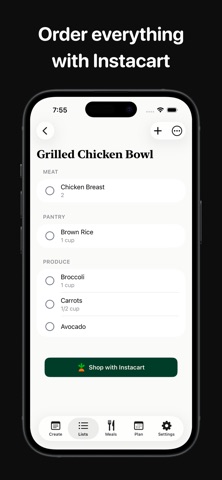
• ORGANIZED BY STORE: Lists are grouped into categories (Produce, Meat, Dairy, Pantry, etc.) so you can move through the store efficiently.
SAVE MEALS ONCE, REUSE FOREVER
QuickList doubles as a simple recipe manager so you’re never starting from zero.
• MEAL LIBRARY: Save meals with ingredients, quantities, and notes.
• FOLDERS: Organize meals into folders like “Weeknight,” “Family favorites,” or “Meal prep.”
• INSTANT LISTS: Turn any saved meal (or combination of meals) into a grocery list with a couple of taps.
• RECIPE IMPORT: Paste a recipe link from the web; QuickList pulls in ingredients so you can tweak and save.
PLAN AROUND HOW YOU EAT
Let QuickList respect your diet automatically.
• DIETARY PREFERENCES: Choose restrictions like gluten-free or dairy-free in Settings.
• SMART ADJUSTMENTS: When possible, QuickList swaps or flags ingredients that don’t match your preferences.
• ON-DEVICE AI (SUPPORTED DEVICES): Uses Apple’s on-device models to apply your preferences when building lists.
SHARE LISTS & PLAN TOGETHER
Use QuickList solo or as a shared planning tool.
• OPTIONAL ACCOUNT: Create an account with email, Apple, or Google to sync and share. You can still use QuickList without an account if you prefer.
• SHARED LISTS: Invite partners, roommates, or family members so everyone sees updates in real time.
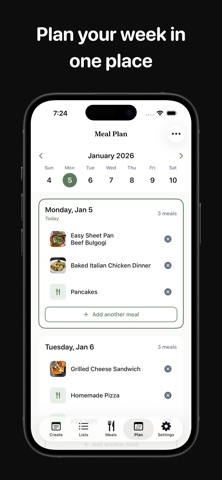
• SHARED MEAL PLANS: Plan the week together and keep grocery needs in sync across devices.
SHOP SMARTER, NOT HARDER
QuickList fits into the way you already shop.
• INSTACART INTEGRATION: Send your list to Instacart with one tap when you want to order delivery or pickup.
• CHECK OFF AS YOU GO: Tap items to mark them complete while you’re in the store.
• FAST EDITING: Add, remove, or adjust items and quantities on the fly.
STAY ON TRACK WITH REMINDERS
Build a simple habit around planning and shopping.
• DAILY REMINDERS: Get a gentle nudge to plan today’s meals.
• WEEKLY PLANNING REMINDERS: Pick a day and time to plan the week ahead.
• FULL CONTROL: Turn reminders on or off and customize times from Settings at any time.
PRIVACY-MINDED BY DESIGN
QuickList is built to keep your data close to you.
• LOCAL FIRST: Your private meals, lists, preferences, and notification settings are stored on your device.
• OPTIONAL CLOUD SYNC: When you choose to create an account and share, your shared lists and meal plans are stored securely in the cloud so collaborators can stay in sync.
• ON-DEVICE AI: Meal understanding on supported devices uses Apple’s on-device AI models, so your text stays on your device.
FREE TO START, PRO WHEN YOU NEED IT
Use QuickList for free with all core features, and upgrade to QuickList Pro if you want more.
• FREE: Create lists, save meals, import recipes, and use reminders.
• PRO (OPTIONAL UPGRADE): Unlock higher limits, deeper planning tools, and more flexibility for people who rely on QuickList every week.
Download QuickList and make grocery planning feel calm instead of chaotic.
Questions or feedback? Email elias@getquicklist.co
Terms of Use (EULA): https://www.apple.com/legal/internet-services/itunes/dev/stdeula/
Learn more at https://getquicklist.co