

QuickRecorder - Voice Library
QuickRecorder - Voice Library is made and published by KAZUHIRO KAKIMOTO. AppBrain is an independent app data site and isn't affiliated with KAZUHIRO KAKIMOTO. The app name, icon, screenshots and description belong to KAZUHIRO KAKIMOTO and are shown as published on the App Store.
AppBrain's verdict
Established- Rating on App Store
- 5.00
- 3 ratings
- Last updated
- August 25, 2026
It doesn't have enough ratings yet to judge what users think.
Rankings
App Store top chartsApp Store Rankings for QuickRecorder - Voice Library
Competitors
Similar apps and more from KAZUHIRO KAKIMOTOAlternatives to QuickRecorder - Voice Library







More from KAZUHIRO KAKIMOTO


Also available on Google Play

Releases
Updates seen on the App Store- Version
- 5.3.27
- Launched
- June 2018
No changelog data
User feedback
Ratings and reviews on the App StoreComments on QuickRecorder - Voice Library for iOS
We don't have enough comments to show example comments. Please check back later.
Technology
Found in the app by AppBrain- Price
- Free
- App size
- 77.0 MB
- Content rating
- Everyone
Technologies used by QuickRecorder - Voice Library
About the app and developer
About QuickRecorder - Voice Library
QuickRecorder - Voice Library is an utilities app developed by KAZUHIRO KAKIMOTO.
User Ratings
QuickRecorder - Voice Library is rated 5.00 out of 5 stars. The rating is based on 3 ratings.
App Information
QuickRecorder - Voice Library is freely available from the App Store. The app size is 76.98 MB. The latest version available is 5.3.27. The last update was on August 25, 2026.
Technical Requirements
The app has a content rating of Everyone. The app has been available on the App Store since June 2018.
Developer information for KAZUHIRO KAKIMOTO
Address:
Frequently asked questions about QuickRecorder - Voice Library
Is QuickRecorder - Voice Library free?
Yes. QuickRecorder - Voice Library is free on the App Store.
Is QuickRecorder - Voice Library still available?
Yes. QuickRecorder - Voice Library is on the App Store, and the last update we saw was on August 25, 2026.
How large is QuickRecorder - Voice Library?
QuickRecorder - Voice Library is 76.98 MB.
Is QuickRecorder - Voice Library suitable for children?
App Store rates the content of QuickRecorder - Voice Library as suitable for everyone.
How do people rate QuickRecorder - Voice Library?
QuickRecorder - Voice Library scores 5.00 out of 5 stars, from 3 ratings on the App Store.
Who made QuickRecorder - Voice Library?
QuickRecorder - Voice Library was developed by KAZUHIRO KAKIMOTO. It is listed in the utilities category on the App Store.
What are the best alternatives to QuickRecorder - Voice Library?
People looking at QuickRecorder - Voice Library also look at these utilities apps: eXtra Voice Recorder., SP Voice, RecorderHQ Pro, Voice Memos-Speech to Text, Contacts Groups Pro Mail, text.
Store listing
By KAZUHIRO KAKIMOTO, from the App Store


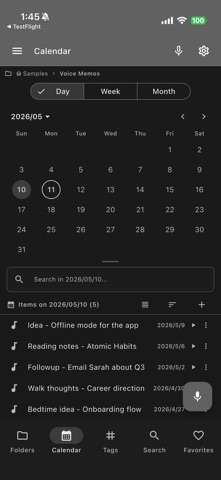
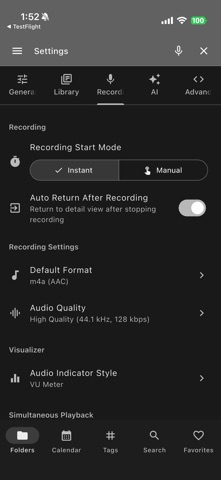
Description by KAZUHIRO KAKIMOTO Written by the developer, not by AppBrain. Click to read.
RECORDING:
- Multiple formats: m4a (AAC), WAV (PCM), OGG (Opus)
- Quality presets: Low (22 kHz), Medium (44.1 kHz), High (44.1 kHz / 128 kbps)
- 7 real-time visualizer styles: bar, line, VU meter, radial, blob, Siri waves, geometric
- Simultaneous playback during recording with echo cancellation
- Microphone device selection (desktop)
TRANSCRIPTION:
- On-device Whisper transcription (Base, Small, Medium, Large models)
- 100% local processing - no data sent to servers
- Speaker diarization with timestamps
- Real-time live transcription via OS speech engine
- 11 transcription languages supported
- Export transcripts as TXT, SRT, WebVTT, PDF, DOCX, or JSON
AI SUMMARY (Pro):
- Auto-generate structured summaries from transcripts
- Title, overview, key points, decisions, action items
- Export as Markdown, plain text, or JSON
- Clean up transcripts, suggest chapter markers, draft follow-ups, and review audio edit ideas
MEETING MODE:
- Meeting title, participants, and agenda tracking
- Action items with assignees and timestamps
- Meeting minutes export (Markdown / text)
EDITING:
- Trim with visual waveform and preview
- Delete ranges, split recordings, normalize volume, add fades, trim silence, and convert to MP3/WAV
- Save edits as new recordings with Restore Original history
- Noise reduction via FFmpeg filters
- Audio bookmarks with labels
- Playback speed control
- Undo system (up to 5 levels)
CLOUD & STORAGE:
- Dropbox, Google Drive, OneDrive integration
- Multiple workspace and folder management
- Full-text search across titles, tags, and saved transcripts
- Tags, favorites, Trash restore, and derived recording history
- Export and share recordings and transcripts
CUSTOMIZATION:
- 20+ theme colors with dark/light mode
- Customizable keyboard shortcuts
- Responsive layout for mobile, tablet, and desktop
QuickRecorder Pro unlocks:
- AI-powered summaries
- Ad-free experience
- Advanced transcription features
- Priority support
Terms of Use: https://kakitiro.com/quickapps/quickrecorder/terms/