QuickScan Enterprise - OCR is a business app developed by iSolid apps.
What is the rating of QuickScan Enterprise - OCR?
QuickScan Enterprise - OCR has no ratings yet.
Is QuickScan Enterprise - OCR free?
QuickScan Enterprise - OCR costs $79.99 to download. The download size is 27.89 MB. The latest version available is 9.6.2. The last update was on August 30, 2026.
What are the requirements for QuickScan Enterprise - OCR?
The app has a content rating of Everyone. The app has been available on the App Store since April 2023.
Description
QuickScan Enterprise is a specific version of QuickScan, made for businesses or schools. NO DATA COLLECTION.
### iOS integration ### • QuickScan has been designed specifically for iOS & iPadOS for seamless integration and an exceptional user experience.
### Scan & import ### • Scan with your camera (automatic document detection & automatic angle correction) • Import existing images • Import existing PDF files • Organize your documents in folders
### OCR (text recognition) ### • Professional-quality OCR on images and existing PDFs • Make documents searchable with text integrated into PDFs (search, select, copy, paste) • Automatic language detection and dictionary matching for highly accurate results
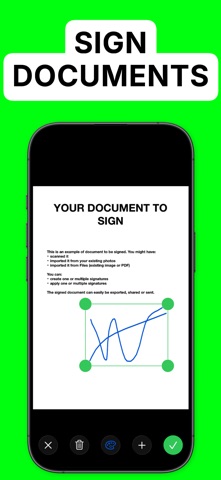
### SIGN ### • Add signatures to your documents • Create signatures with your finger, Apple Pencil, or import existing signatures • Adjust size and color for a polished look
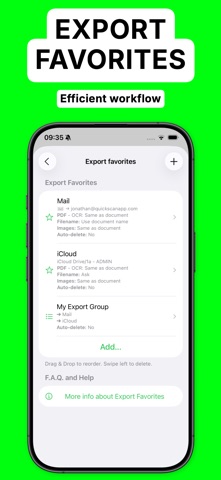
### Automate ### • Automatic document/file naming with patterns (e.g., document date, title, issuer, time, text, counter) • 'Export Favorites': Automatically export to preconfigured locations (cloud, email, etc.) with custom settings (color, black & white, filename, format) • 'Export Groups': Export to multiple locations simultaneously by grouping Export Favorites • Automatic deletion of documents after successful export • iOS Home screen & Lock screen Widgets & Control Center controls. Associate an Export Favorite to the widget for instant export to that favorite after the scan started by tapping the widget. • Place document automatically in the configured folder when the scan is started from a Widget/Shortcut associated to an Export Favorite • Siri Shortcuts compatible • Launch scan directly from the home screen with a long press on the app icon (or using a widget)
### Export ### • Export in PDF with the recognized text integrated (very advanced feature). This allows to search/copy & paste into the generated PDF. • Export recognized text as a .txt file • Export as images with optional filters (grayscale, black & white) • Save to cloud services with Favorites (iCloud Drive, Dropbox, Google Drive, OneDrive, SharePoint, WebDAV, paperless-ngx, pCloud, NAS, SMB, NextCloud, and more) • Export anywhere (to Files, to any Drive, E-mail, message, Airdrop, …), or to the cloud • Apply image filters (grayscale, black & white), crop, rotate images • Easily adjust output file size and quality with real-time size estimation
• ... and much more, there are really many useful features
Everything is processed on your device: No internet connection required and ZERO data collection.
There’s no quicker, easier way to scan, OCR, and manage documents beautifully
SUPPORTED LANGUAGES FOR OCR: • ENGLISH • GERMAN • FRENCH • SPANISH • ITALIAN • PORTUGUESE • CHINESE • KOREAN • JAPANESE • UKRAINIAN • RUSSIAN • VIETNAMESE • THAI • ARABIC • ARABIC NAJDI • Danish • Swedish • Dutch • Norwegian • Norwegian Nynorsk • Norwegian Bokmål • Czech • Polish • Romanian • Turkish • Indonesian • Malay • Other languages are supported but do not benefit from the enhanced accuracy provided by language dictionaries
I hope you’ll save a lot of time thanks to the efficiency of QuickScan!
Your privacy matters: everything happens locally, on your device! This app does not use any server. No personal data is collected.
Each subscription will automatically renew 3 days before the expiration date for
the same time period. Subscriptions can be cancelled at any time before the renewal.