

RabbitKey: Password Manager
RabbitKey: Password Manager is made and published by 心怡 刘. AppBrain is an independent app data site and isn't affiliated with 心怡 刘. The app name, icon, screenshots and description belong to 心怡 刘 and are shown as published on the App Store.
AppBrain's verdict
- Last updated
- July 6, 2026
- Size
- 70.4 MB
User feedback
Ratings and reviews on the App StoreComments on RabbitKey: Password Manager for iOS
We don't have enough comments to show example comments. Please check back later.
Store listing
By 心怡 刘, from the App Store


Description by 心怡 刘 Written by the developer, not by AppBrain. Click to read.
END-TO-END ENCRYPTION
Every entry is encrypted with XChaCha20-Poly1305 before it ever touches storage. Only your master password can unlock your vault — your data stays on your device, and we never see it.
BIOMETRIC UNLOCK
Unlock your vault instantly with Face ID or Touch ID. Your biometric data never leaves the device.
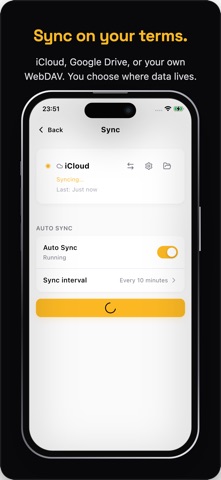
FREE CLOUD SYNC
Keep your vault in sync across iPhone, iPad, and Mac through iCloud, Google Drive, or your own WebDAV server — free, no Pro required. You choose where your data lives — or keep it fully offline.
SYSTEM AUTOFILL
RabbitKey integrates with iOS AutoFill so credentials appear right above the keyboard — in Safari, in apps, anywhere iOS supports autofill.
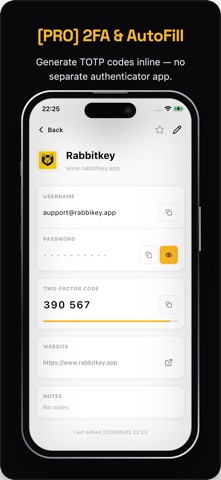
ONE-TIME CODES (OTP) WITH AUTOFILL
Store your two-factor authentication secrets next to the matching login. RabbitKey generates the rolling 6-digit code and autofills it straight from the keyboard — no app switching. OTP secrets are encrypted just like everything else.
STRONG PASSWORD GENERATOR
Generate high-entropy passwords on demand. Tune length and character classes to fit any site's rules.
PASSWORD HEALTH
Surface weak and reused passwords before they become a problem. RabbitKey scans your vault and flags entries that need attention.
IMPORT IN SECONDS
Migrating from another password manager or browser? Import existing passwords from a CSV file in a guided, step-by-step flow.
DEVICE MIGRATION
Moving to a new iPhone or iPad? Transfer your vault directly via QR code — no cloud, no account required.
MULTIPLE VAULTS
Keep work and personal credentials separate with independent vaults, each with its own master password.
TRASH & RECOVERY
Deleted something by accident? Entries stay in Trash for 30 days before permanent removal.
FREE vs PRO — ONE-TIME PURCHASE, NO SUBSCRIPTION
Free: up to 100 entries with full XChaCha20-Poly1305 encryption, biometric unlock, AutoFill, cloud sync (iCloud / Google Drive / WebDAV), password generator, password health, tags, multiple vaults, QR device migration, CSV import, trash recovery, and offline use.
Pro (one-time purchase): unlimited entries plus one-time codes (OTP) with autofill.
No subscriptions. No ads. No analytics SDKs. A password manager that respects your privacy.
Safety and technology
Found in the app by AppBrain- Price
- Free
- App size
- 70.4 MB
- Content rating
- Everyone
Technologies used by RabbitKey: Password Manager
Releases
Updates seen on the App Store- Version
- 1.2.2
- Launched
- June 2026
No changelog data
Alternatives
Similar apps and more from 心怡 刘Alternatives to RabbitKey: Password Manager


Rankings
App Store top chartsApp Store Rankings for RabbitKey: Password Manager
About the app and developer
About RabbitKey: Password Manager
RabbitKey: Password Manager is a productivity app developed by 心怡 刘.
User Ratings
The app has no ratings yet.
App Information
RabbitKey: Password Manager is freely available from the App Store. The app size is 70.38 MB. The latest version available is 1.2.2. The last update was on July 6, 2026.
Technical Requirements
The app has a content rating of Everyone. The app has been available on the App Store since June 2026.
Developer information for 心怡 刘
Address: