

RaptorPDF: PDF Editor-Scanner
RaptorPDF: PDF Editor-Scanner is made and published by Erkin Yagci. AppBrain is an independent app data site and isn't affiliated with Erkin Yagci. The app name, icon, screenshots and description belong to Erkin Yagci and are shown as published on the App Store.
AppBrain's verdict
- Last updated
- October 3, 2026
- Size
- 10.7 MB
User feedback
Ratings and reviews on the App StoreComments on RaptorPDF: PDF Editor-Scanner for iOS
We don't have enough comments to show example comments. Please check back later.
Store listing
By Erkin Yagci, from the App Store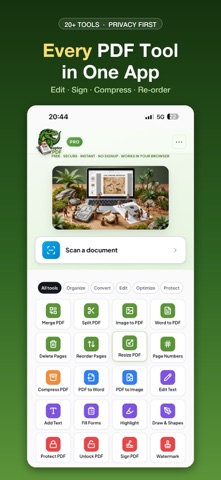



Description by Erkin Yagci Written by the developer, not by AppBrain. Click to read.
SCAN PAPER INTO PDF
Point your camera at a page and RaptorPDF finds the edges, straightens the perspective and cleans up the image — the way a real desk scanner would. Scan a whole stack in one go and every page lands as a single sharp PDF, ready to annotate, reorder or sign. Built-in OCR text recognition turns the scan into a searchable PDF, so you can find and select the words on the page instead of staring at a picture of them. Contracts, receipts, notes, ID pages, homework: paper goes in, a clean PDF comes out.
A REAL PDF EDITOR, NOT A VIEWER
Most mobile PDF apps are just a reader. RaptorPDF lets you work:
• Add text anywhere on the page, in any size and color
• Highlight passages and mark up what matters
• Draw freehand, add shapes, boxes and circles
• Drop sticky notes with adjustable opacity
• Undo and redo every change, or tap any mark to edit or delete it
• Redact content you need to hide
PDF TO WORD — AND BACK
Turn a PDF into a fully editable Word document (DOC, DOCX) with the layout, tables and formatting intact, then convert it straight back. Also converts to and from images (JPG, PNG) — so a photo becomes a PDF, and a PDF becomes shareable images.
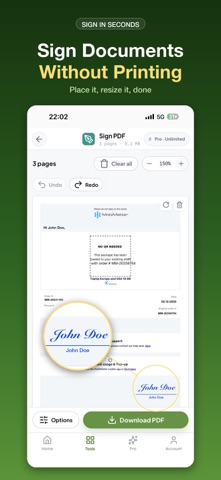
SIGN AND FILL, WITHOUT PRINTING
Draw your signature, type it, or upload one you already have. Save it once and reuse it forever. Place it, drag it, resize it, done — no printer, no scanner, no back-and-forth. Fill in PDF forms and add your e-signature directly on your phone.
ORGANIZE AND OPTIMIZE
• Merge and combine several PDFs into one
• Split a large PDF or extract the pages you need
• Reorder, rotate or delete pages
• Compress files that are too big to email
• Resize pages and add page numbers
• Add a watermark
• Lock a PDF with a password, or remove one you own
COMMON THINGS PEOPLE DO WITH RAPTORPDF
• Sign a PDF on your iPhone without printing it
• Convert a PDF to Word, edit it, and convert it back
• Scan paper documents to PDF with your camera
• Use OCR to make a scanned PDF searchable
• Combine several PDF files into one
• Compress a PDF that is too large to email
• Fill out a PDF form on your phone
PRIVACY FIRST — AND WE MEAN IT
Almost every tool here runs entirely on your device. Your merges, splits, edits, signatures, annotations, scans and compressions never leave your iPhone. There is no account required to start, no upload queue, and nothing stored on a server waiting to be breached. (One exception, stated plainly: high-fidelity PDF to Word conversion is handled by a secure conversion service, because that quality is not achievable on-device. Everything else stays local.)
BUILT FOR A PHONE, NOT SHRUNK ONTO ONE
Big tap targets, a tool sheet you can reach with your thumb, and a canvas you can pinch and pan. Files open from Files, Mail, Photos, iCloud Drive or any share sheet, and go back out the same way.
FREE AND PRO
Free includes 3 PDF operations per day and files up to 50MB — enough for everyday paperwork, with every tool unlocked. No tool is hidden behind a paywall.
Pro removes the daily limit and raises the file ceiling to 300MB:
• Pro Monthly — $4.99 per month
• Pro Yearly — $39.99 per year (works out to $3.33 a month)
Prices are in USD and may vary by storefront. Subscriptions are charged to your Apple Account at confirmation of purchase and renew automatically unless canceled at least 24 hours before the end of the current period. Manage or cancel anytime in your Apple Account settings.
Whether you are signing a lease on the train, scanning receipts at a kitchen table, or turning a PDF back into a Word file before a deadline — RaptorPDF has the tool, and it works in seconds.
Terms of Use: https://www.apple.com/legal/internet-services/itunes/dev/stdeula/
Privacy Policy: https://www.raptorpdf.com/privacy-policy.html
Safety and technology
Found in the app by AppBrain- Price
- Free
- App size
- 10.7 MB
- Content rating
- Everyone
Technologies used by RaptorPDF: PDF Editor-Scanner
Releases
Updates seen on the App Store- Version
- 1.3
- Launched
- February 2026
No changelog data
Alternatives
Similar apps and more from Erkin YagciAlternatives to RaptorPDF: PDF Editor-Scanner


More from Erkin Yagci

Rankings
App Store top chartsApp Store Rankings for RaptorPDF: PDF Editor-Scanner
About the app and developer
About RaptorPDF: PDF Editor-Scanner
RaptorPDF: PDF Editor-Scanner is a productivity app developed by Erkin Yagci.
User Ratings
The app has no ratings yet.
App Information
RaptorPDF: PDF Editor-Scanner is freely available from the App Store. The app size is 10.70 MB. The latest version available is 1.3. The last update was on October 3, 2026.
Technical Requirements
The app has a content rating of Everyone. The app has been available on the App Store since February 2026.
Developer information for Erkin Yagci
Address:
Frequently asked questions about RaptorPDF: PDF Editor-Scanner
Is RaptorPDF: PDF Editor-Scanner free?
Yes. RaptorPDF: PDF Editor-Scanner is free on the App Store.
Is RaptorPDF: PDF Editor-Scanner still available?
Yes. RaptorPDF: PDF Editor-Scanner is on the App Store, and the last update we saw was on October 3, 2026.
How large is RaptorPDF: PDF Editor-Scanner?
RaptorPDF: PDF Editor-Scanner is 10.70 MB.
Is RaptorPDF: PDF Editor-Scanner suitable for children?
App Store rates the content of RaptorPDF: PDF Editor-Scanner as suitable for everyone.
Who made RaptorPDF: PDF Editor-Scanner?
RaptorPDF: PDF Editor-Scanner was developed by Erkin Yagci. It is listed in the productivity category on the App Store.
What are the best alternatives to RaptorPDF: PDF Editor-Scanner?
People looking at RaptorPDF: PDF Editor-Scanner also look at these productivity apps: MyScanner: Scan PDF & QR Code, Crimson Pdf: Editor & Tools, Web Builder AI : Vibe Codes, Daily Betterment, NoDi: Lofi Pomodoro Timer.