

REC Voice recording
REC Voice recording is made and published by Sascha Koziellek. AppBrain is an independent app data site and isn't affiliated with Sascha Koziellek. The app name, icon, screenshots and description belong to Sascha Koziellek and are shown as published on the App Store.
AppBrain's verdict
- Last updated
- April 9, 2026
Rankings
App Store top chartsApp Store Rankings for REC Voice recording
Competitors
Similar apps and more from Sascha KoziellekAlternatives to REC Voice recording





More from Sascha Koziellek


Releases
Updates seen on the App Store- Version
- 1.0.9
- Launched
- June 2024
No changelog data
User feedback
Ratings and reviews on the App StoreComments on REC Voice recording for iOS
We don't have enough comments to show example comments. Please check back later.
Technology
Found in the app by AppBrain- Price
- Free
- App size
- 17.3 MB
- Content rating
- Everyone
Technologies used by REC Voice recording
About the app and developer
About REC Voice recording
REC Voice recording is a productivity app developed by Sascha Koziellek.
User Ratings
The app has no ratings yet.
App Information
REC Voice recording is freely available from the App Store. The app size is 17.27 MB. The latest version available is 1.0.9. The last update was on April 9, 2026.
Technical Requirements
The app has a content rating of Everyone. The app has been available on the App Store since June 2024.
Developer information for Sascha Koziellek
Address:
Frequently asked questions about REC Voice recording
Is REC Voice recording free?
Yes. REC Voice recording is free on the App Store.
Is REC Voice recording still available?
Yes. REC Voice recording is on the App Store, and the last update we saw was on April 9, 2026.
How large is REC Voice recording?
REC Voice recording is 17.27 MB.
Is REC Voice recording suitable for children?
App Store rates the content of REC Voice recording as suitable for everyone.
Who made REC Voice recording?
REC Voice recording was developed by Sascha Koziellek. It is listed in the productivity category on the App Store.
What are the best alternatives to REC Voice recording?
People looking at REC Voice recording also look at these productivity apps: Speech to Text - Transcriber, Depict :: Audio Notes, Youtube Transcripts - YouSumm, Recorder Pro - Voice Memo, Priori - Simple List.
Store listing
By Sascha Koziellek, from the App Store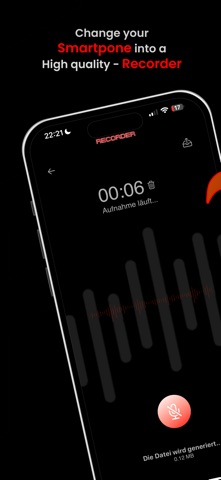
Description by Sascha Koziellek Written by the developer, not by AppBrain. Click to read.
SoundRecorder is the ultimate app for anyone who wants to make high-quality audio recordings. Whether you need to quickly record sound, use it as a dictaphone for professional purposes, or capture recordings for meetings, lectures, music, or voice memos – SoundRecorder makes it easy and offers powerful tools for every type of audio recording.
Key Features:
Quick and easy recording: Start recording with just one tap. Thanks to the intuitive user interface, you can record sound whenever you want – be it for quick voice memos, important meetings, or creative music ideas. SoundRecorder is your flexible dictaphone, MP3 recorder, and audio recorder in one.
Background recording: Work in other apps or turn off your device’s screen while SoundRecorder continues recording in the background. Perfect for longer sessions where you want to remain flexible.
Timed recording: Plan your recordings in advance! With the timer feature, you can schedule when the recording should automatically start – ideal for capturing a meeting or event without needing to be present.
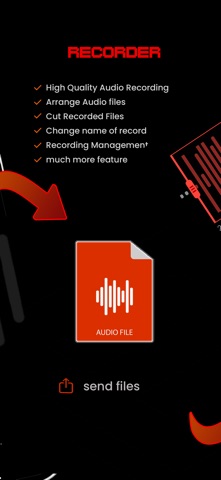
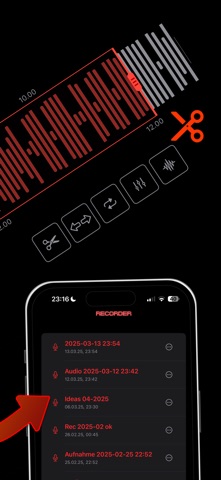
Visual editing and audio trimming: SoundRecorder provides a visual editing tool where you can see your audio recordings at a glance and edit them precisely. Cut unwanted sections easily by working directly with the waveform. Trimming audio has never been simpler, allowing you to fine-tune your recordings exactly as needed.
Adjustable audio quality: Adjust the recording quality to your needs! Choose between various audio qualities depending on whether you need a quick voice memo or high-quality professional recordings. From compact file sizes for everyday use to crystal-clear studio recordings – you’re in control.
Select file format: Decide which format to save your audio files in. SoundRecorder supports popular audio formats like MP3, WAV, and M4A. Whether you want to save space or preserve the highest quality – you can choose the format that suits your needs. SoundRecorder also serves as a reliable MP3 recorder.
Rename files: Keep track of all your recordings by renaming them directly in the app. Give each file a unique name so you can easily find the recording you’re looking for.
Share recordings: Send your audio files directly from the app to friends, colleagues, or other devices. Whether via email, messages, or other apps – sharing your recordings is as easy as ever.
iCloud sync: Never worry about lost files again! SoundRecorder securely saves your recordings in iCloud, so you can access them anytime, from any device. Your data is always safe and synchronized.
Why SoundRecorder? Whether you're recording sound for professional use or getting creative in your free time, SoundRecorder provides you with all the tools you need to manage your audio recordings efficiently and professionally. The combination of user-friendly design, extensive editing features (including precise audio trimming), and the ability to record in the background or schedule recordings with a timer makes SoundRecorder the ideal solution for anyone looking for a reliable dictaphone or versatile voice recorder. With adjustable audio quality and file formats, it's also perfect for music recordings, voice memos, and more.
Download SoundRecorder now and turn your iPhone or iPad into the ultimate recording device for any situation!
Subscription:
Unlock all features with a subscription. The subscription renews automatically 24 hours before the end of the current period. Payment is charged to your Apple ID account. You can cancel or manage your subscription at any time in the App Store account settings.
http://audio-recorder.eu/dsgvo.html
http://audio-recorder.eu/terms.html