AppBrain
AppBrain
  • Apps
  • Apps being viewed right now Trending apps today Most popular apps All-time most installed apps Top rated apps iPhone and iPad apps
  • Intelligence ▾
    Intelligence overview → Track any Android app or your whole market
    Track & analyze
    Keyword Tracker & OptimizerTrack & improve Play rankings App Performance ReportOne-off PDF for any app StatisticsFree Android & Play market stats
    Promote your app
    Featured Apps App Links
  • Intelligence
  • Pricing
  • Dashboard
  • Sign up
  • Log in
App Store Apps > Business > Receipt Office: Expense Scan
App profile & analytics · Business · Data updated 2026-10-07
Receipt Office: Expense Scan icon

Receipt Office: Expense Scan

by IVAN YEVSIEIENKO · Free · Version 1.0
Availability On the App Store since April 2026 ↗
Rating on App Store
5.00/5
1 ratings
Rating
5.00
1 reviews
Best rank
–
not in the top lists
Last updated
April 20, 2026
1.0
AppBrain's verdict

It doesn't have enough ratings yet to judge what users think.

Receipt Office: Expense Scan is made and published by IVAN YEVSIEIENKO. AppBrain is an independent app data site and isn't affiliated with IVAN YEVSIEIENKO. The app name, icon, screenshots and description belong to IVAN YEVSIEIENKO and are shown as published on the App Store.

About Receipt Office: Expense Scan

Receipt Office: Expense Scan is a business app developed by IVAN YEVSIEIENKO.

User Ratings

Receipt Office: Expense Scan is rated 5.00 out of 5 stars. The rating is based on one rating ratings.

App Information

Receipt Office: Expense Scan is freely available from the App Store. The app size is 8.31 MB. The latest version available is 1.0. The last update was on April 20, 2026.

Technical Requirements

The app has a content rating of Everyone. The app has been available on the App Store since April 2026.

Description by IVAN YEVSIEIENKO (from the App Store)
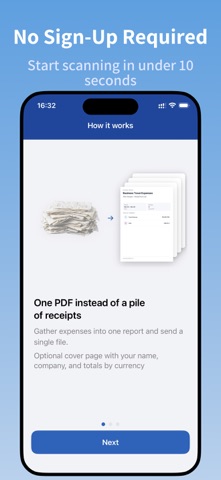
Turn receipts into polished expense reports in seconds. Snap a photo — AI extracts the amount, merchant, currency & date instantly. Export a professional PDF and send it anywhere.

Whether you're a freelancer tracking business expenses for tax season or a corporate traveler submitting reports to accounting — Receipt Office makes it effortless.

HOW IT WORKS

Create a report
Add receipts — scan with your camera or import from photos
AI does the work — amount, merchant, currency, date, and category are filled in automatically
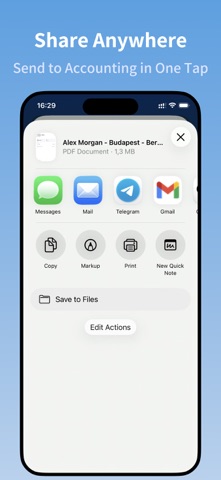
Export & share — generate a polished PDF and send it via email or any app

SMART AI RECOGNITION

Our AI reads your receipts and auto-fills:
- Amount & currency (EUR, USD, GBP, and more)
- Merchant name

Every field is editable — you're always in control.

MULTI-CURRENCY SUPPORT

Traveling across countries? Totals are automatically grouped by currency. Your PDF cover page shows a clear breakdown — no manual math required.

PROFESSIONAL PDF EXPORT

Generate a ready-to-submit PDF report with:
- Cover page with your name, company, report title & date period
- Totals broken down by currency
- All receipt images organized with page numbers
- Clean, professional layout that accountants and managers trust

WHO IS IT FOR?

- Business travelers submitting hotel, restaurant, and transport receipts
- Freelancers and self-employed professionals tracking expenses for tax deductions
- Small business owners keeping organized financial records
- Anyone tired of shoeboxes full of crumpled receipts

BUILT FOR SIMPLICITY

- No account required — start scanning in seconds
- Works offline for report management
- Minimal, intuitive interface — zero learning curve
- Designed for people who hate expense reports

WHY RECEIPT OFFICE?

Too many expense apps are either overengineered enterprise tools or basic scanners that don't understand receipts. Receipt Office is the sweet spot — smart enough to auto-extract data from any receipt, simple enough to use in 30 seconds.

FREE TO START

Use Receipt Office for free with up to 2 receipts per report. Upgrade to Premium for unlimited receipts and full PDF export.

Download now — turn your receipts into professional reports.

Term of use https://www.receipts.onedevapps.com/terms/
Privacy Policy https://www.receipts.onedevapps.com/privacy/
Show more Show less

Screenshots

Receipt Office: Expense Scan Screenshot 1 of 6
Receipt Office: Expense Scan Screenshot 2 of 6
Receipt Office: Expense Scan Screenshot 3 of 6
Receipt Office: Expense Scan Screenshot 4 of 6
Receipt Office: Expense Scan Screenshot 5 of 6
Receipt Office: Expense Scan Screenshot 6 of 6
Screenshots by IVAN YEVSIEIENKO, from the the App Store listing
Official page on the App Store

Alternatives to Receipt Office: Expense Scan

Dux Capital icon Dux Capital
ArcDux
0.0
Free
Invoistr Invoice Scanner icon Invoistr Invoice Scanner
Bobcode s.r.o.
0.0
Free
Hajir Khata icon Hajir Khata
Hunchha Digital Pvt. Ltd.
0.0
Free
Prompt Eval - Better Prompts icon Prompt Eval - Better Prompts
Mohamed Bourouiba
0.0
Free
Scanner : Scan To PDF & Image icon Scanner : Scan To PDF & Image
Nitin Katrodiya
0.0
Free
Ezeetel Go icon Ezeetel Go
Ezeetel Inc.
0.0
Free
Scrappy — Digitial Scrapbook icon Scrappy — Digitial Scrapbook
Steve Harris
5.0
Free
3 ratings
Flow Expense icon Flow Expense
ONFLY S.A.
0.0
Free

More from IVAN YEVSIEIENKO

NoPen – Scan docs, Sign & Fill icon NoPen – Scan docs, Sign & Fill
IVAN YEVSIEIENKO
5.0
Free
3 ratings
Offline Talk: Bluetooth Chat icon Offline Talk: Bluetooth Chat
IVAN YEVSIEIENKO
4.7
Free
3 ratings
Pet Chase: Cat Screen Game icon Pet Chase: Cat Screen Game
IVAN YEVSIEIENKO
0.0
Free

Changelog of Receipt Office: Expense Scan

No changelog data

Developer information for IVAN YEVSIEIENKO

IVAN YEVSIEIENKO

Address:

Share Receipt Office: Expense Scan

Comments on Receipt Office: Expense Scan for iOS

We don't have enough comments to show example comments. Please check back later.

App Store Rankings for Receipt Office: Expense Scan

This app is not ranked

Technologies used by Receipt Office: Expense Scan

Frequently asked questions about Receipt Office: Expense Scan

Is Receipt Office: Expense Scan free?

Yes. Receipt Office: Expense Scan is free on the App Store.

Is Receipt Office: Expense Scan still available?

Yes. Receipt Office: Expense Scan is on the App Store, and the last update we saw was on April 20, 2026.

How large is Receipt Office: Expense Scan?

Receipt Office: Expense Scan is 8.31 MB.

Is Receipt Office: Expense Scan suitable for children?

App Store rates the content of Receipt Office: Expense Scan as suitable for everyone.

How do people rate Receipt Office: Expense Scan?

Receipt Office: Expense Scan has one rating of 5.00 stars on the App Store.

Who made Receipt Office: Expense Scan?

Receipt Office: Expense Scan was developed by IVAN YEVSIEIENKO. It is listed in the business category on the App Store.

What are the best alternatives to Receipt Office: Expense Scan?

People looking at Receipt Office: Expense Scan also look at these business apps: Dux Capital, Invoistr Invoice Scanner, Hajir Khata, Prompt Eval - Better Prompts, Scanner : Scan To PDF & Image.

Popular Business Apps Top new apps Apps other people are watching Today's trending apps Price drops on Google Play
Dux Capital icon Dux Capital
Invoistr Invoice Scanner icon Invoistr Invoice Scanner
Hajir Khata icon Hajir Khata
Prompt Eval - Better Prompts icon Prompt Eval - Better Prompts
Scanner : Scan To PDF & Image icon Scanner : Scan To PDF & Image
Ezeetel Go icon Ezeetel Go
Scrappy — Digitial Scrapbook icon Scrappy — Digitial Scrapbook
Flow Expense icon Flow Expense
Overview Alternatives Reviews Rankings Technology
AppBrain Intelligence premium content

Subscribe now to get full and unlimited access to AppBrain Intelligence. You'll have access to:

  • App Intelligence dashboard (performance timeline, competitor comparison, country rankings, insight cards)
  • Detailed ranking data per app
  • Full timeline per developer
  • Device market shares data per country
  • Unlimited keyword tracking
1 Month

$75/mo
(billed every month)

SAVE 0%
Subscribe
3 Months

$65/mo
($195 billed every 3 months)

SAVE 13%
Subscribe
1 Year

$57.50/mo
($690 billed every year)

SAVE 23%
Subscribe
Each subscription will automatically renew 3 days before the expiration date for the same time period. Subscriptions can be cancelled at any time before the renewal.

AppBrain is an app data site, we track rankings, ratings, installs for all apps and games on Google Play and the App Store. AppBrain doesn't host app files or APKs, all install links go directly to the official store. All trademarks are owned by their respective owners.

More apps

  • Top Android apps being viewed
  • Tasty Match: Cook and Puzzle
  • View Block Strike: FPS Shooter
  • DilMeet

App statistics

  • Android statistics
  • Google Play Developer stats
  • Trending Android Apps
  • Trending iOS apps
  • Top popular Apps
  • Buy the best Android phone
  • Buy & sell app businesses

About AppBrain

  • Contact
  • Privacy
  • Documentation
  • DMCA takedowns
  • Articles
  • Blog
  • Android App Marketing: Learn how to better market your Android app
© 2010-2026 - AppBrain